Pay error shuts down program


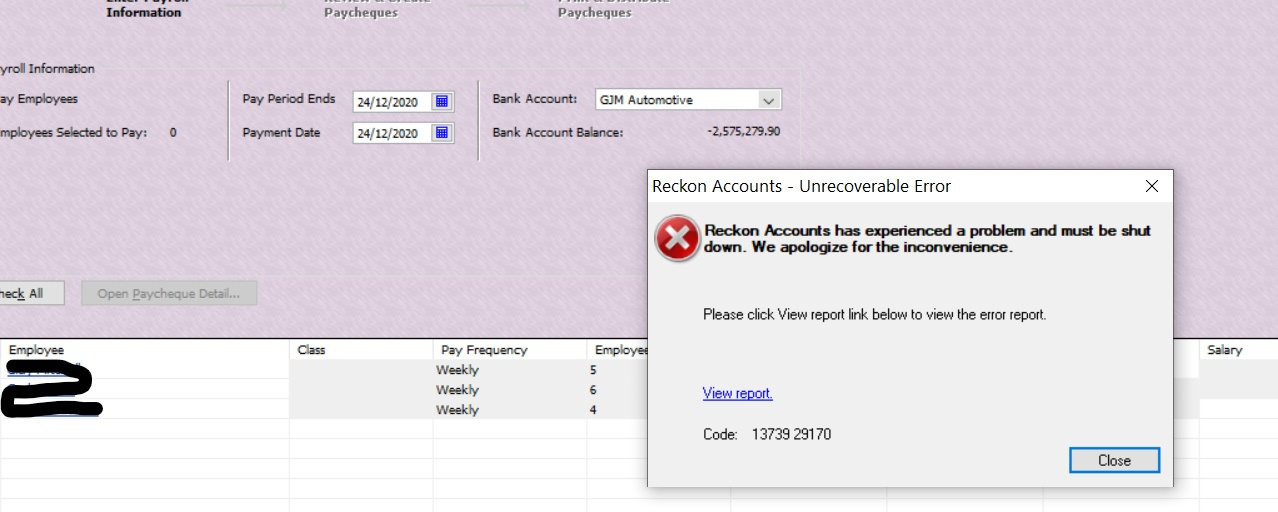
I consistently get this message when attempting to complete pays. Does anyone know how to fix the issue?
Thanks
Comments
-
It looks like a corruption somewhere.
Have you tried verifying & then rebuilding your company file? (From the File dropdown menu, click on Utilities then Verify ... / Rebuild ...)
0 -
Thanks for the advice Acctd4. I did try your advice but it is still doing the same thing.
0 -
Did the “Verify” detect any errors?
Regardless, run the “Rebuild” THREE times - No one knows why but this often fixes persistent issues!
1 -
Hi Acctd4, I tried your advice and still not working. There was also no error when I verified the data. Thanks again for your help. Regards Garry3
0 -
Do you get a crash when you go into any individual employee records or their pays? That may tell you if it’s one particular employee that’s corrupted.
If the file is not detecting any errors when you verify it, it may just be the installation itself that’s corrupted. Have you tried uninstalling & reinstalling the program? (This won’t affect your data file but make sure you save a copy of it first)
If that doesn’t work, as a last resort you may need to send the file to Reckon for them to fix it which unfortunately is a paid service.
0 -
Garry. I did experience something like this a long time ago and I seem to recall posts about this problem occasionally. As Shaz suggested, there is likely to be a corruption in one of the employee pays. The only way to isolate this potentially, is to run each employee's run separately until you isolate which employee is causing the problem. Once you get to that point, you may have to say delete each line in the payroll record and then re-enter the information again and then test the pay run again for that employee. I vaguely seem to recall that the Reckon suggestion was to delete the employee and start again, but that was not something which I was happy to entertain.
John L G
1 -
Hi Garry3,
When was the last time you were able to succcessfully process a pay run without experiencing that problem?
How often do you make a backup of your company data file?
Do you have a backup from that last time or earlier when you were able to process a pay run?
You've indicated that the Verify operation detects no errors.
While that is a good sign, consider viewing the resulting QBWIN.LOG file to confirm what issues may have been found.
If you are able to create a backup, create one first before trying the steps below.
As indicated in the previous posts by Shaz, consider processing the pay run for only half of the employees.
If the first half succeeds, then the affected employee(s) may be in the 2nd half of the employees in that pay run.
Process another test pay run until you experience a crash.
Keep narrowing down or halving the number of employee records being processed in that pay run until you identify one or more employee records which if processed individually still results in a crash.
Then as per John's post, go through that employee record and remove the payroll items and re-add them to the employee record.
Then test whether processing a pay run for just that employee now works, or still crashes.
If you have tried those steps and still experience the problem, consider sending it to us to undergo a free analysis so we can check if there is something we can do further to resolve the issue.

Searching the Reckon Help and Support Centre | Asking good questions on the Community
#TipTuesday: Picture Paints a Thousand Words | How do I add screenshots to my discussion?
1






 Reckon Staff