FBT entry after termination


How do I enter FBT benefit for a previously terminated employee in Reckon Payroll?
Comments
-
Hello @Lambert Kitchens ,
We have a helpful guide on setting up FBT on our help website.
You can find it here: https://help.reckon.com/article/pjx32fia4r
After you've followed this guide, you will need to rehire the employee and make them active again, edit their previous payruns, and add in their FBT before their termination payrun.
This should cover the FBT Benefit.
Kind regards,
Alexander McKeown
Reckon Senior Technical Support
Alexis McKeown
Reckon Senior Technical Support
Working hard since 20182 -
I would just like to add on Alex's post above, here is the process to rehire the employee and make them active again if the termination option is greyed out:

Thank you and speak soon.
Cheers,
Lucas
 0
0 -
I never recommend duplicating an Employee record as this can cause issues with STP 😬
Reckon Accounts allows for "Re-Hire" of a previously-terminated employee via the Employee Organiser, if necessary, so that method is the correct process to use:

When selecting that it's a Rehire ("Yes"), the original Hire Date is still retained & a new (second) Hire Date entry option is also provided:
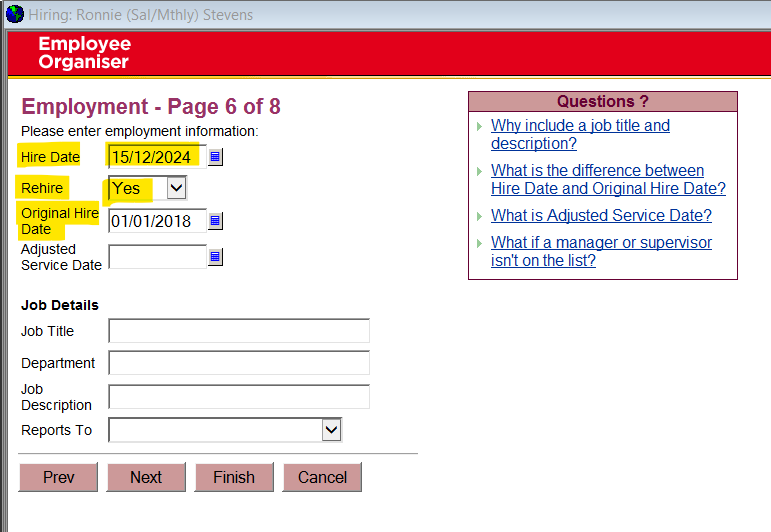
Having said that @Lambert Kitchens, it's not necessary to do this just to add a Reportable Fringe Benefit to their record. NOTE: This amount should only be obtained from the Tax Agent based on the FBT Return lodged as this amount is a specific calculation, not just the perceived "value" !
Once you have this, edit the last Paycheque for that employee in the relevant FBT year (Apr-Mar), Unlock it & add the RFB Payroll Item & determined amount there. It's a manual entry & should not impact any other employee amounts, either on that Paycheque or YTD balances.
You will also need to re-lodge an STP Update Event submission for this employee. If it was in a prior FY, you'll need to lodge a new Finalise Year STP submission for that FY instead.
1

 Reckon Staff




