Find out current MFA.

Cathy_7327712
Member Posts: 31 Reckoner 
Reckon Tech services set up my MFA. I do not know what that number is. How can I find it? I do have my recovery pin MFA, but I believe I need my MFA to upload STP.
0
Comments
-
Hi Cathy,
Reckon Tech services set up my MFA.
Can you give us a bit more detail on this? Did the support team step you through setting up MFA on your phone (Google Authenticator) or browser?
How do you usually login to GovConnect to lodge your STP submissions?0 -
I have not logged an STP. Darven took over my computer to set up MFA. He tried over a dozen times, there was an error with the clocks being out of sync which he overcame somehow. I did write down the Recovery pin MFA but I dont know what the actual MFA is. My ID is 0023790607. After watching the webonair I think I need to enter the MFA when connecting to submit STP.0
-
Nope. That's not correct. When you login in the system sends a code to your phone. You need this code to authenticate yourself to the portal.0
-
i did not do it on my phone, it was done on my computer.
0 -
If that's the case, then you'll have a browser extension in your Chrome browser that will serve your MFA codes to you.
Look for an extension in the top right corner such as the example below or alternatively go to the menu button (the 3 dots in the corner), scroll to More Tools then Extensions.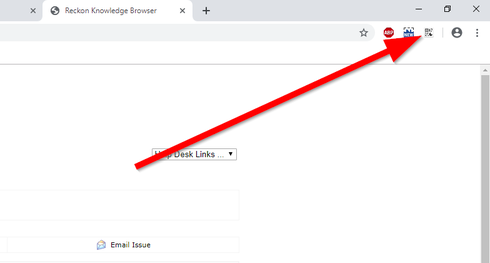
There's more info on using a browser extension for MFA in the Knowlegebase article here -
Adding MFA via Chrome extension alternative to smartphone
0 -
I cannot find that authenticator on my browser. I know when Darven (Reckon Tech Supervisor) created the MFA it was there, it is not there now. I am at a loss about this.0
-
I did this back in February and I just realised I did it on the other computer. I did find the authenticator! It shows Reckon Portal Services and there is a 6 digit number that changes each minute. Is this my MFA???? Changing constantly??
My next question is how do I get my software ID on to my Auskey??
0 -
Yes that is your MFA.
I'll link two articles below, the first outlines how to find your Software ID in GovConnect STP and the second is how to register it with the ATO
Where is my Software ID for GovConnect Single Touch Payroll (STP)?
Single Touch Payroll - AUSkey and Software ID FAQ's
0 -
So is the changing number my MFA?
I do have my software ID. Will read the link on associating it with Auskey.0 -
Yes1




This discussion has been closed.