can you make the font bigger on my pc

Cheryl Boneham
Member Posts: 17 Reckoner 
I find the font very small on Reckon Hosted for the whole program, I know I can change the font on reports & invoices but is there a way to make the font larger for the whole program
0
Comments
-
Hi Cheryl
If you alter the zoom/view of your browser and this will in turn increase the size of Reckon Accounts Hosted.
It depends on the browser you use, but below is a screenshot of using Hosted on Google Chrome at 150% zoom.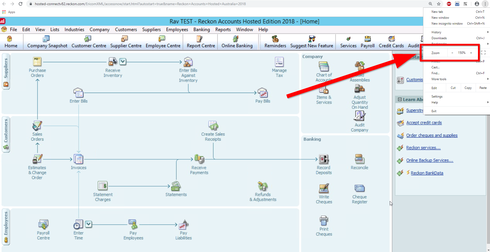
0 -
I am using Opera0
-
Thanks for the clue Rav. Whilst I have been able to do this in Chrome, I had not been able to find the way to do this in Opera, because I wasn't able to find the proper menu "button". So, in looking around, I eventually found the Opera menu within a round red background circle (with a white centre) in the top left hand corner of the browser - the opposite end to where it is in Chrome - Opera actually call this the "O Menu". Clicking on that brings up a menu listing which includes Zoom. Interestingly, whilst ?"Ctrl +" ?is an alternative way to do this within other browser windows, when fully logged into Hosted, the "O Menu" method is the only way to engage zoom.
Cheryl, by following the above, you will be able to engage zoom within Hosted.
John L G1 -
Thanks0




This discussion has been closed.