Enterprise 2019 error estimate not balance on top section not matching bottom

Walter H
Member Posts: 4 Novice Member 
Trying to enter an estimate , it show an error comes up on preview or enter - saying that it is not in balance with the top and bottom - i typed in $1.00 it showed 10% GST $0.10 and then shows $1.20 in the end total and bottom shows $1.10 - having all sorts of issues upgrading from Premier 2015 - not very happy with this 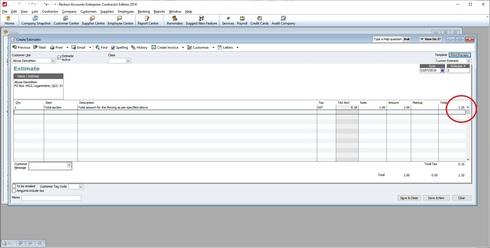

0
Comments
-
Can you check the settings on this item - then try to create a new estimate? if you tick the Amounts Inc Tax box and enter the amount again - does it still go out of balance? did you rebuild the datafile BEFORE you upgraded from 2013 to 2019? Have you done a Verify and Rebuild since upgrading?1
-
Yes it still out of balance and the same is in the invoicing, it when I select GST column it calculates and add the GST value by double. I set up the new version without anything in it , I imported the lists and names and no values or anything as I wanted to start fresh.
0 -
just did another verify and rebuild and a n error came up , also program crashed aswell , so i am going to start all over again0
-
hmm... when you installed it did you make sure any virus software was disabled? and did you run as Administrator?
1 -
Linda, thanks heaps i finally got on to technical support, still were having issues after he told me to add in another GST item, after crashing a couple of times , i Worked out that when I imported items / lists from Premier 2015 via *.iif export / import it caused the tax supplier to change thus not recognizing it being part of Goods services tax, i had to re-click on "Australian taxation office " and then showed the assigned item bar. After 8 hours trying to work it out , i am glad it is working. anyway thanks Linda you gave some great ideas to check and verification etc. it all helped to work out why it caused a miscalculation etc.1
-
Glad you got it sorted out - interesting scenario - cant say I have seen this one before!0

This discussion has been closed.