STP file not showing in list of transmissions when uploaded

Alana Edwards
Member Posts: 8 Novice Member 
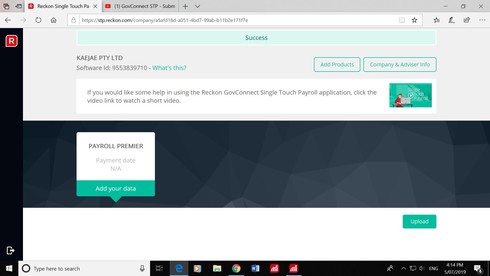
I have logged into Recon Single Touch Payroll and Uploaded the STP file. It says Success at the top of the screen, however nothing is showing up in the Lists of Transmissions section to submit.
I am using Reckon Accounts Premier 2019.
I have gone through all the steps on the YouTube tutorial numerous times now. I can't work out where I'm going wrong ???
I am using Reckon Accounts Premier 2019.
I have gone through all the steps on the YouTube tutorial numerous times now. I can't work out where I'm going wrong ???
0
Comments
-
Are you able to post a screen shot Alana? might help us to see what it could be?2
-
0 -
Good call on the screenshot Linda, this one had me scratching my head..
Alana, I notice that in GovConnect you've selected the Payroll Premier product rather than Reckon Accounts.
Can you please select 'Add Products' and then tick the Reckon Accounts option and then submit your file to that product in GovConnect. Should go through without a problem.
2 -
Hooray! Thanks so much. Knew it had to be something simple, but for the life of me couldn't work out what I'd done wrong.0



This discussion has been closed.