CAN'T LOCATE FILE


HELP
I am trying to open my RAH file and it is not located on the Q drive.
Any suggestions how I can locate it.
Comments
-
Have you created sub-folders within your Q or B drives to save your files in/keep them organised?
If so, have you searched within those folders?
0 -
HI Rav
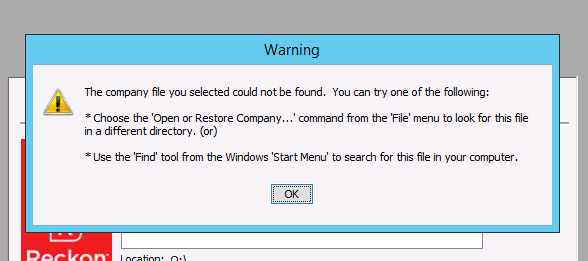
I have checked all folders and it seems the qbw file is not in any of them, this is the error I am getting
 0
0 -
The Accountant has just finalised taxes, is it possible they might have converted it to desktop?
0 -
I have downloaded it to try and access it but it is now telling me I don't have the right permission to access the download.
Does anyone have any ideas please, this is starting to give me the irrits!!!!
0 -
Its hard to make any determination on what is going on here so far. It might be worth having a conversation with your accountant to see what they may have done with the file during their use of it.
As per the message in your screenshot, go through the 'Open or Restore Company' option under File and then look through the Q & B drive and any sub-folders within those drives.
I have downloaded it to try and access it but it is now telling me I don't have the right permission to access the download.
Does the above mean you found the file? What is the specific error message you're getting at this point?
0 -
Morning Rav
Re the error and not being able to access it, I was going to install RAH again but didn't have the serial number handy, so stopped that process.
I haven't been able to locate the file. I have looked in the Q drive and any of the sub files, I have also looked in the back up folder, and the current file isn't there.
I thought maybe the Accountant may have downloaded it to the desktop to work on it, we have had a brief conversation with the Accountant's staff, but they weren't sure, so we are waiting to talk to the Accountant herself today.
Question: if the accountant has downloaded it to the desktop, can she convert it back to RAH online?
OR
if the Accountant provides us with a copy of the file, can we restore it?
thank you
0 -
A file that is used in Hosted can only be opened or worked on offline in the Enterprise version of Reckon Accounts.
Reckon Accounts Hosted is essentially Enterprise but in the cloud so provided that's what has happened here then yes you'll be able to open it directly back in Hosted. You'll just need to upload it into your Q drive first.
0 -
Thanks Rav
I will wait until Accountant advises what they have done with the file
0


