Hourly rate on Payslip incorrect


I have loaded a new employee this week, they are a casual, the pay rate showing on the payslip is the 25% loading not the casual pay rate could you please advise how I correct this?
Thanks,
Comments
-
Hi @727019
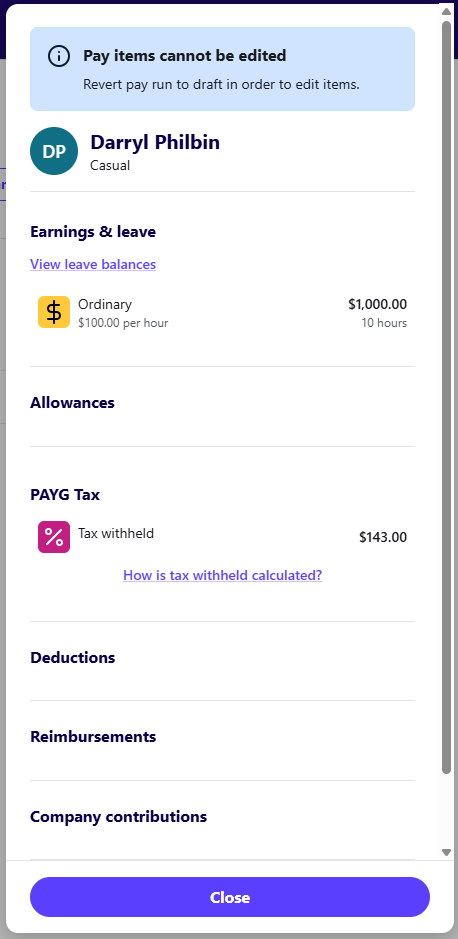
Can I grab a screenshot of the items that show within the pay run itself for this particular employee? (example below).
Are there multiple items for this employee? I'm assuming this is the first pay run that this employee is being included in, is that correct?
 0
0 -
Yes this is the first payroll for this employee
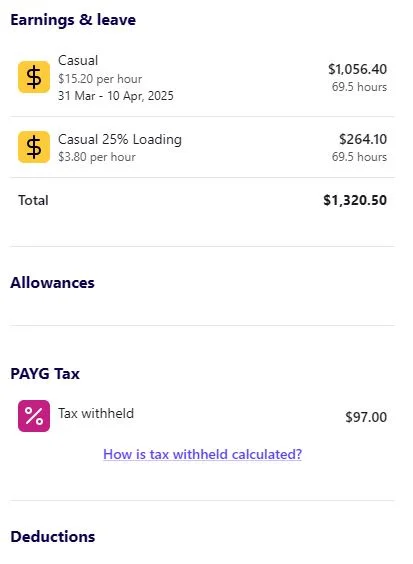 1
1 -
Thanks for that @727019
Are there any other employees within the same pay run that use those items? If so, does the casual earnings pay item appear correctly on their payslips?
Also, I just tested using the default ordinary earnings item which seemed to work normally. The above though look to be custom earning items, can I grab the details of the setup of those items and I'll try to test it out in my book to see if I can replicate this.
0 -
I have one other casual but has not worked the last month or so but prior to that payslips working fine employee #443 Collier, maybe that would help
1 -
All my other employees are either fulltime or salary and all the rates appear correctly
0 -
Thanks for that, just taking a look at your book and I can see that specific employee in your Employee List but I can't see a recent pay run either in draft or paid status that includes this employee (I could be blind though! 😄)
Can you please create a draft pay run with the respective pay date, pay period and pay items for this employee and I'll take another look 🙂
0 -
ok I have created a draft pay run
0 -
Awesome, thanks for doing that.
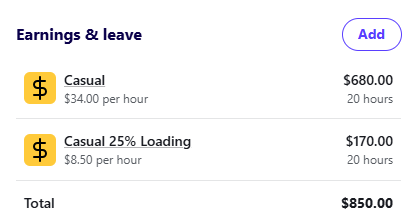
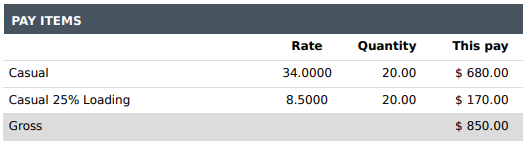
I've just had a look and compared the draft payrun to the payslip preview and it seems to display ok from what I've observed. I've added a couple of screenshots below. Are you seeing a different result? Or am I misunderstanding the issue?
 0
0 -
-
Here is the attachment, not sure why it didn't attach the first time, maybe this will help
1 -
Hmmm ok a couple of things to cover.
On the draft pay run, I can see this looks normal. See screenshot below.
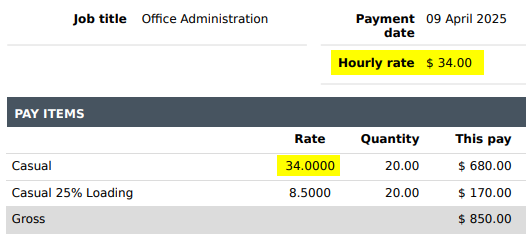
I do however see what you mean in the 10 April 2025 pay run that is marked as paid for employee Schulz. Can you recall if there was anything different when it came to entering the pay for this specific employee?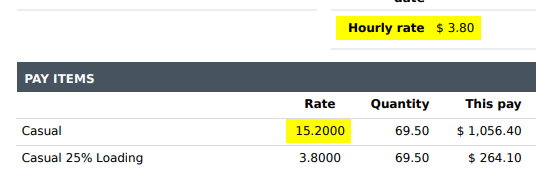
Do you usually create the pay run using the option to use default pay setup items, copy from the previous pay run or do you add items and their respective rates manually?
0 -
This employee was a little different to set up it didn't put the rate in the pay items so I edited the employee during the payrun, rather than wasting your time I will wait and see what happens next payrun and let you know. On reflection it could be how I had to edit, is that fair?
1 -
Ok that sounds like a plan.
Also, yes potentially it could be related to the edit, and it most likely is to be honest, but I'm just not sure on the what/how yet but see how you go with the next pay run.
Hopefully its just a one-off but if you need to edit, try and just take note of the steps and let me know, I'll try to replicate and see if there's something we need to fix up there.
0 -
Great, I will do that, thanks for you time looking at this for me
1 -
Hi Rav, this has corrected itself
1




