Upgrading to 2025


I have five company files that need upgrading to the latest version of Reckon 2025.
Three are ok but two will not allow me to login as Administrator as the password is wrong.
I don't think I ever had a password for the Administrator to begin with.
Also the Admin window doesn't open either.
Comments
-
If you never had a password set for the Admin user, try leaving it blank and pressing OK button.
If it allows you in, then there was no password.
If it does not, then there is a password.
It is a good idea to ensure that you are able to login as the username "Admin" with a known password well before it becomes time to upgrade a file.
If you are able to login to the data file at all in the existing Accounts 2024 application using a specific username and password , you can view the User List by clicking on the Company menu, then select Users, then select View Users.
In the list that gets displayed, you can see which username has alongside it "(Admin)" and "(logged on)".

Searching the Reckon Help and Support Centre | Asking good questions on the Community
#TipTuesday: Picture Paints a Thousand Words | How do I add screenshots to my discussion?
2 -
Admin (Admin) doesn't have anything beside it. I can only login as a user and not Admin.
0 -
what happens if you type admin and leave the password blank?
1 -
I cannot get the correct window to add the Admin password!
0 -
what happens when you click on the file to open it?
0 -
you can call me if you wish
0415 940 843
0 -
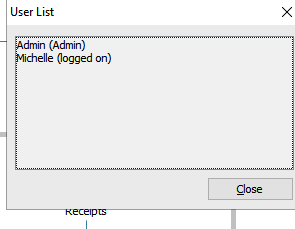
I can only logon with the user Michelle, not Admin
0 -
When the file login prompt appears, enter Admin in the user name field and then try leaving the password field blank and see if that gets you in.
This will only work if there has been no file password set for the admin user.
0 -
I have tried everything and I just can't remember putting a password on it but it keeps wanting one.
I will just have to log a ticket with support.
0 -
0
-
Easily. With no problems.
0 -
0
-
With no password. The only explanation is that maybe the accountant had put a password without telling me. I am looking into this. I will lodge contact support if I cannot resolve the issue.
0 -
Hopefully the accountant will be able to advise what password they may have set on the file login but let us know how you go.
If they're not aware of the password, our technical support team won't be able to assist as they don't have any visibility on an individual user password. Instead, shoot through a password removal request to our Data Services team, they'll be able to assist with removing a password set on the file and I'll link some info on this here - How to remove or reset an unknown Admin user password in Reckon Accounts (Desktop / Hosted) company
0 -
I have checked with the accountant and he hasn't put a password on it. Somehow there seems to be one on it; whether I did it I cannot remember. I will contact support to remove it.
0 -
Three day removal service or the express service which is STUPIDLY expensive
I guess you won't make that mistake again
Kr
1 -
Yes, I know. I certainly won't do it again.
0

 Reckon Staff






