Unable to store required information error message


Had to reload Personal plus which activates & opens. however, when attempting to reopen I get the message 'Unable to store required information". When attempting to activate by telephone I receive the same message. The only way I can get access is to uninstall & reinstall. Can't
open once closed.
Comments
-
Dear @213499 ,
This is due to a corrupt registration file.
To fix this, you will need to do the following:
- Close Reckon Accounts.
- Open up your Windows File Explorer/Documents.
- Navigate to C:\ProgramData\Inutit\Quicken\Config\.
- Find the quicken.lic file.
- Delete this file.
- Attain a new installation key from the member's website.
- Try and open the program again, and use this new installation key.
Kind regards,
Alexis McKeown
Reckon Senior Technical Support
Working hard since 20181 -
have run several searches in C:\programData & don't appear to have any files in that name.
0 -
Dear @213499 ,
I can confirm this file and this location exists:
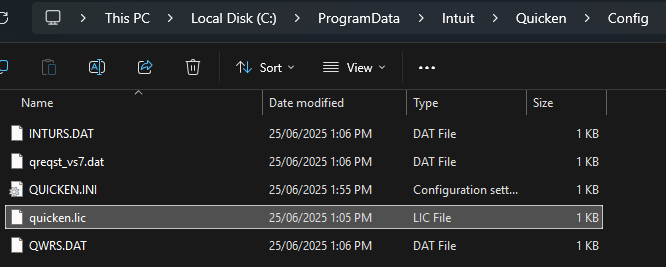
The pathway is C:\ProgramData\Intuit\Quicken\Config\quicken.lic .
If you cannot find/access this location, or this file does not seem to exist, you may need to perform a clean uninstall of Reckon Accounts Personal.
You can find our guide on how to do so here:
Kind regards,
Alexis McKeown
Reckon Senior Technical Support
Working hard since 20180

 Reckon Staff