Changing date of recurring transaction


I have some recurring transactions that I set up and found i couldn't backdate them, so did them for the next day. Now I am trying to change the date of the next one and it doesn't seem to allow it. Since setting them up I have had to edit each one's date after it is processed on the wrong date. Short of deleting and losing all the detail and re-create a new one all over again, can I just edit the date it is to recur on?
Answers
-
Hi @Jean_10862158,
It should allow you to modify the start date from the recurring template. Your next transaction date should be based on your specified frequency.
Best regards,
Karren
Kind regards,
 1
1 -
Just adding to Karren's info above, you cannot set the start date for a recurring transaction earlier than today as it doesn't create historical transactions. As Karren has mentioned you can edit the start date of the recurring schedule and/or choose to skip the next occurrence which will alter the date the recurring transaction will run based on the frequency.
There's more info on recurring transactions and how they work here -
0 -
Here is one I need to change the date to 19th November. Nothing I do changes the "Next transaction Date".
Aldi keep varying their dates, so I need to change it when it gets too far out of sync.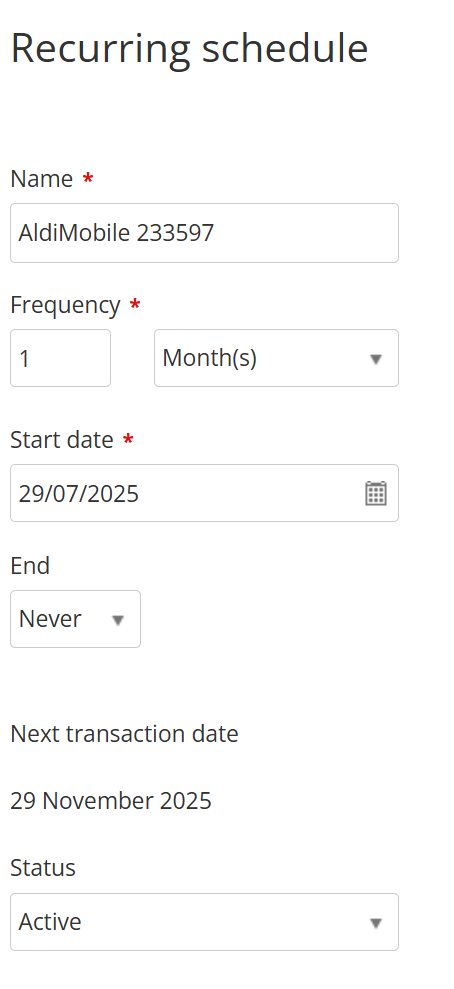 0
0 -
Hi @Jean_10862158,
Recurring transactions are meant to happen automatically on a set schedule. However, if a recurring transaction is too far out from the current date, you may need to skip and manually enter or adjust those transactions as they get generated.
I hope it helps.
Best regards,
Karren
Kind regards,
0 -
But why can't we edit the "Next Transaction Date"?
0 -
If your transaction dates varies, recurring transaction might not be ideal. The next transaction date is determined by your start date and the selected frequency of your recurring transaction criteria.
Best regards,
Karren
Kind regards,
0 -
Hi @Jean_10862158,
Echoing the info above from my colleague Karren. We don't allow backdated recurring transactions to be setup. The next transaction date field shows you when the next transaction will be created and this is not editable. With that said, there is a suggestion that you could potentially think about in this case.
Set the recurring transaction to occur on the last day of the month. When you receive your invoice from your supplier, in this case Aldi Mobile, go back to the transaction that has been created and change the date to match the invoiced date.
Thank you.
 1
1 -
"Set the recurring transaction to occur on the last day of the month. When you receive your invoice from your supplier, in this case Aldi Mobile, go back to the transaction that has been created and change the date to match the invoiced date."
This is what I have been doing for the last 4 months, But I asked "why can't I change the next transaction date" . I not not asking to back date it. The next transaction date in this case would be 19th November, which is in the future.
But I just now I thought, change the start date, which I had before, and it didn't change anything there where I could see, but this time save, exit, and go back in, and voila, it changed Next trans.date to the 19th Nov.So all settled. But rather frustrated at how cumbersome this online software is.
0

 Reckon Staff



