Constant Report Searching


HI, Ive noticed that this week that when I log into Reckon, it says report searching and eventually comes up with the Company Snapshot (which I have not set on my log in) and when I process anything - invoice, supplier invoice, even payroll - it say working, then says "report searching - why is this? I have not changed any settings!! Just finished payroll and went to email off payslips - wait button came up then report searching, icon going around, then report searching again - this went on for approx 5mins before payslips were emailed. Same with printing anything. Constant…. I am currently doing a re-build of my data but would like to know why this has started when nothing has been changed. Very frustrating - working in multiple companies and this is slowing me down considerably
Comments
-
Hi @Pivacadmin
If you have the Company Snapshot appearing but had not set it to display, then something has changed.
You may also be encountering this 'report searching' if you have multiple activity centres/windows open.
As a test:
Close the Company Snapshot screen.
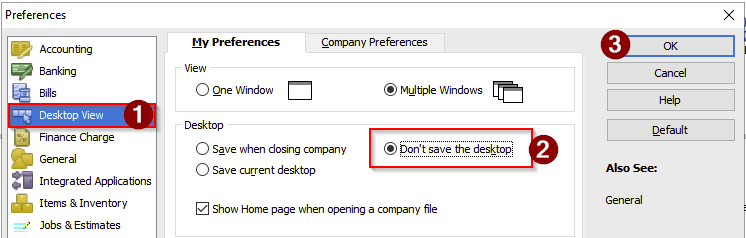
Go to the Edit menu and select Preferences
Set it to 'Don' save the desktop'
Go to the File menu and select Close company/logoff
Go to the File menu and select Open company to re-open your company file
Confirm whether the Company Snapshot re-appears.

Searching the Reckon Help and Support Centre | Asking good questions on the Community
#TipTuesday: Picture Paints a Thousand Words | How do I add screenshots to my discussion?
2 -
Thanks - I will try this later. I have done a re-build on my data again and it seems to have stopped
1

 Reckon Staff
