Reckon Software Discussion
Help Guides
Posts
Groups
Support Hub
🛠️ Support
📥 Downloads
ℹ️ Reckon Status
Find a Reckon Partner
Home
Point of Sale
windows 10 - Security Policy prevents drive sharing with QPOS
Pete_9532574
After upgrading (down grading?) to Windows 10, and having the "Fall Creator Upgrade -1709 automatically install, Windows 10 will no longer allow disk mapping. This means that the QB Administrator cannot talk to the QB Pos Terminal on the other computer. Has anyone else run into this problem? We are desperately looking for a solution.
Microsoft says they will only help for a hefty fee, and Reckon says its our problem because we can't get the computer to share a drive.
We have attempted to change the security policies on the the Back Office computer, but no luck thus far.
Comments
Linda ABC
Hi Pete - haven't had this issue yet... are both machines Windows 10? if not, which is the W10 machine? the POS terminal one or the POS Admin one? which machine has the Reckon Accounts datafile on it - which machine has the POS database on it? which one are you wanting to share? If only one machine is Windows 10 have you thought about sharing the files on the Windows 7 machine and then mapping to that?
Chris McGregor
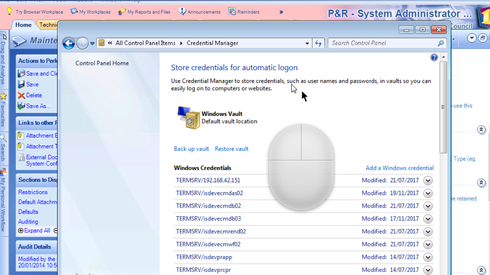
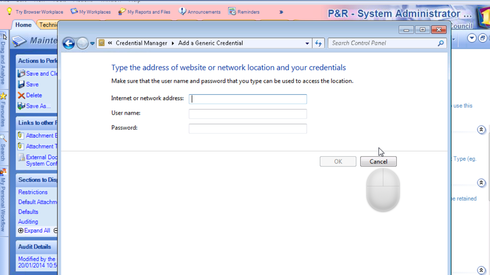
Hey Pete, i havent had much experience with win 10 but i have had all kinds of issues in the pst with pos and mapped drives. What i found was sometime you need to create a windows user account on both machines with the same name and password then go to the credential manager in control panel and add those credentails for that shared folder location
Once you have established the credentails then see if you can connect to that machine in windows explorer. Hopefully it helps, windows can be a fickle beast. Chris
Find more posts tagged with
Who's Online?