Reckon Software Discussion
Help Guides
Posts
Groups
Support Hub
🛠️ Support
📥 Downloads
ℹ️ Reckon Status
Find a Reckon Partner
Home
Reckon Accounts (Desktop)
Solution to Reckon program crashing when in Template 'Layout Designer' or changing data names
Luke Graeme Denham
You might or might not receive the following error when pressing 'Layout Designer' in the Template Customisation Screen: Problem signature: Problem Event Name: BEX Application Name: qbw32.exe Application Version: 22.0.4002.1210 Application Timestamp: 51b976f8 Fault Module Name: QBSTYL32.dll Fault Module Version: 22.0.4002.1210 Fault Module Timestamp: 51b97862 Exception Offset: 0000b06f Exception Code: c0000409 Exception Data: 00000000 OS Version: 6.1.7601.2.1.0.768.3 Locale ID: 3081 Additional Information 1: 8530 Additional Information 2: 85308e4a97802e82283eac164731bc8e Additional Information 3: 9e61 Additional Information 4: 9e615240e095f1f8d3ce15ec9f2b80e3 For some reason, this is caused by the character count (with spaces) amounting to 42 or more in the 'Template Name' line. Attn Quicken: Please patch this in your next update.
Comments
Ifti
Hi Luke,
Thank you for your post.
It looks like your
Template name
has
42 or more characters
. Please have a name less than that than and this should fix it.
This is due to limitation of the software and there's no plan to change it for the time being.
To overcome this issue. please do the following steps:
Go to
Lists
>
Templates
> double click on your
template
/
Create
New Template and select
Type
Click on
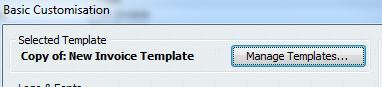
Manage Templates...
from the top
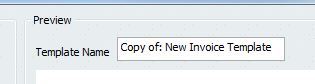
Type in the name on the right box next to
Template Name
Ensure it's less than 42 characters long including space
Now go to
Layout Designer
We hope the above helps.
Thanks
Ifti
Find more posts tagged with
Who's Online?
Dimi