GovConnect is an auxiliary programme on Reckon Accounts Hosted that uploads your BAS Lodgement form to the ATO through the SBR system. To use it you must have an AUSkey which you can obtain from
https://abr.gov.au/AUSkey/.
This key is downloaded in a file called Keystore.xml to your PC by default to:
- Windows 8, 7 & Vista: C:\Users\<logged in user>\AppData\Roaming\AUSkey
- XP & Server 2003: C:\Documents and Settings\ <logged in user>\ Application Data\AUSkey
- MAC OSX: Finder/ Username/Library/Application Support/AUSkey
- USB: <USBdrive>\AUSkey or, AUSkey Browser\AUSkey
You may experience a delay of several minutes between selecting the keystore.xml file on your local PC and GovConnect being ready for the next step. To avoid this delay, you can copy your keystore.xml file to your Hosted Q drive and select it from that location.
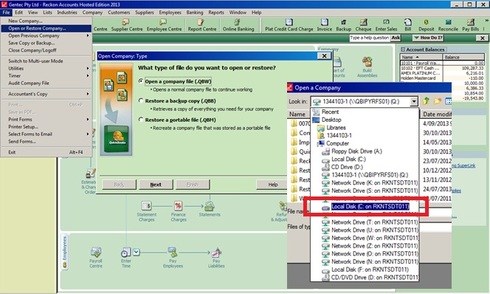
On Hosted, using the directory through
File > Open or Restore a Company File > Open a Company file, right-click and
Ctrl+C on your keystore file on your local PC and Paste with
Ctrl+V in your Hosted Q drive.
You will need to configure your BAS Lodgement form to use SBR and not the old ECI portal. On the BAS Lodgement form , click on
Config > BAS Lodgement, and select
Standard Business Reporting (SBR)....
When you click on Lodge in your BAS:
- a file titled qbEAS.xml is created and saved on your Q drive;
- Govconnect will open automatically. Browse to your AUSkey file (Keystore.xml) and continue with the process.
Once your BAS has been uploaded to the ATO you should, as a security measure, delete your kestore file from the Q drive.
Your BAS is done for another month or three.
regards,
John