Reckon Software Discussion
Help Guides
Posts
Groups
Support Hub
🛠️ Support
📥 Downloads
ℹ️ Reckon Status
Find a Reckon Partner
Home
Reckon Accounts (Desktop)
holdings report in detail
Gordon_6790750
RECKON ACCOUNTS PERSONAL PLUS: How does one extract a report of all current holdings within an account. i.e. to produce a listing of all investments, when purchased, price / cost of purchase? Needed for passing on details to benefactors of inheritances
Comments
Mirko
Hey Gordon,
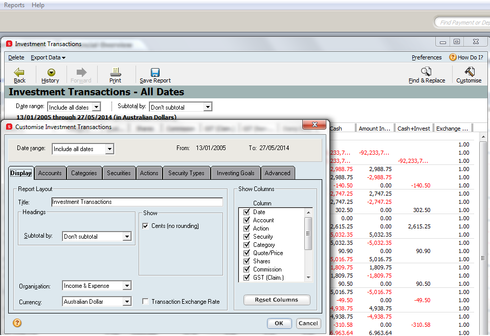
You are able to go to Reports > Investing > Investment Transactions.
This will bring up a report on all investment transactions, make sure you select 'ALL DATES', if there is anything you would like to omit from the report click on the Customise on the top right hand side and make your selections.
The image below may help.
Thanks,
Mirko
Gordon_6790750
Thanks Mirko, this seems to get part of the way to the solution. How do we eliminate all the transactions that are redundant, so the report only contains data for current investments. eg the info provides a customised report of all bought investments, but need to only see the current holdings and dates acquired.. All visible in the Value report for the account , key is how to turn this data into a exportable report, rgds Gordon
Mirko
Hey Gordon, once you play with the filter, you'll be able to remove certain data and set the report to only include the information you set up. To export, there is a '
E
xport Data' drop down on the top left of that screen shot i included, next to '
D
elete'. Cheers.
Gordon_6790750
Thanks Mirko,
so as I now understand it, there is no report that will provide listing of all CURRENT investment holding within an Account broken down by date of purchase and price?. I have to export an Excel report of all Bought transactions ( for past 20 years.....) and then delete those we no longer hold, and adjust those we hold to the current total. Surely not??? rgds
Find more posts tagged with
Who's Online?