You might like to review other posts on this community forum, especially :
https://community.reckon.com.au/reckon/topics/how_to_manually_update_share_prices_in_personal_plus_h...
or the knowledge database:
http://kb.reckon.com.au//issue_view.asp?ID=3203
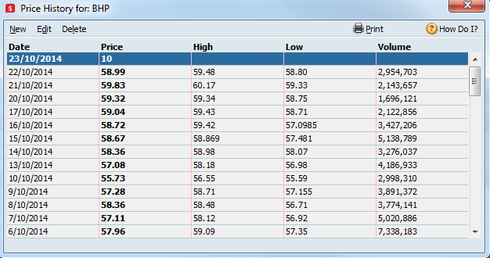
These show how to include High, Low and Volume/100, although the format is rather strange and there are restrictions on volume, that regularly affect Telstra, FMG and other companies with volumes more than 20 million in a day.
It is of the form below, requiring '---' and '*' fields, although their use is not explained. At least the date field is not US.
"share,Close,,Date,,High,Low,volume,"amc,7.35,---,24/02/2006,---,7.46,7.32,63712,*
I have been using this approach with RPP 2013 since 1 August, as it allows entering of prices back for many years and not restricted to ASX codes.
Mirko,
Is there any documentation of what price information is available with RPP 2015 auto download facility ?
Over the last few months I have asked a number of questions about what is and is not provided and not yet received a clear answer. There are also numerous examples of RPP 2015 not being able to reliably use this facility.
Is there a document which lists the exchanges and codes that are currently supported?
John
Could we have an explanation of this, specifically:
Select Delete Investing Price History: does this delete all price records or only those companies selected ?
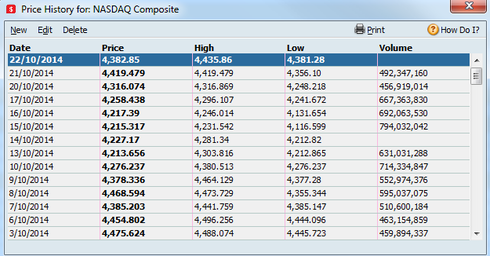
Click the Mark All button: does this list include ASX codes or only the 2 US historical codes (Dow Jones and Nasdaq) that I am aware of ?
If this is a more extensive rebuild capability, this would be a significant improvement !!
There is NO WAY I would try this one without some confirmation that it works, as described.
I also have an outstanding request for documentation of what company codes are supported by the "last week" automatic update and also the "historical codes" update that applies for a longer period.
A list of currencies that are available would be a help also.
This is a request that appears to have disappeared into the ether, although some benefit from my $115 would be appreciated.
Gavin,
There are utilities on the web to extract all price information from a .qph file, which can be re-imported with a .csv, but the import function is limited. I also have developed this to be able to correct the .qph files for incorrect imported volume information.
I also have non asx and non-listed unit prices, but these can be re-applied with .csv import. What happens for change of company codes and all the other splits and adjustments that happen on ASX and other companies ?
I think this concept of deleting the .qph file and starting again is a mirage, or this is a significant new feature. Can we really get ASX price info for more than a week back from the historical option, or is this just another uninformed comment from Reckon who know little about their product.
If you give your managed funds a company code, you should be able to see them with reltan. (try a nine character code like AAF0186AU works for me). (not sure if you can still access your .qph file via RPP ?)
I have my own program like reltan and can extract everything, including managed funds but without company codes are more difficult to identify.
The .qph file contains price and volume records only (actually mainly, as some other annual price summaries appear to be randomly included, which RPP2013+ don't appear to use). If you send me contact details I could dump out all info into a .csv file style. ("share_code,Close,---,Date,---,High,Low,volume,"
I have written a program to export all prices to a .csv format, which can be imported (does require a company code for import). Once RPP has imported the records, my program can then modify the price records in the updated .qph file, to correct for mainly volume errors. I have used this approach since August on RPP 2013, without any problems.
By using RPP to add new price records, and only adjusting the values RPP imports incorrectly, I have had no problems with file corruption, as I am avoiding changing the between record pointers inside the .qph file.
The .qph file has at least 3 types of records:
1) Company header record
2) daily price and volume record
3) annual price summary records (I don't know about these and there are very few; only 10 in my file)
Importantly, RPP stores most of the company information in another file, so it is best not to change the record structure or the location of the company records, as this may be referenced by other QDATA file records. Also, I'm not sure how the .qph file relates to share buy/sell history, so I am wary of changing the record structure.
Another problem is that I don't think that RPP Validate does much (anything?) with the .qph file. My .qph file (now nearly 300,000 price records in a 16 mb file) has all price records before Nov-2004 duplicated, courtesy of a bug in RPP 2005, so there is a lot of junk in the file, as well as ex-company codes. I have about 80 active companies, but over 180 sets of company and price records in my .qph file. Quite a mess really, but I've given up on Reckon fixing this up.
>> You can rebuild the price history file using the steps provided above.
How can you reiterate this claim, as on the basis of available documentation, it is not the case.
I have not seen any documentation to support your claim that by "Choose Historical Prices etc" that ASX price information could be recovered. The best that I expect is that the 2 US market indices will be recovered.
Could you please confirm if any ASX codes would be supported in this way, before making any further reckless claims that the .qph file can be deleted then re-created.
As has been indicated in posts from many users, there are many trusts etc which have historical prices stored in their .qph file and are simply not publically listed. These can not be regenerated in the way you have indicated.
Again, could you please obtain some documentation of what price codes are supported by the "Choose Historical Prices" approach you have outlined.
I hope no RPP user proceeds with your recommendation until the claims you have made are confirmed, which I suspect will not be the case.
You also wrote:
>> Occasionally this data becomes corrupted and needs to be rebuilt.
Why can't Reckon address this issue, by providing a rebuild option for the .qph file ?As I have indicated above, I have reviewed the structure of the .qph file and it should not be too difficult to regenerate the company and price records of companies stored in the QDATA files.
I have no experience of corrupted .qph files, but suspect that corruption of record pointers could occur. The record structure chosen for the .qph file is not very robust, as price records do not identify the company they relate to. There is little redundancy in the one-way pointer system that was chosen.
Reckon should look at revising the record structure, to provide a more robust format for rebuilding of the retrievable information.
A useful alternative could be to provide a functional .csv import and export facility for information in the .qph file. ( Why Reckon have failed to fix the volume import bug amazes me and reinforces my cynicism about useful improvements ever being achieved.)
Unfortunately I suspect this improvement is beyond Reckon's capability or drive.
I do not have info on the detail of the relationship between the .qph file and other files in the qdata.xxx structure.
What I do know is that not all the company info is stored in the .qph file, so if you change company information in RPP, this may change some implied info in the .qph file and so old .qph files may be seen differently by RPP. To cope with this you should do a full backup, not just .qph file.
It is possible within RPP to:
export price info, (one company at a time!) which can be compacted and converted to .csv format in Excel, and
import most price info of companies with a code, using .csv
However, if you delete price records in RPP, this will change the expected info in the .qph file and so the old .qph file may no longer be usable by RPP.
As I have not seen a corrupted .qph file, I wonder what RPP could recover from a damaged .qph file anyway. You may have to set up an alternative QDATA database from a backup and export from that.
Is there any update on my questions ?
What company price data can be recovered in the way you have recommended ?
You can't just leave out there a recommendation of deleting the .qph file without clarifying what information can be retrieved in the way you have suggested.
I think it is important that this post be updated.
I just can not believe how farcical Reckon's share price support is becoming. Not only is this thread about deleting the .qph file not being corrected, but also the attempt to replace the share prices lost last week is also pathetic.
Why couldn't a .csv file including date, high, low, close and volume have been provided. Can't Reckon Support staff look at their own knowledge database and see how it is done. I'm not surprised that thread was closed for comment.
And still there is no reply !!
Can you provide a menu path for creating the graph ?
I could look at it and may be able to provide comment.
It is relatively easy to construct a .csv file from the info in the old .qph file, using the reltan dump. If you have not ben able to do this I could assist, although I think you have been able to do this.
If you select Investing > Portfolio; what date is selected for share price display ?
In the top right; my view has "As of:27/11/2014".
If you select the calendar, does it highlight today's date (which mine does) or 26 Aug 06 ?
Your problem appears to be that QPP thinks that 26/08/06 is today's date. What is the date setting on your PC !!
As for importing prices, If you select Portfolio view (Investing > Portfolio) or the Portfolio tab next to Analyse.
Now go to File > Import > Import Prices.
It appears that the menu system responds to what is the selected display.
My preference would be to generate what could be recovered from the old .qph file in the extended format and import that.
I have also downloaded all ASX share prices from 1/1/2007 into .txt files.
If I use the DOS utility FIND for the ASX code and pipe that to a file, I can then format this in excel to a valid .csv file for import into QPP, using the extended .csv format. Works ok, although there are all sorts of problems with companies that change their code, eg AGL
Hope this helps,
which did work but took ages and of course lost all the high/low/volume data!
Are you importing a .csv file ?
Check the file name (tree name) is spelt correctly, which sometimes happens without a browse option.
I use a file c:\temp\qdata_updates.csv which works ok. Sometimes it is not found, with the error you reported, which I put down to typing the name incorrectly. I try again and it works.
There may be access right problems for c:\file.csv option.
Do you have a past file which worked ok? It should scan and report updates.
My first alternative would not be to reinstall RPP, as I'd expect this to be a very unlikely solution.
Check the file name spelling or look at the .csv file with notepad. Sometimes there can be excess ,,,,,
Did you close excel ?
I don't have any other explanation.
I will be importing this weeks prices and volumes into RPP 2013 tomorrow afternoon and report any problems.
I have again checked this topic and still no reply from Reckon. It is very frustrating that basic problems that could be easily fixed are continuing to be ignored.
Why can't the product manager for Reckon Personal Plus 2015 provide a response. Surely there is someone in Reckon who takes responsibility for this product and can find the time to address the repeated comments the users have made about deficiencies in what is a mature product.
Should my next step be to try to arrange a meeting in North Sydney to try and progress the issues that continue to be ignored ?