Reckon Software Discussion
Help Guides
Posts
Groups
Support Hub
🛠️ Support
📥 Downloads
ℹ️ Reckon Status
Find a Reckon Partner
Home
Reckon Accounts (Desktop)
Member Voluntary Super Contributions (MV) not included at W1 on simplified BAS, nor with "Gross Paym
DOBOS4
Using Reckon Accounts Plus 2016. It seems that voluntary super contributions (ie after tax employee contributions) are being deducted from the amount showing at W1 on Simplified BAS? The amount is also being excluded from "Gross Payments" on the annual payment summary. The payroll item has been set up as Member Voluntary (MV) super contribution type. At "Tax Tracking Type" I have selected Gross Payments. Where have I gone wrong?
Comments
John Graetz
Hi. Very easy to correct. The
Tax Tracking
should be set to
none.
By setting it as
Gross Payments
you are telling Reckon that this amount is to be included as part of Gross Payments and therefore, as a deduction, it is being deducted from Gross Payments. This probably also means that the employee is having this treated as a tax deduction, meaning that tax is being undercharged.
John L G
DOBOS4
Thanks John. When I set
Tax Tracking
to
none
, it doesn't change the PAYG tax amount, the voluntary super is being deducted after tax. I checked this on a payslip. The change DID correct the
Gross Payments
amount on the annual payment summary. However, when I ran a simplified BAS report, the total at W1 was not corrected, as it uses the "adjusted gross pay" amount, which excludes both salary sacrifice and member voluntary super. Not sure how to fix this?
John Graetz
There is one other thing that you can try, if you didn't already do this. Now that you have changed the tax label you will theoretically need to go into each affected pay and do the following:
1. Unlock the pay
2. Take note of what the tax figure is and the net pay amount
3. Delete the super deduction line
4. Reinsert the super deduction line
5. Check that nothing else has changed e.g. net pay amount and tax amount.
6. It is likely that this will properly change the background details for you. However, there is one thing that I am not certain about. This approach will generally work for the business range of products, but I am aware ow that there are some differences in the setup for the BAS for the Home and Business range of products. It is hoped that what I am suggesting will work for you, but, because of the version that you are using, there may be something which prevents this.
If the above approach does not work, please come back and hopefully, somebody who is familiar with your version may be able to offer a different solution.
John L G
DOBOS4
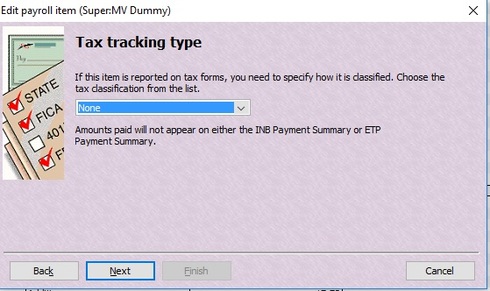
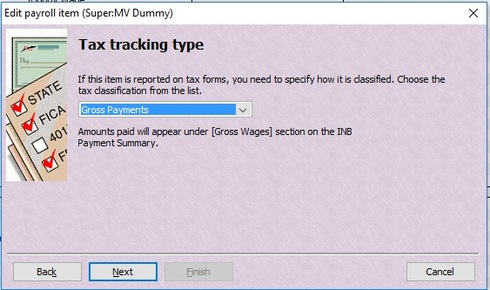
Thank you John. Your advice was very helpful and solves my problem. However, I do think the Reckon descriptions on the screens for (MV)
"Tax tracking type"
is confusing. I will attach current screen shots for both types of tax tracking.
(1) Tax tracking type
is set to
none:
Where
Tax tracking type
is set to
none
, I think it would read better as:
This deduction
will not be applied
at Gross Payments on the INB Payment Summary and the ETP Payment summary.
This deduction will be applied after PAYG tax calculations on pay slips.
(2) Tax tracking type
is set to
?Gross Payments
:
Where
Tax tracking type
is set to
Gross Payments
, I think it would read better as:
This deduction
will be applied
at Gross Payments on the INB Payment Summary and the ETP Payment summary.
This deduction will be applied after PAYG tax calculations on pay slips.
Perhaps, if this post is seen by support, someone at Reckon could come up with better descriptions than my suggestions. However, the current descriptions on the Reckon screens have caused confusion for both myself and accounting colleagues. I wonder if others have also struggled with this?
Once again, John ... thanks for your helpful advice.
Find more posts tagged with
Who's Online?