Software: Reckon 2023 plus Desktop
I tried to process super payment. Every time I selected the new employee. It showed Payroll Item no likability agency.
I do not understand it.
Thank you
Good news. I fixed the problem. I did not set up the new super fund properly in the Reckon system.
Hi Shi
I'm not to sure what you mean - What process are you using to enter this ?
I am going to pay the Quarterly super. The steps I did below
Employee-----payroll tax and liabilities----Create custom liability payment.
I chose the employees. Others all ok except the new employee.
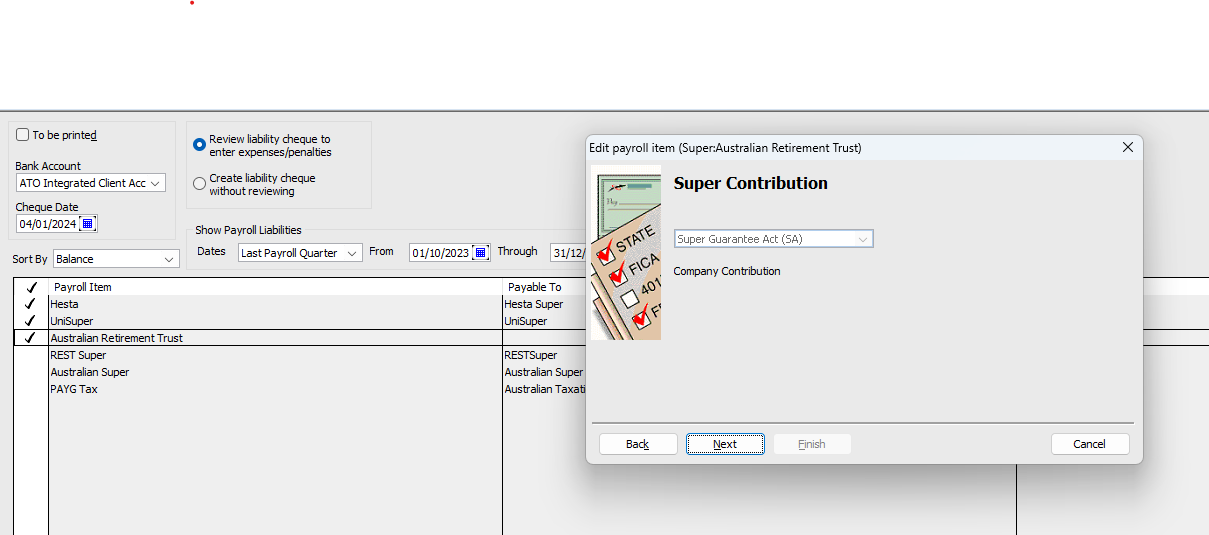
It showed "Payroll Item no likability agency. Do you wish to enter one on the payroll item".
I do not know why?
You select Payroll Items (not Employees) so I'm assuming you mean one of your Super Payroll Items ?
Have never heard of "likability" - Can you post a screenshot of the message ?
Please find attached screen shot. You will find out there is no Payable to for Australian Retirement Trust.
I set this super fund in the Reckon. Others were set up by the previous Accounts staff. Thank you.
I am not sure what should I enter? Thank you.
I selected Employee - then select Payroll tax and liabilities - then Create custom liability payment.
I also selected the the period and each super funds. The problem happened. Thank you
Good to hear Nancy!
Yes, The payee (Supplier) needs to be added in the Payroll Item config so the Payroll Liab Chq is able to be created 😊
Don't miss announcements and important info for Reckon Accounts Hosted
Do you have an idea for a feature in Reckon Accounts Hosted? Let us know here!