I get out of balance error.
Many Thanks for that,
In for a penny…
Lets try something new.
Cheers.
Hi @Jim_9169941
An out of balance error indicates that the transaction total amount does not match the sum of the individual line item amounts.
Can you provide some more information:
Hi D,
Im loading txt (help pages say I can) file, Transaction, Invoices.
I created 'Access' table and exported as tab delimited txt file.
first attempt.
Many Thanks.
What specific Help pages are you referring to?
The 'text files' that is recognised as acceptable for import need to be in a specific format called "IIF".
Whilst you can create tables in an MS Access database and export them as a tab delimited txt file, you need to ensure that they have the necessary header row and structures present.
We do not provide detailed support for creation of IIF file other than what is present in the in-product Help.
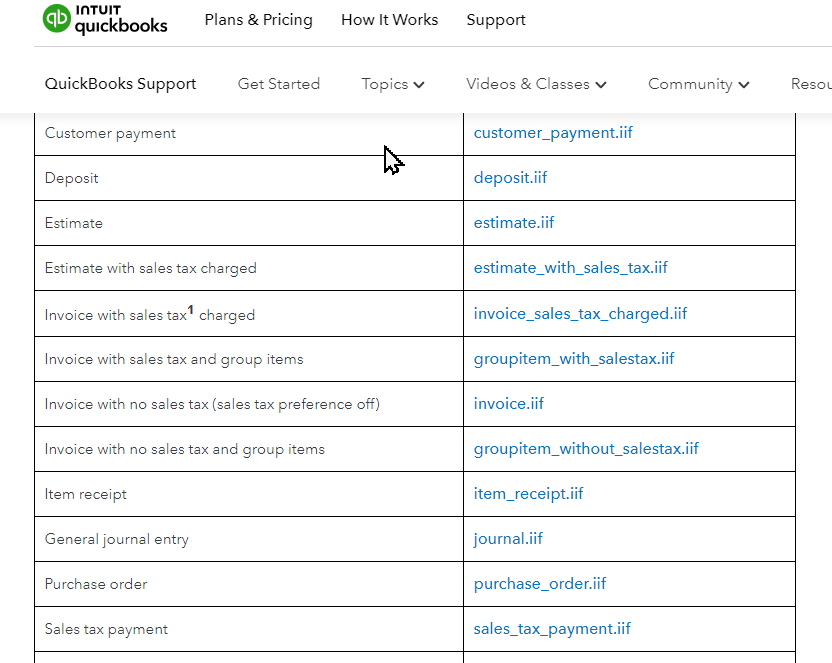
However you can find examples via the Intuit site which follows the same structure for IIF that is accepted by Reckon Accounts.
https://quickbooks.intuit.com/learn-support/en-us/help-article/list-management/iif-overview-import-kit-sample-files-headers/L5CZIpJne_US_en_US
the IIF file, is it more than correctly formated txt file?
Does it simply need an iif extention or is there a process to save it?
Where all docs say iif files best viewed in EXCEL, EXCEL doesn't allow an iif save.
Having created the proper formatted text file, how do I save as iif?
A lot of the information is very verbose, repetitive and contradictory.
An IIF file is a tab-delimited text file.
The file extension ".IIF" is only necessary for the program to 'see' the file.
In Excel, you can create your tab-delimited text file and save it as type "Tab-Delimited Text" with a ".TXT" file extension.
Then at that point you can rename the ".TXT" to ".IIF".
The link has examples of IIF for different transaction types.
At least take a look at one example transaction, based on the type of transaction you are trying to create and import.
Yes I've done all of that.
orig comment 'out of balance', its trying to load but only seems to read some of the rows.
it really has very poor error messaging for a load function.
doesnt need to be iif file, just loaded your file 'Full Invoice' as txt.
Your 'Full File Correctly Formatted' file has incorrect date formats in it.
this may be excel configoration. Notepad has yyyy/mm/dd.
The file extension being ".IIF" or ".TXT" is only a convention.
The important thing is the STRUCTURE of the HEADER and the ROWS of data.
The example is from the Intuiit which is a USA based company, you can can modify the date format and confirm whether the date shown in the IIF is applied in the manner you require.
hi again,
still chipping away at this. Import load.
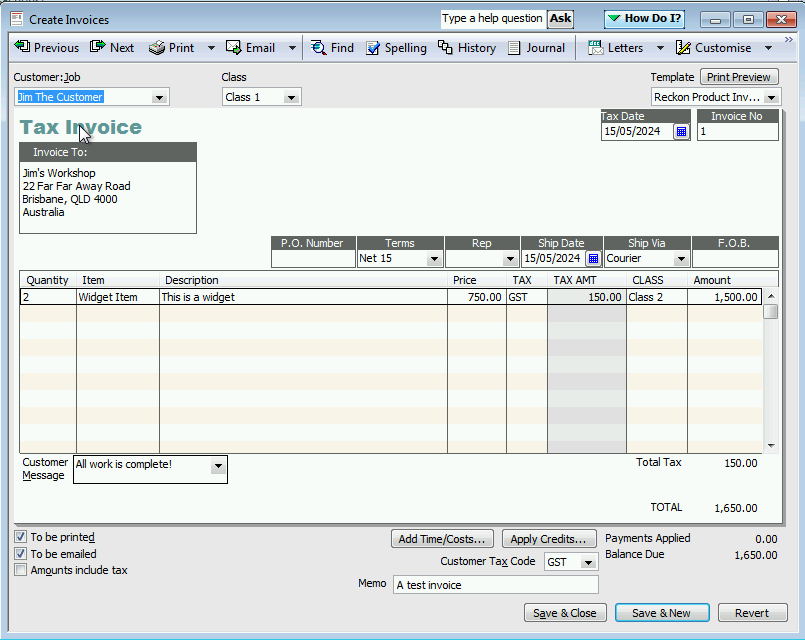
What do I need to fill, to get 'Tax' and 'Tax Amt' on my invoice to fill?
Also 'Customer Tax Code' down the bottom?
Did you review the documentation provided in the link in the previous posts?
There are example IIF files there.
In a blank new Reckon Accounts company file, create a Customer and Item.
Create a new invoice using that Customer and Item.
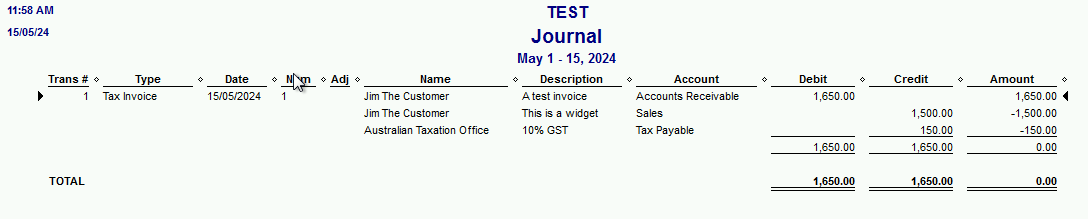
This will show you what a transaction would be in the Reckon Accounts software.
Then consider providing an example of an IIF file that you are creating that is trying to replicate the transaction that you had manually entered.
Hi Im back again,
I have got my file to load and seem to have almost all the bits it should.
I still can't get 'TAX' & 'TAX AMOUNT' on the invoice. It has the tax and correct amounts etc, just
doesn't show those two details or the 'Customer Tax Code' at the bottom.
I have loaded every iif invoice example given and none of them load these values.
It must be able to do it because my system has done so for over 18 years.
Is there no one who can give me the simple mapping for this?
I include a copy of the simple invoices I am using for my tests.
many thanks.
Well nobody seems to know about loading invoices.
A new company, will load my test file and an actual file.
My actual company, gives errors for my actual file, wont load, and actually crashes the system on my test file.
Please see attached screenshots.
Also files, Trans(actual), Trans2(test).
I would start with the first error and check all items and the accounts they are linked to and make sure none are linked to the accounts listed in the message
The example IIF you provided has a problem with the DATE value.
The correct TRNSTYPE = TAX INVOICE
The row line 6, SPL has an invalid year value
When asking a question, consider including screenshots of what the transaction is meant to look like that you are expecting to be imported via an IIF.
The Zed-Axis tool may be useful for you as an alternative to manually constructing IIF files for import.
https://www.reckon.com/marketplace/add-on/zed-axis/
My bad on the date, missed the difference.
Many Thanks for that, much easier with the correct file key.
next topic -
What, How is the best way to interact with Reckon, externally.
ie. Creating a new customer from an external application, saving on both.
I know applications do this.
At the moment I am creating in R, Exporting loading etc.
Is there a link, interpreter or protocol of some sort?
An API/SDK is available for the Reckon Accounts product.
It is likely more complicated than the IIF import format discussed previously.
Note that whilst there is support for API/SDK developers, it is for more for developers who already have experience with integration of products using API's.