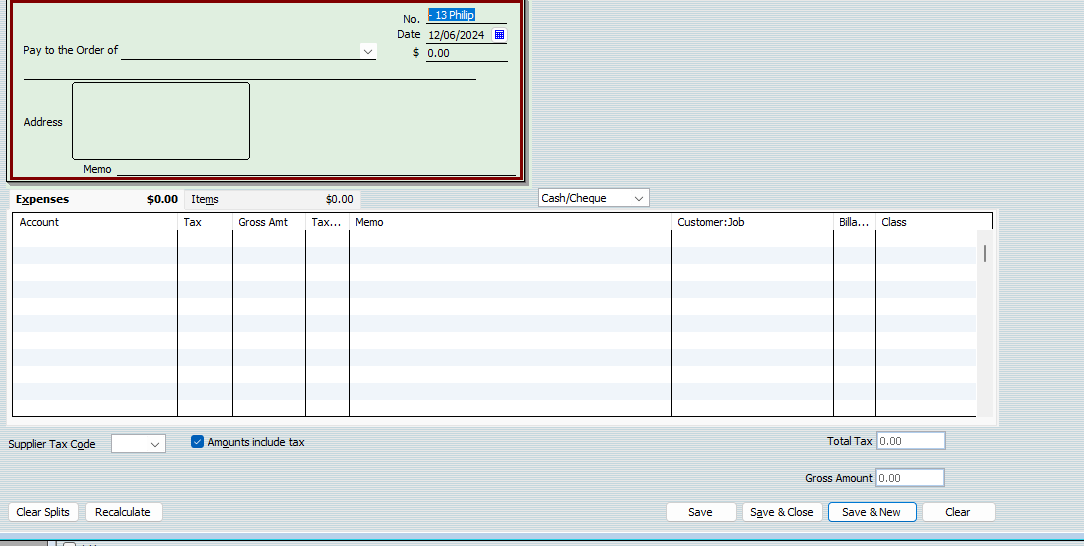
How can I remove an automatic cheque no. from occurring?
For some reason the cheque no. always prefills as -13 Philip. I don't know how this happened, and I can't work out how to remove it.
just under the actual cheque there is a box that says Cash/cheque. If you click on the arrow and select to be printed and no number will go in. I wish I could make this a universal selection but as far as I know I have to click it every time
Thanks Kris!
That was an easy fix 😄
The only thing to be aware of with this is that it will create a build-up of Cheques in your print queue which - over time - can slow the file down & affect performance. Therefore, make sure you regularly clear these out by "printing" them to PDF (after which you can just delete the PDF file created) 😊
Does anyone know why the cheque number would come up with a number such as -13 Philip?
It seems a little odd.
The number field populates from the porevious number entered + 1 when entering a cheque.
To get rid of the numbers appearing I pretend to run a payrun.
In the "Review & Create Paycheques" step instead of "Print pay cheques" choose the "Assign cheque numbers to handwritten cheques" option and put DD in the First Cheque Number section. Then Create Payment.
This should then hold the next cheque to also be DD.
Remeber to delete the pay that you just ran as it didn't actually happen.
I don’t have a problem with payruns, they just state PayChq but don’t allocate a number. My problem is having to tick the box every time I enter ordinary cheques.
@Shari Fallaw I believe if you search for that number and try 12 in exactly the same format instead of 13 you should find where once upon a time you entered that number inadvertently- and now it’s just going up by 1, which is what the cheque numbers do
Good luck
Hi Kris, I wasn't suggesting you have a problem with payruns. I was suggesting this is how you fix the issue with the normal "write cheques" giving a cheque number. My suggestion above is how to fix that issue.
ok thanks I’ll give it a try