Years of Data in the QDF.
My PC was slow to open Quicken 2010. My guess this was because I was loading data from 2001. So, I decided to cut the number of transactions now starting now from 2020 and also delete all record of closed accounts. Of course this took an adjustment to each account.
Given I deleted 100's of records the QDF didn't seam to change in file size. Now that I've found how to create a QIF for each account I find all the transactions from 2001 are included in the QIF even though my accounts plus only shows from 2020. So, it appears that the program still has records of every transaction. I was thinking the QIF would only have the records I can now view in the accounts. Does this mean there is some way I can restore all my deleted records?

Comments
-
Hi @ColinT,
I don't believe there is a way to restore the deleted records, you would have to use a backup to restore them. However, I do recommend contacting our @Datarec (Data recovery team) and they may be able to assist in removing transactions and shrinking the file size.
Thank you and speak soon.
Lucas2 -
Hi Colin,
Before you deleted the records, did you first create a backup or a copy of the original data file set?
That would be the fastest way to get back to a state before the removal of records had been done.
Unfortunately, we do not offer a file size reduction service for the Reckon Accounts Personal range.
Try the following to see if it reduces the size of the QDF file.
- Open the QDF file
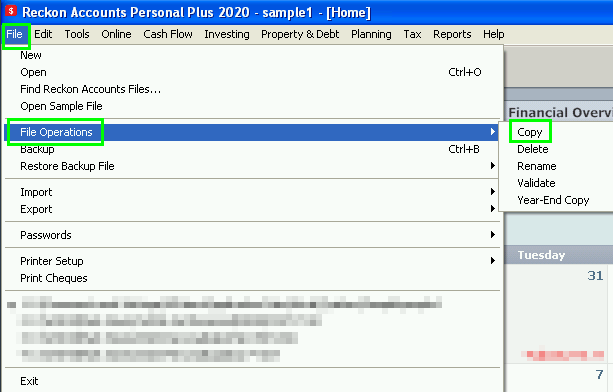
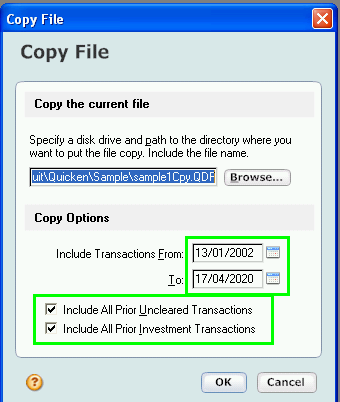
- Use the File | File Operations | Copy function
- Change the selected options as needed based on your requirements
Give the copy a new distinctive name and place it to your preferred location.
In Windows Explorer, compare the size of the copy to the original.
If the copy is smaller, then make use of it.
Searching the Reckon Help and Support Centre | Asking good questions on the Community
#TipTuesday: Picture Paints a Thousand Words | How do I add screenshots to my discussion?
1 -
Thanks for your suggestions. I do have a backup pre the account deletions that I can use. But more so my question was how to create a QIF that didn't include the previous data I don't want.
0 -
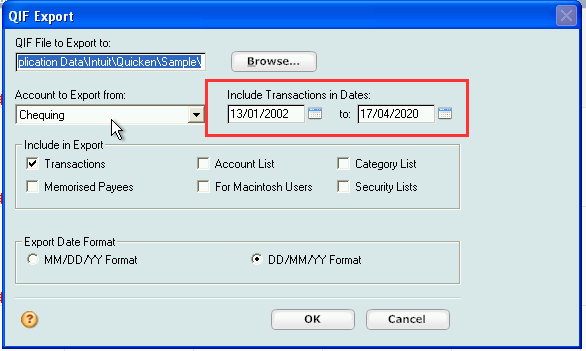
When exporting the transactions, are you specifically selecting the period you want?
Searching the Reckon Help and Support Centre | Asking good questions on the Community
#TipTuesday: Picture Paints a Thousand Words | How do I add screenshots to my discussion?
0 -
I tried that for a 5 year period but still ended up with the same full date range when I did the import into another program. Also there is so difference in the QIF file size between full and part data.
0 -
Hi @ColinT
In the test export process I've attempted, by changing the date start and end range, the resulting QIF only contained the period that was asked for.
Note: That QIF file can be opened in any text editor to confirm what it contains.
Searching the Reckon Help and Support Centre | Asking good questions on the Community
#TipTuesday: Picture Paints a Thousand Words | How do I add screenshots to my discussion?
0 -
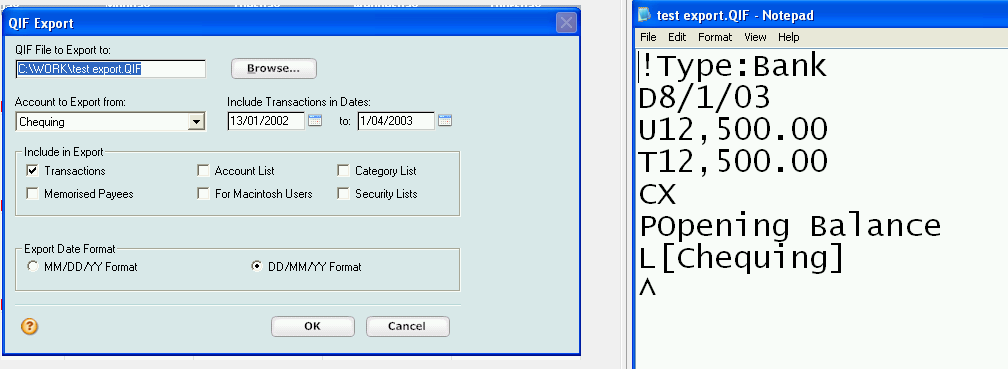
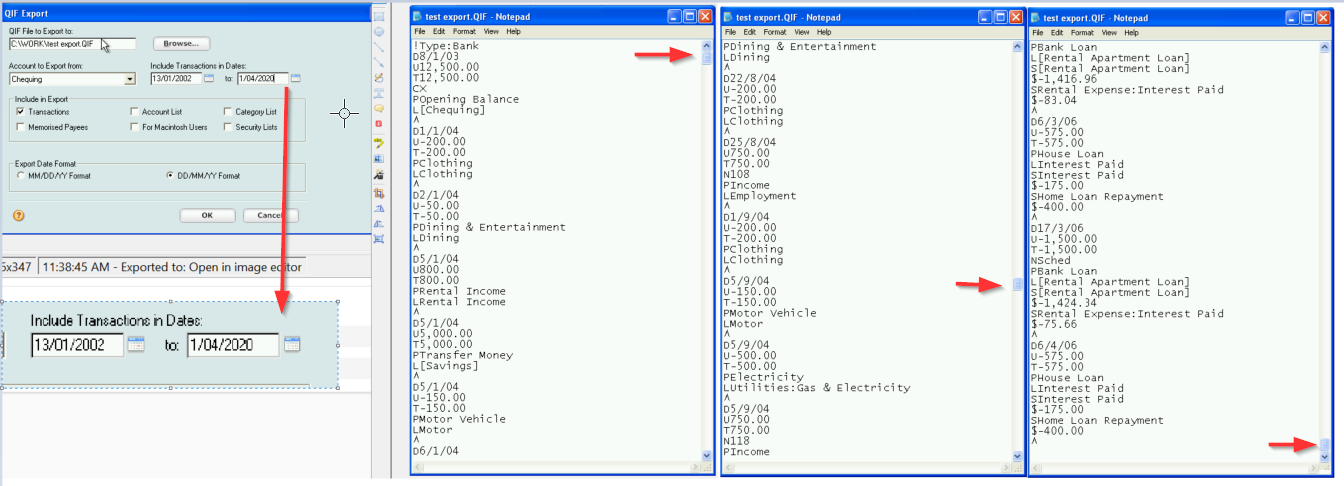
Example of changing the date range and the resulting QIF contents.
This first screen shot has the date range set up to 01/04/2003.
This has only one entry appearing in the QIF.
This second screenshot has the date range set up to 01/04/2020.
This has multiple entries appearing in the QIF.
Searching the Reckon Help and Support Centre | Asking good questions on the Community
#TipTuesday: Picture Paints a Thousand Words | How do I add screenshots to my discussion?
0 -
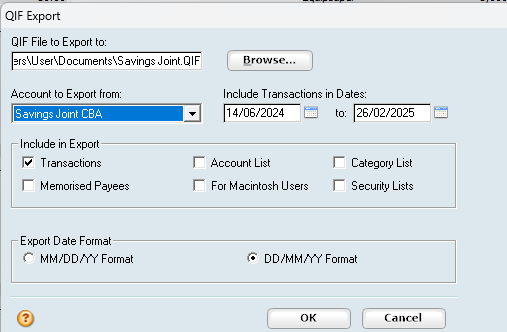
Export Range set to a few months
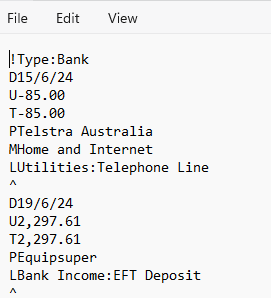
As viewed using Notepad the first transaction matches date range
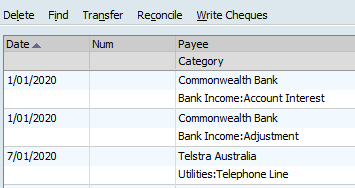
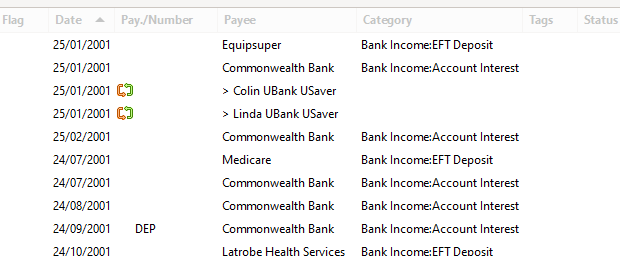
These are the first few entries as viewed in Reckon PPlus for the full account. I deleted all records before this date from the account.
This is what I get when I import the QIF with the short date range. As you can see the new program goes all the way back to when I started records. Even further back than the records I currently use.
I think for this reason somewhere even in the shortened QIF it must be able to find every transaction ever for the account.
Thanks for your help guys but the new program is too smart.
0 -
Hi @ColinT
Are you importing these QIF files into a totally blank new file?
Are you reviewing all of the QIF files and their contents before you performed the import to confirm that each QIF for each account only contains the transactions in the period you have nominated?
Searching the Reckon Help and Support Centre | Asking good questions on the Community
#TipTuesday: Picture Paints a Thousand Words | How do I add screenshots to my discussion?
0 -
I had deleted all QIF's and uninstalled the program I am testing. Starting from scratch installing the program which recognises a new install and I then creating new QIF's. I posted the results. I'm happy with the Reckon PPlus but at the price to manage a few accounts I was considering something else. The PPlus does exactly what I need it to.
0