Filter Stuck on

Natalie_9100443
Natalie_9100443 Member Posts: 11 Reckoner Reckoner
edited April 8 in Reckon One

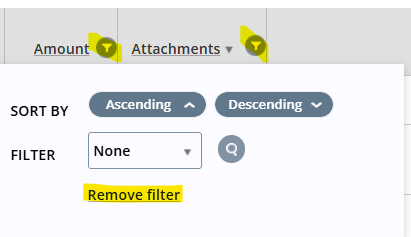
Hi, I am having an issue with removing the filter on the make payment screen. I can change the filter properties but it will not remove by clicking the remove filter button. It seems to only be the make payment screen that is affected.

image.png

Comments

  • Alexis McKeown
    Alexis McKeown Reckon Staff Posts: 596 Reckon Staff Reckon Staff

    Dear @Natalie_9100443 ,

    Could you set a Filter up for me that isn't set to None? eg. Set the filter on Amount to "Above 1"?

    After you do this, save, refresh the page, and see if the filter has kept on.

    If it has, then try to remove the filter.

    Kind regards,

    Alexis McKeown

    Reckon Senior Technical Support

    Alexis McKeown

    Reckon Senior Technical Support
    Working hard since 2018
  • Natalie_9100443
    Natalie_9100443 Member Posts: 11 Reckoner Reckoner
    edited April 8

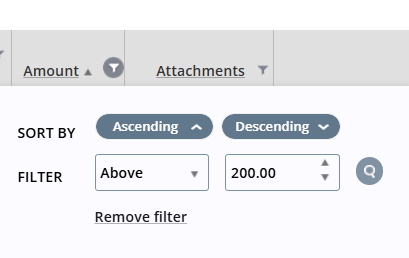
    Thanks Alexis, Thank you I have done as suggested above but it is still stuck on. I managed to remove the attachment filter by selecting the "select value" from the dropdown box but the remove filter button still did not work.

    image.png
  • Alexis McKeown
    Alexis McKeown Reckon Staff Posts: 596 Reckon Staff Reckon Staff

    Dear @Natalie_9100443 ,

    You may need to solve this via an alternate method:

    1. Press Tab on your keyboard until the "Remove filter" line is outlined/highlighted.
    2. Press Enter.

    It may take a few presses of the Tab key in order to highlight the Remove Filter button, but this should fix the issue.

    Kind regards,

    Alexis McKeown

    Reckon Senior Technical Support

    Alexis McKeown

    Reckon Senior Technical Support
    Working hard since 2018
  • Natalie_9100443
    Natalie_9100443 Member Posts: 11 Reckoner Reckoner

    Thanks Alexis, unfortunatley that didnt work.

  • Alexis McKeown
    Alexis McKeown Reckon Staff Posts: 596 Reckon Staff Reckon Staff

    Dear @Natalie_9100443 ,

    I will be sending you a private message to gather up more details and try to correct this on my end.

    Kind regards,

    Alexis McKeown
    Reckon Senior Technical Support

    Alexis McKeown

    Reckon Senior Technical Support
    Working hard since 2018
  • Ankit
    Ankit Member Posts: 12 MMC Convert Staff Member MMC Convert Staff Member

    Hii Natalie,

    Based on the troubleshooting already conducted with Reckon Support, we would like to suggest a few additional steps from our end that may help resolve the issue with the "Remove Filter" button on the Make Payment screen:

    1. Clear Cache and Cookies (if using Reckon Hosted or Web Access):
      If you are accessing Reckon via a browser or hosted environment, clearing your browser's cache and cookies can often resolve interface-related glitches. Alternatively, try using an incognito/private browsing window.
    2. Switch Browser or Device:
      If applicable, attempt to access Reckon from a different browser or device to determine if the issue is browser-specific.
    3. Review User Permissions:
      Confirm that the user profile in use has full access rights, particularly for payment functionalities. In some cases, limited permissions can affect how certain features operate.
    4. Refresh the Session:
      Fully log out of Reckon, close the application or browser, and log back in to reset the session. This can help resolve temporary interface issues.

    If these steps do not resolve the issue, it is likely a system-specific glitch within the Make Payment module, which would require further assistance from Reckon’s technical team.

    MMC Convert remains available for any further assistance you may require. Please feel free to reach out at any time.

    Warm Regards,

    Ankit Mehta

    MMC Convert