What can I do to rectify this so that I can print my ABA report which shows the details of employees paid?
What details are you wanting to see? I print the payroll report and then compare the gross and tax totals when I preview the aba file. If correct I then create the aba file, download it to computer and lodge with bank. An aba is not meant to be printed usually. You could see it after you download it but it’s not easily read
Dear @HighfieldsKindy ,
Usually, an auRegFindQuery Failed error means one of two things:
To fix the first issue, perform the following:
To fix the second issue, perform the following:
Kind regards,
Hello Alexis,
Thank you for your suggestion which I have tried.
Point 3. - the Company name and Legal Name both appeared correctly.
I have Run as Administrator from the launcher on the desktop. I don't have any pays to export today. When I try to "Create ABA file" - a message says there is no data in the table to be exported. So unsure if what you have suggested has worked.
We do fortnightly pays and the last successful pay that I could print when creating the ABA file was on 1st July 2025. When I check the ABA File History, the last pay showing in the history is 1st July 2025.
However each pay since, the ABA File for importing into the bank saved successfully onto the desktop to enable the pays to be made to our staff. We don't have the ABA File or ABA File History within Reckon to print for our records.
Hello Alexis, This Preview ABA Report is what I could print just now since "Run as Administrator" was completed. Unfortunately there are no Preview ABA files in ABA File history appearing - the last time a Preview ABA file appeared was 1st July 2025.
The aba history does not normally hold past exports, certainly not in my case
@HighfieldsKindy That screen snip is just a "preview" of the what's in the ABA file. It doesn't reflect whether it's been successfully submitted though & there have been some occasions where that preview incorrectly displays as $ 0.00!
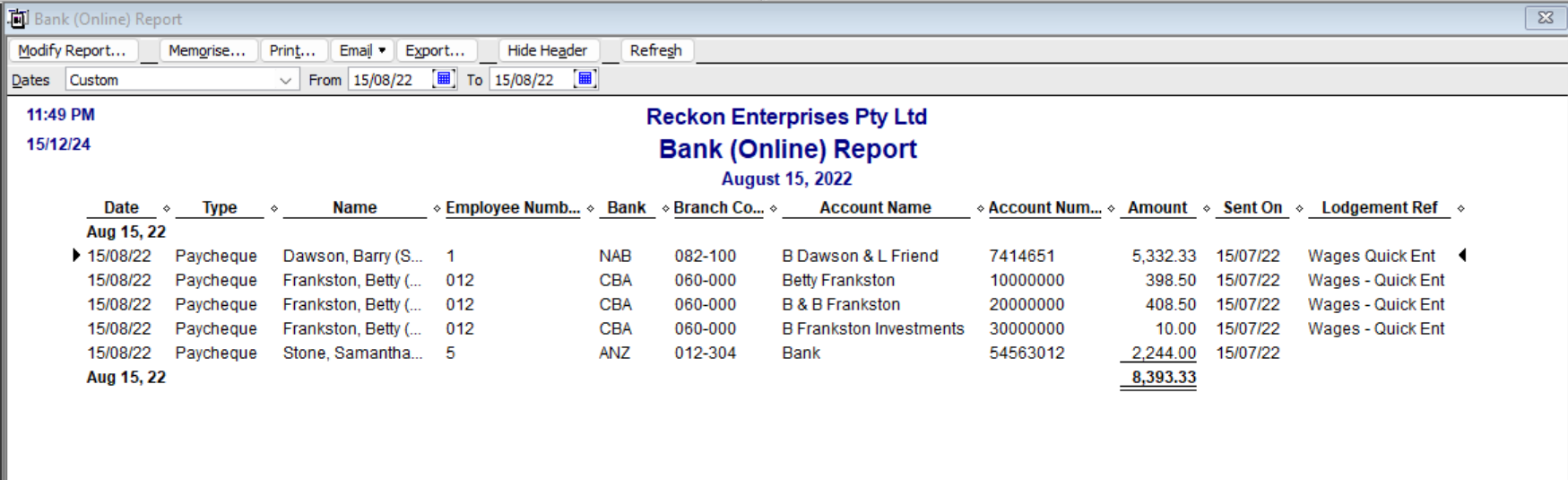
A better option is to use the existing, default ABA report - This one is far more useful as it reflects all entries created as Bank (Online) (eg ABA files), the date the ABA was created/sent & can also be modified, memorised & printed ! 😊 :
You can find this under Reports > Banking > Bank (Online) Report.
(NOTE: If you want to print this, you need to Save as PDF from the File dropdown menu FIRST & then print that PDF. This is because the bank details are automatically blanked out upon "printing" 🙄😬)