Recurring Transfers in Reckon One

Cheryl Medley
Cheryl Medley Member Posts: 154 Reckoner Reckoner
edited August 2025 in Reckon One Ideas

I have just asked the question on how to set up Recurring Transfers and have been told it is non existent! So …. How about it? I'm sure many people have regular transfers between their bank accounts, so it would be a REALLY useful feature. Looking forward to hearing it's done!


2
2 votes

New idea · Last Updated

Comments

  • Rav
    Rav Administrator, Reckon Staff Posts: 14,387 Reckon Community Manager Community Manager

    Hi @Cheryl Medley

    Thanks for raising this idea. Can we get a little more context or detail on the types of transfers you're actioning on a consistent basis so the product team understand your use-case.

    Cheers!

  • Cheryl Medley
    Cheryl Medley Member Posts: 154 Reckoner Reckoner

    Sure. I can do recurring payments and receipts easily, but what I need to be able to do is set up recurring transfers from one bank account to another bank account, that belong to my client. He does about 4 or 5 weekly and I only get to reconcile his accounts each quarter so too much time is spent entering these transfers.

  • Rav
    Rav Administrator, Reckon Staff Posts: 14,387 Reckon Community Manager Community Manager

    Hi @Cheryl Medley

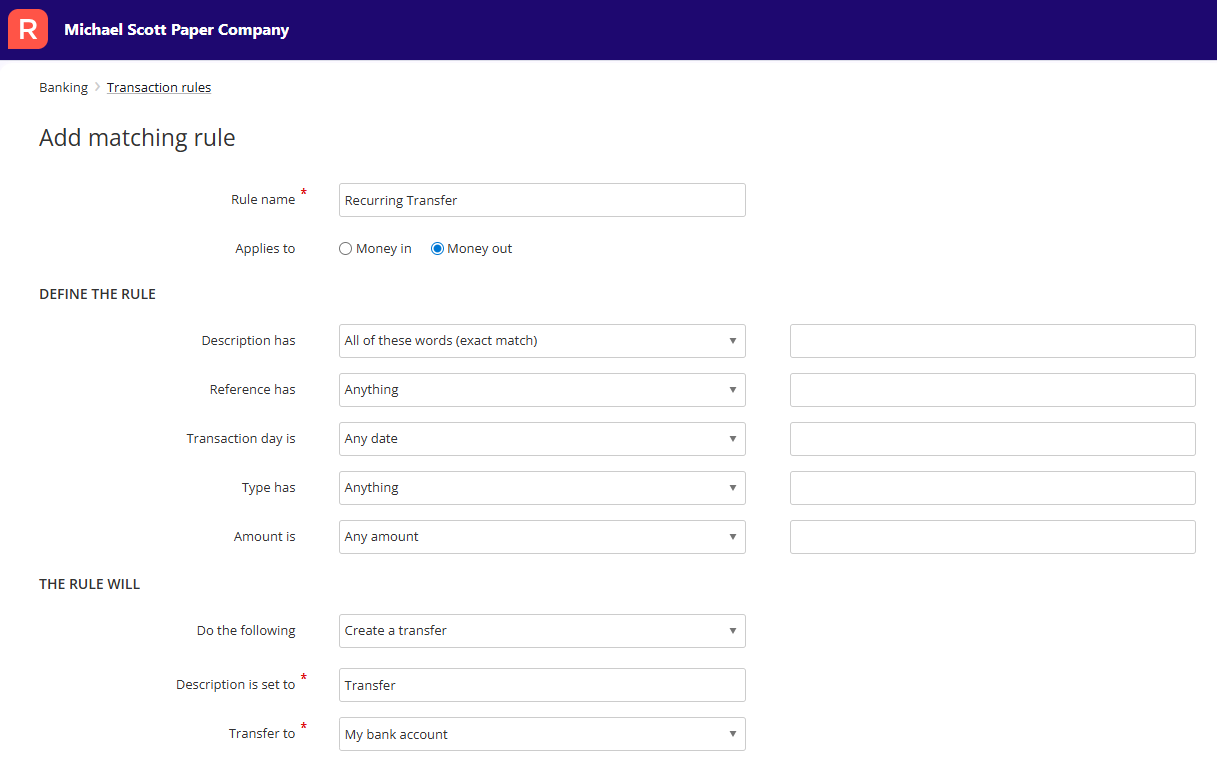
    I know its been a while but I just wanted to come back to you on this, I believe this is already possible in Reckon One by using a transaction rule to create a transfer.

    For example, you could create a transaction rule where if the transaction description is XYZ then create a transfer to ABC bank account.

    Check out transaction rules under Banking ➡️ Transaction Rules, you can setup rules for both money in and money out transactions and tailor the rule parameters for when they run.

    image.png
  • Cheryl Medley
    Cheryl Medley Member Posts: 154 Reckoner Reckoner
    edited November 2025

    Thank you, Rav. I will be working on the account that mostly uses this by the end of the week, so I will give this method a go. Cheers!

  • Cheryl Medley
    Cheryl Medley Member Posts: 154 Reckoner Reckoner

    Hiya, Rav. I followed instructions as per above, but when I went to save it (many times with different set-ups!), I received the red rectangle with 'add a bank account'. Since I could only find one place to add a bank account - 'Transfer to' - I couldn't achieve what I needed to. Is there more to the example that might be missing?

  • Rav
    Rav Administrator, Reckon Staff Posts: 14,387 Reckon Community Manager Community Manager

    Hi @Cheryl Medley

    I'm assuming the bank account you transfer from and to are already setup in your book, correct?

    If so, you simply need to select the bank account to transfer TO and also the criteria you want the rule to run on. The rule will then run on any bank transaction that matches that specific criteria.

    So for example, if the bank transaction description for this specific transfer you action is always the same, add that in as your criteria and select the bank account to transfer to. The rule will then identify the description and action the transfer to the nominated bank account for you.

    I'll add a link to our guide on transaction rules here - https://help.reckon.com/article/4y827yobbj-transaction-rules in case it helps at all but let me know if you have any questions.

  • Cheryl Medley
    Cheryl Medley Member Posts: 154 Reckoner Reckoner

    Thank you, Rav, but I want to do transfers from one bank account to another. As soon as I hit 'Transfer', that bottom line 'and allocate the bank transaction to:' disappears.

    I have already set up recurring transactions where the money leaves the bank and goes to an account, such as Bank Fees, so that isn't the advice I need. It's the transferring from the main bank account to subsidiary accounts that my client has set up (he has his main business account, a savings account and a Visa account.) He transfers weekly so when I get his books to prepare his BAS, I have 12-13 weeks of 4 lots of transfers to enter.

  • Cheryl Medley
    Cheryl Medley Member Posts: 154 Reckoner Reckoner

    And I've just discovered that he's set up a bank feed starting in October so my problem is solved!!! I can just accept those feeds. Thank you for your time, though.

  • Cheryl Medley
    Cheryl Medley Member Posts: 154 Reckoner Reckoner

    Nuh! I got excited too soon. I am still looking at that same problem. Although the transactions are feeding through, I still need to make the weekly entries so that I can match them.

  • Cheryl Medley
    Cheryl Medley Member Posts: 154 Reckoner Reckoner

    I might be right with the bank feed. I can 'Allocate Transfer' and it's straight forward. So from October on I'll be fine, I just have to input all the July to September items. The receipts that have come in are easy enough to match with invoices sent. The bills are another story, so I will need to let him know to make sure he keeps putting his bills in so that I can match with the payments from the feed. Thank you for listening!

  • Rav
    Rav Administrator, Reckon Staff Posts: 14,387 Reckon Community Manager Community Manager

    Morning @Cheryl Medley

    From the sounds of it, it looks like you may now be sorted with the recurring transfer, is that right?

  • Cheryl Medley
    Cheryl Medley Member Posts: 154 Reckoner Reckoner

    Almost, Rav. It would be good if I could set the recurring transfers from bank to bank so that they happen automatically then the bank feed will find the match. It is easier with just allocating the transfer, but still one by one whereas if the transfers are in Reckon One accounts, then it's just a case of matching. But I'll continue this way until there is a better way. At the moment, it's easy to set up recurring payments from bank account to a normal account, just not bank to bank. The other matters are for me to sort with my client! Cheers