How do I link Employer Super contribution to RESC STP reporting?
I have created a new pay item for Employer Super contribution but the only option in Tax Tracking is Salary Sacrifice Super which Reckon Support told me to use.
I've done a dummy pay run and it is allocated to salary sacrifice and added to W1 which is clearly incorrect.
How do I link the item to RESC reporting?
When I preview the STP report there is a column for RESC. Why can't I find any link in tax tracking other than salary sacrifice? How is it done correctly?

Answers
-
Welcome to the Community @Janet Schloeffel ! ๐๐ป
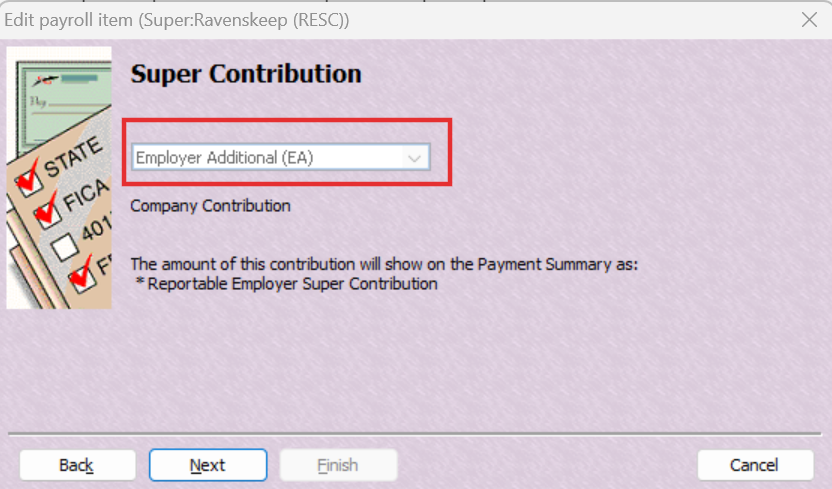
EA Super needs to be specifically set as that, here:
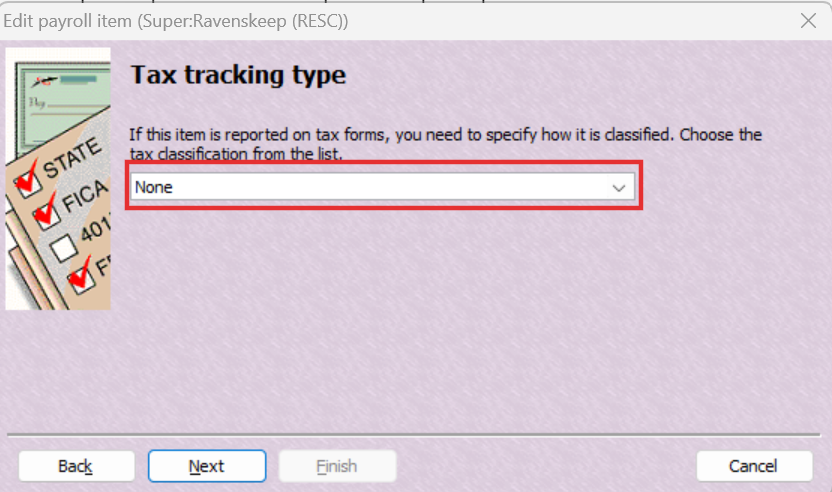
โฆ & mapped to None (NOT Salary Sacrifice Super) for Tax Tracking Type :
๐
1 -
Thank you, I appreciate your help but it still doesn't appear as RESC (or anywhere) in fact when I preview the STP report. There are 3 things to set up, name, linked expense account and tax tracking. How does the pay item report the RESC when it doesn't seem to be linked to anything?
0 -
The accounts you link to (from your Chart of Accounts) are internal only & do not impact STP.
The new Preview button doesnโt display the RESC column but when you upload the STP file to Reckonโs portal & click on its Detail link, you will see it there ๐ :
0 -
Great suggestion Shaz. That's a good tip!
1