SUPER GUARANTEE ADJUSTMENT
On my last pay run, one employee's super was short paid. It appears that it didn't calculate super on the fringe benefits amount. All prior pays have been correct and I looked at the next pay run and it is also the correct amount.
How can I process and extra amount of super $79.30, in this fortnights pay?

Best Answer
-
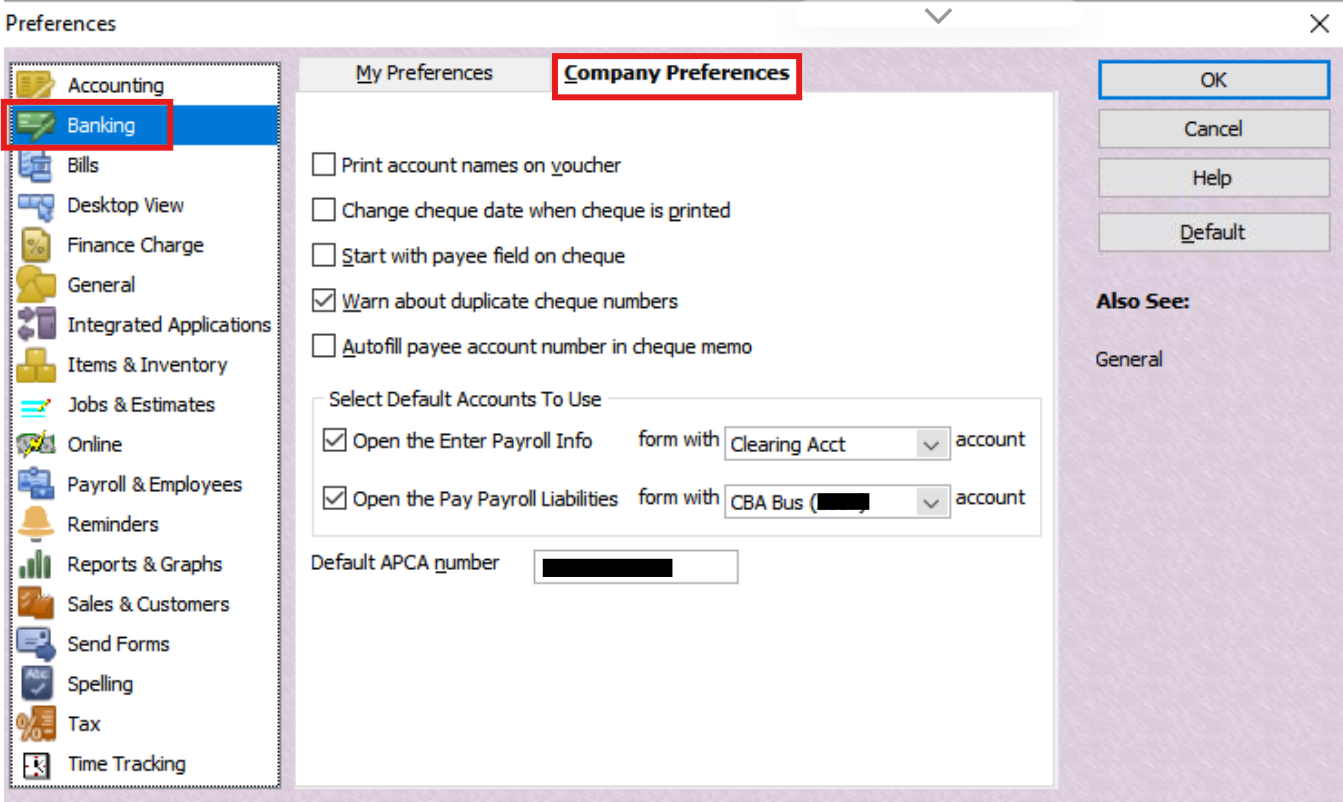
Ah Yes, that will probably be why then … as the system can only have one account as a default, for paying payroll 😬
0
Answers
-
Hi @Alison Hart
If it's not calculating correctly as just a one-off, it sounds like a another Payroll Item configuration - specific to that particular pay - may be impacting it. I would determine which one & edit it accordingly, then & edit the relevant Paycheque instead (via Unlock Net Pay).
This will automatically fix both the Super calculation as well as the STP reporting of it next submission 😊
0 -
Thanks for your reply.
I have had a look at everything and nothing seems to be any different from the last pay run.
They are setup as scheduled pay runs so I just check them but don't change anything. So not sure what to do now.
Another issue I have is with one of the scheduled pay runs I have to change the bank account each time as it is not remembering from the last pay run. Any thoughts ???
Thanks so much
0 -
Have you done a rebuild of the data file? If not - Utilities - run rebuild, and do it 3 times.
0 -
Hmm … there may be some data corruption 🤔 Are you verifying the file regularly ?
What is the Fringe Benefit for exactly ? ( Just to clarify, SG Super isn't normally payable on non-cash Fringe Benefits - with the exception being SS to Super only - unless you have a specific Award/regd Agreement that states otherwise, of course ?)
Therefore, by default, a FB Payroll Item would normally not have any Payroll Items selected for inclusion as it is not calculated from these, but instead is a separately-determined, grossed-up amount, calculated & provided by your Tax Agent, annually.
Regarding the bank account issue ….
Check your default payroll bank account in the Preferences (From the Edit dropdown menu > Preferences, then on the Company Preferences tab, under Banking):
0 -
I just had another try and actually went in and changed the super to the correct amount and now it's fine.
Kris are you referring to the bank account not changing?
0 -
Good to hear @Alison Hart 👌👍
However, something is obviously causing some discrepancies, so - as Kris mentioned - I would rebuild the file (From the File dropdown menu > Utilities > Rebuild Data) THREE times
For some reason, 3 rebuilds can fix a lot of issues! 🤞🏻🤞🏻🤞🏻
0 -
Doing the rebuild now.
I have 2 Scheduled payrolls coming from different bank accounts.
If I change the company preference as above, wont I still have the same problem.
0 -
Thank you both for your assistance today.
Both problems resolved.
Have a lovely evening.
1 -
Glad you’ve got it sorted
1