is it possible to add a function to either delete or make inactive more than 1 Customer Message at a time?
Hi @JTB346
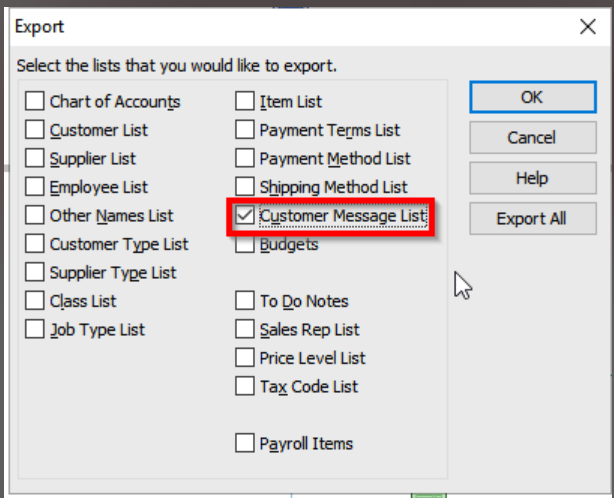
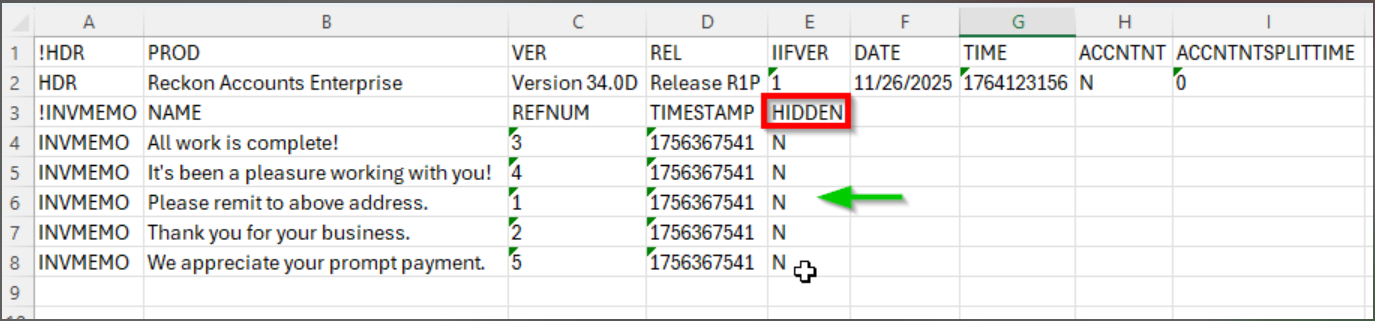
Reckon doesn’t provide this function natively, but you could update Customer Messages by exporting them to IIF, editing them in Excel, then re-importing.
⚠️Before attempting I would recommend also creating a backup incase.
3. Save the file and give it a name (e.g.. Customer Messages.IIF)
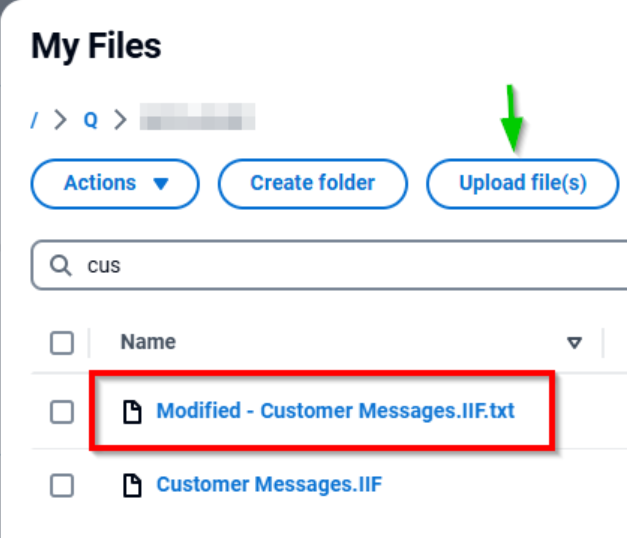
4. Download the exported file to your local PC (if using Hosted)
2. Rename the file from Modified - Customer Messages.IIF.txt to Modified - Customer Messages.IIF (remove the *.txt extension)
Let me know how it goes😁
thanks. that's a lot of manual work compared to just having a "select multiple" or "select all" option within the software. will see how i go…
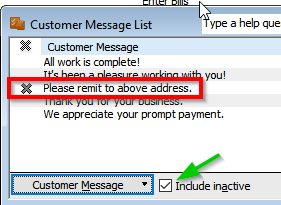
Also, then you can use this toggle here to show/hide the inactive records. Typically you cannot delete things that have been used before so making it inactive would be best option.
Don't miss announcements and important info for Reckon Accounts Hosted
Do you have an idea for a feature in Reckon Accounts Hosted? Let us know here!