HOW DO I SHOW EXTRA TAX SEPERATELY ON PAY SLIP

Allan_6480951
Member Posts: 14 Novice Member 
I HAVE AN EMPLOYEE THAT IS PAYING EXTRA TAX EACH WEEK. HE WANTS THE EXTRA TAX TO SHOW AS A SEPERATE AMOUNT ON HIS PAYSLIP. IS THAT POSSIBEL
0
Comments
-
Hello Allan,
Thanks for asking the Reckon Community.
You cannot split up the components of the PAYG tax amount.
You can consider this workaround of creating a custom Reckon Standard Payslip (this is the full page payslip).- Lists > Templates > Reckon Standard Pay Slip
- Click on Designer Layout
- Click on Make a Copy
- Click the Add icon at the top and select Text Box
- Add a message, like: this pay contains extra tax and click OK
- Position the text box to a suitable location
- Click on Properties to change properties.
- Click OK > OK > OK to Save and Close
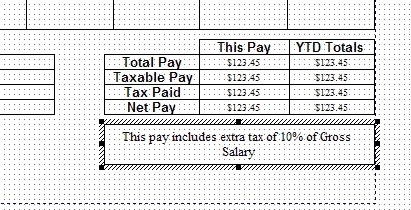
When you print payslips select this payslip template for this employee.
Hope this helps.
regards,
John0 -
WHAT'S WITH THE ALL CAPS??
-im0

 Reckon Staff
 This discussion has been closed.