How to lock previous period after BAS?


Hello All
we are using Reckon Accounts Premier: contractor edition 2023, so not sure if i pick rright category.
i have searched in community for my question but did not get anything, the closest one is to look the book in general setting, which i could not find in my reckon, maybe i am not looking at the right screen, could anyone help to show me a screen shot of how to lock a period ? thank you so much
cheers
jenny
Best Answers
-
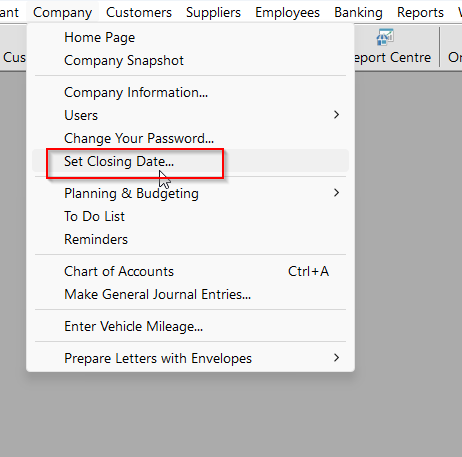
in Reckon Hosted and Reckon Desktop you just go to Company in the menu tab and down to set closing date.
0 -
Hi @jenny_9151212 ,
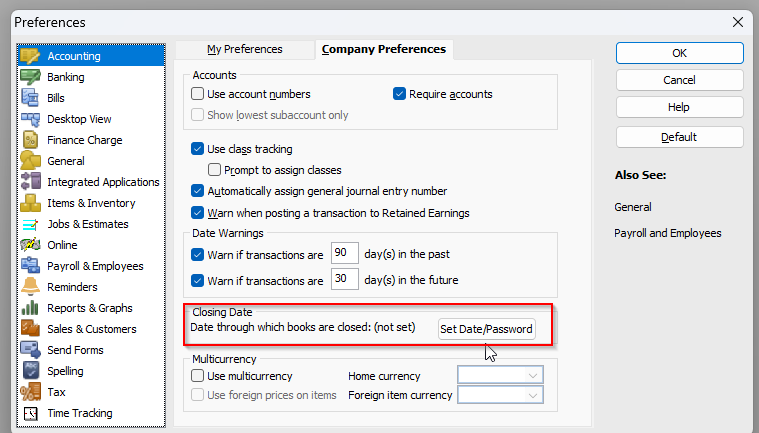
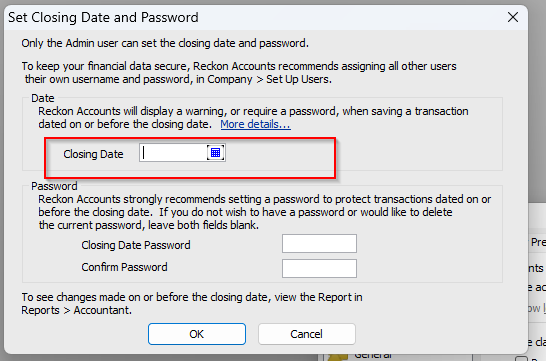
As Kris mentioned above, Navigate to the "Company" section, access the "Set Closing Dates" option, and input the required dates. I've also attached screenshots for your reference.
Also, Simpro's data should remain unaffected as long as all invoices and data are dated after the closing date.
If you need any further assistance , please don't hesitate to reach out.
Kind regards,
Reeta
 2
2



 Reckon Staff


Answers
-
thanks Kris, i will give it a try
we are using Simpro to enter invoices and export all the data to Reckon, just wondering does the lock will change how data transfered from Simpro to Reckon? thanks again
cheers
jenny
0 -
I shouldn’t think so as long as it’s after the closing date
1 -
hi Kris
i am just a bit worried if the invoices has been changed in Simpro before the set closing date, i understand it should not be any backdate invoices, but it happens , so when it transfer to Reckon, it will set a warning or just not transfer and leave a descripency in Reckon ??
cheers
Jenny
0 -
I believe you would be asked to enter the password, and if you’re on Cash basis for your BAS extra invoices shouldn’t be a problem
3