Is there a way I can access the balance EOFY balances without having to submit?


Morning, Is there a way I can access the balance of STP for EOFY checking without having to upload a payroll file.
thanks
Teresa
Comments
-
What exactly are you needing? You can look at an EOFY figure in the STP export window without having to submit it.
what exactly are you trying to do?0 -
Morning @agofarm
As mentioned by @Kris_Williams, you can go to Employees - Process Single Touch Payroll - Export EOFY Report - Upload the file to GovConnect - Click on Details to check the figures and instead of Submit, click Delete as in the screenshot attached. This way, you can access the figures for the EOFY.
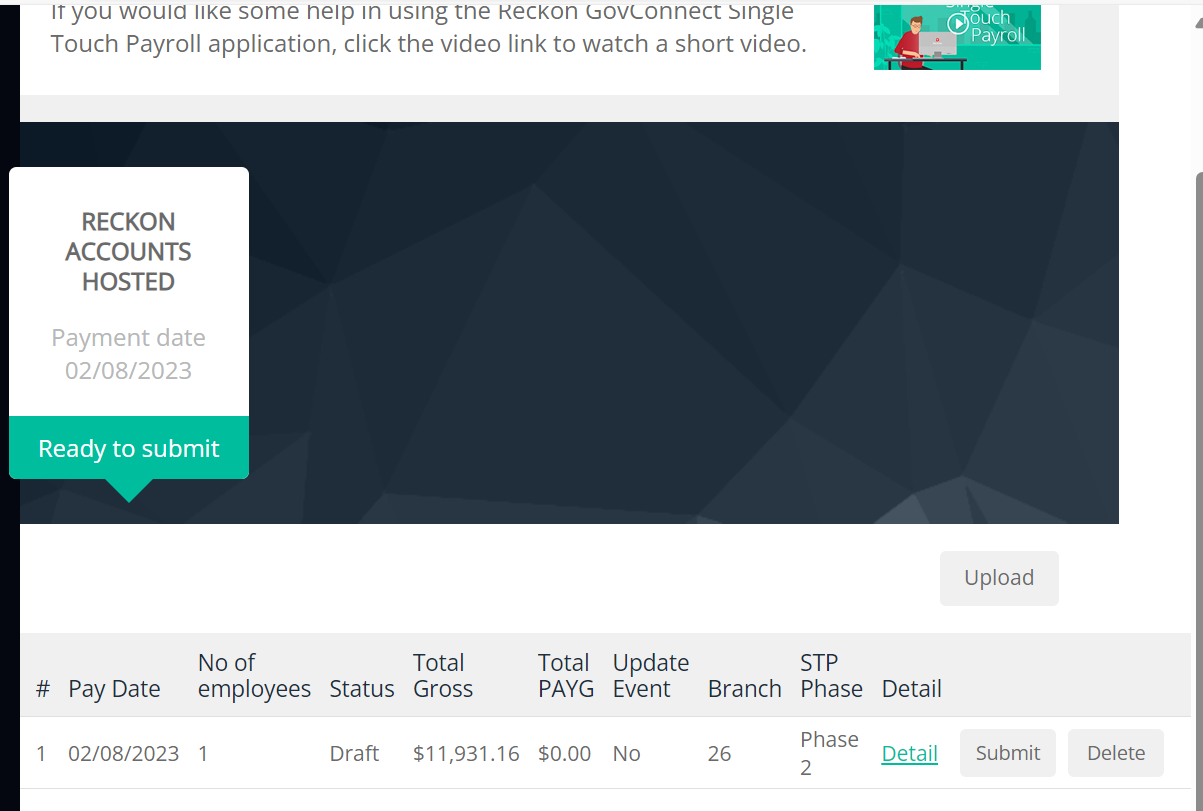
I hope this is helpful. Thank you!
Regards
Tanvi
 2
2 -
Hi @agofarm ,
You can see all the payroll totals for the employee by creating a payroll total reports.
This report shows you the payroll totals for each employee for the selected time frame. To be able to see this report go to the Reports , click Employees & Payroll on the left-hand side, and then click Payroll Totals.
You can also customize this report as per your requirement.
Kind regards,
Reeta
 1
1



 Reckon Staff
