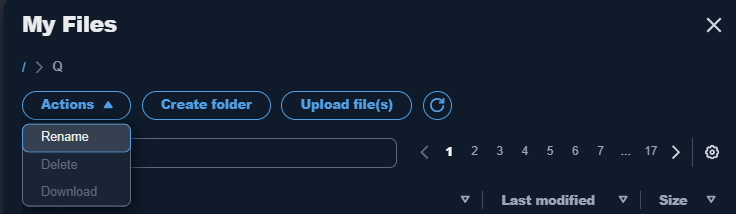
Download or upload buttons

Tiffany
Tiffany Member Posts: 32 Reckoner Reckoner

I do not have download or upload buttons on my Reckon Account Hosted in 2025 since upgrading to 2025. Trying to submit the super SAFF, it allows me to save it to My Live Q but I am not able to then download it to my computer so I can submit it to the Superstream ?

Best Answer

  • GerryWinter
    GerryWinter Accredited Partner Posts: 1,576 Accredited Partner Accredited Partner
    Answer βœ“

    It helps if you sort them by last modified and then i just have to click on the file and mine downloads automatically to my computers download folder

    Gerry id 6376

    Gerhard Winter

    Ph. 0418907140

    Reckon Store Next Door

    "Always at your Service"

    Email: gwinter0808@gmail.com

Answers

  • Jason_Z
    Jason_Z Reckon Staff Posts: 310 Reckon Staff Reckon Staff

    Hi @Tiffany ,

    The Download and Upload Files buttons should appear when you navigate to the My Files menu and click into the Q drive. In the new toolbar at the top, you'll find:

    • Download under the Actions dropdown menu
    • Upload Files as a separate button to the right of that

    Let me know if you don’t see them or need help!

    image.png image.png
  • Tiffany
    Tiffany Member Posts: 32 Reckoner Reckoner

    Thanks so much Jason that has solved my question. But to tell the truth I did like the little tool box in the previous versions.