Super Amount Not Showing Up in Pay Liabilities

Yeepy
Yeepy Member Posts: 29 Reckoner Reckoner

Good Morning all,

I paid the super today, and was trying to enter in Reckon. I went to Employeesโ€”>Payroll Centre, and clicked on 'Create Custom Liability Payment' under Pay Liabilities. I then chose the Dates as 'Last Payroll Quarter' and clicked ok. Amounts to Pay are all zero. Could anyone help me with this? I have attached the screenshot below. You assistance would be highly appreciated. Thank you.
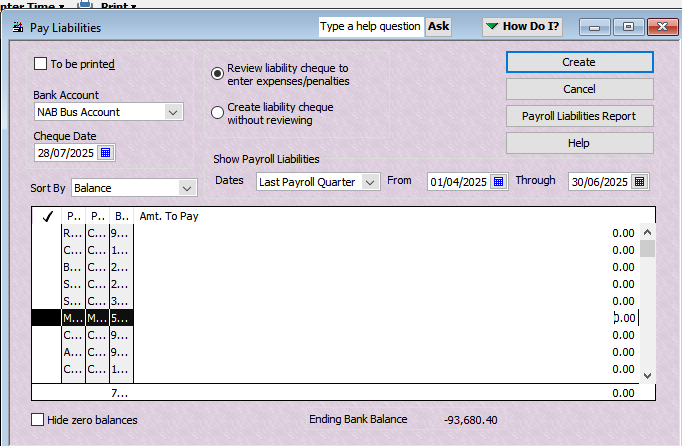

image.png

Best Answer

  • Kris_Williams
    Kris_Williams Member Posts: 4,277 Reckon Hall of Famer Reckon Hall of Famer
    Answer โœ“

    have you looked at that Payroll Liabilities report tab, and tried ticking the hide zero balances

Answers

  • Kris_Williams
    Kris_Williams Member Posts: 4,277 Reckon Hall of Famer Reckon Hall of Famer

    Go to the Chart of Accounts and look under the Liability account Super clearing or super liabilities, are there any figures in there?

  • Yeepy
    Yeepy Member Posts: 29 Reckoner Reckoner
    edited July 28

    Yes Kris. What do I need to do?

  • Acctd4
    Acctd4 Accredited Partner Posts: 4,208 Reckon Accounts Hosted Elite Expert Reckon Accounts Hosted Expert

    Agree with @Kris_Williams - It looks like there are quite a few there @Yeepy so you may just need to scroll down the list (or tick the Hide Zero Balances checkbox at the bottom) ๐Ÿ˜Š

  • Yeepy
    Yeepy Member Posts: 29 Reckoner Reckoner

    Thank you very much, Kris and Shaz. My issues solved.

