How to set up Super for Contractors without making them Employees

Vickie Wesolowski
Vickie Wesolowski Member Posts: 46 Reckoner Reckoner

We are a (very) small Regional Council in WA. We have 12 Councillors who we pay meeting attendance fees to bi-monthly. I've always treated them as suppliers and raised bills when their payments are due. Unfortunately after next month we will be required to pay them superannuation as well.

I don't want to set them up as employees (we don't deduct tax, they're not entitled to leave and payments are assigned to different cost centres to wages). Does anyone have any great ideas for what would be the best/easiest way to handle this? The only thing I've been able to think of is to create a new cost centre for the super, calculate the amount manually and apply this to the new code. Any better ideas?

Best Answer

Answers

  • klaura
    klaura Reckon Staff Posts: 525 Reckon Staff Reckon Staff

    Kind regards,

    Karren.png
  • Vickie Wesolowski
    Vickie Wesolowski Member Posts: 46 Reckoner Reckoner

    Thanks for the speedy response Karren.

    One of the reasons I'm reluctant to set them up as employees is that I don't want my reporting skewed by their inclusion, i.e. showing that we have 16 employees rather than 4 actual ones. If I run a Payroll Summary report will they be included?

  • klaura
    klaura Reckon Staff Posts: 525 Reckon Staff Reckon Staff

    Employees are exempt from STP reporting but will still be included in reports within Reckon.

    Kind regards,

    Karren.png
  • Vickie Wesolowski
    Vickie Wesolowski Member Posts: 46 Reckoner Reckoner

    Thanks Karren but that's what I want to avoid so I'll need to find an alternative method.

  • Acctd4
    Acctd4 Accredited Partner Posts: 4,275 Reckon Accounts Hosted Elite Expert Reckon Accounts Hosted Expert
    edited September 2025

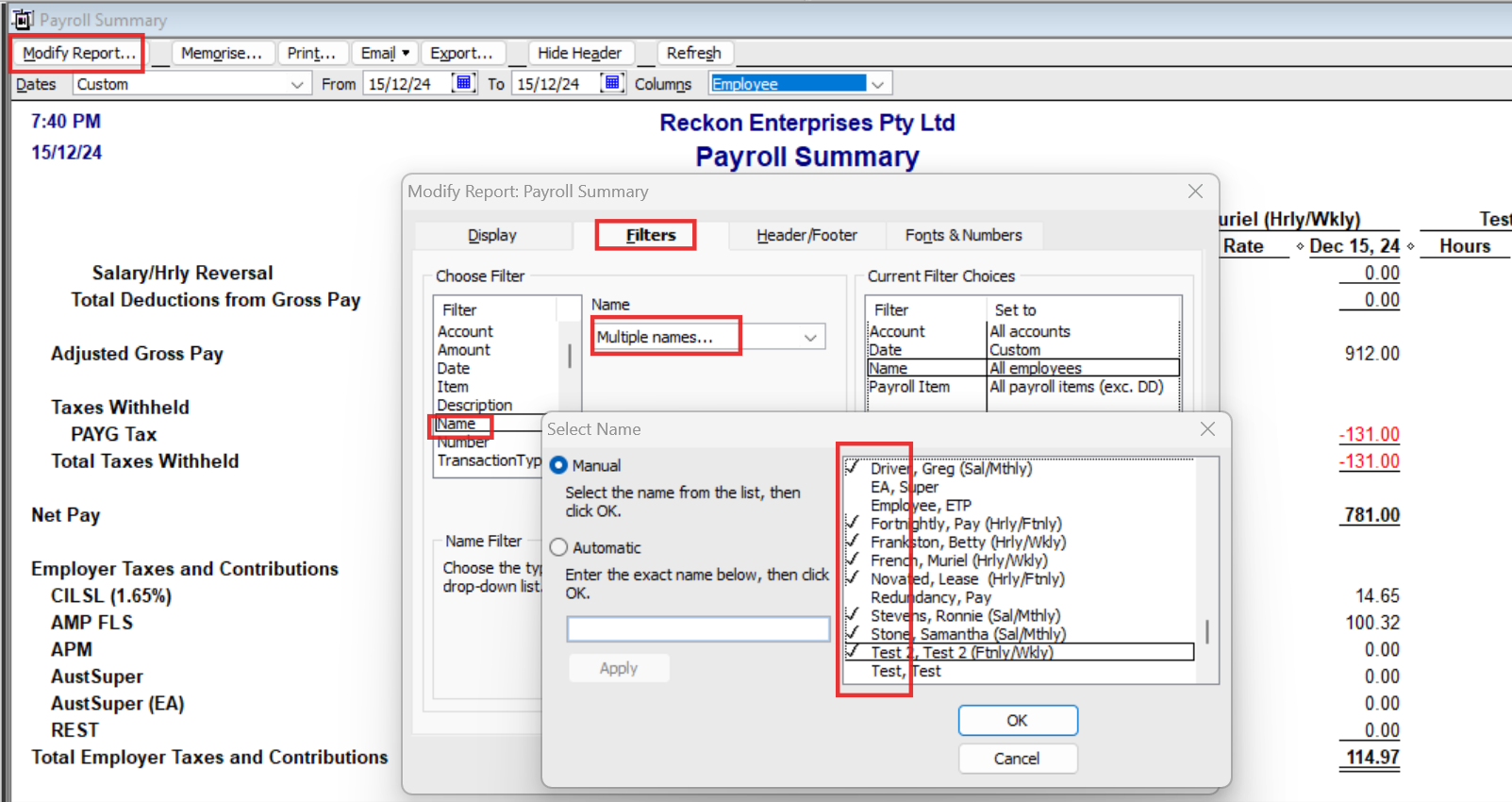
    @Vickie Wesolowski You can filter (& Memorise) your reports - including the Payroll Summary - to just include the actual employee names :

    image.png

    😊

    The benefit of using this method is that all the Super is tracked/reported together for you, allowing you to create your standard Payroll Liability Cheque for all of it.

    The other option is to add the Expense account & minus the Liability account on the Bill/Chq itself … but this means that:

    1. You'll have to manually calculate the amount to enter each time &
    2. You'll have to enter their super payments separately to everyone else's (when presumably, you pay all the Super together 😬)
  • Vickie Wesolowski
    Vickie Wesolowski Member Posts: 46 Reckoner Reckoner

    Thanks Shaz. I'm still a bit conflicted as I can see pros and cons for both methods. I'll be paying employee super every fortnight but only paying theirs bi-monthly. I'm not even sure how Reckon will deal with that.

  • Acctd4
    Acctd4 Accredited Partner Posts: 4,275 Reckon Accounts Hosted Elite Expert Reckon Accounts Hosted Expert
    edited September 2025

    That shouldn’t be a problem as you can create & filter (& then Memorise) your Super reports accordingly, too 😊

    … Just curious as to why you don’t want to pay the Super altogether though ? 🤔

  • Vickie Wesolowski
    Vickie Wesolowski Member Posts: 46 Reckoner Reckoner

    The Councillors are only paid bi-monthly, in arrears, so that's how we'll be paying their super too.

    One of my other issues is that 90% of the time Reckon doesn't create my payroll ABA file correctly, I have to open each pay cheque and close it for the data to populate. It's frustrating enough doing that for 4 entries, it'll drive me nuts having to do it 16 times.

  • Acctd4
    Acctd4 Accredited Partner Posts: 4,275 Reckon Accounts Hosted Elite Expert Reckon Accounts Hosted Expert

    Have you verified & rebuilt your company file ? There could be some corruption that’s causing that as that shouldn’t be the case 🤔

  • Vickie Wesolowski
    Vickie Wesolowski Member Posts: 46 Reckoner Reckoner

    I haven't but I'll give it a try ☺️

  • Acctd4
    Acctd4 Accredited Partner Posts: 4,275 Reckon Accounts Hosted Elite Expert Reckon Accounts Hosted Expert

    Do the Rebuild THREE times (for some reason, 3 rebuilds can fix a lot of issues 😊)

  • Vickie Wesolowski
    Vickie Wesolowski Member Posts: 46 Reckoner Reckoner

    A bit strange but I trust your advice on this and did 3 x rebuilds (now I have to wait a fortnight for the next pay run to see if it works).

  • Acctd4
    Acctd4 Accredited Partner Posts: 4,275 Reckon Accounts Hosted Elite Expert Reckon Accounts Hosted Expert

    There’s no guarantee, but it’s the first step to take & is often sufficient 🤞🏻🤞🏻🤞🏻

  • Vickie Wesolowski
    Vickie Wesolowski Member Posts: 46 Reckoner Reckoner

    Hi Shaz

    I hope you're still receiving comments for this thread.

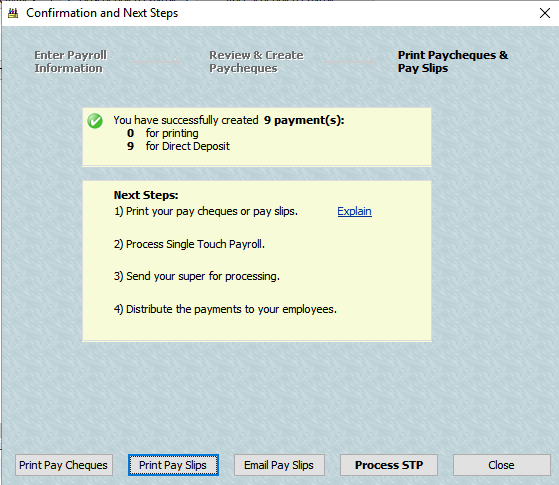
    I relented and set them up as employees with their own payroll and super items going to different expense accounts to usual wages. I ran the first payroll for them today to be paid tomorrow and everything looks ok other than I can't print/email them their payslips. I also can't find a way to export the super data to the clearing house. If I have to do this manually I may as well be paying them as suppliers like I used to (we're not allowed to pay tax for them).

    Any suggestions?

    Thanks Vickie

    image.png
  • Acctd4
    Acctd4 Accredited Partner Posts: 4,275 Reckon Accounts Hosted Elite Expert Reckon Accounts Hosted Expert
    edited January 27

    Hi @Vickie Wesolowski

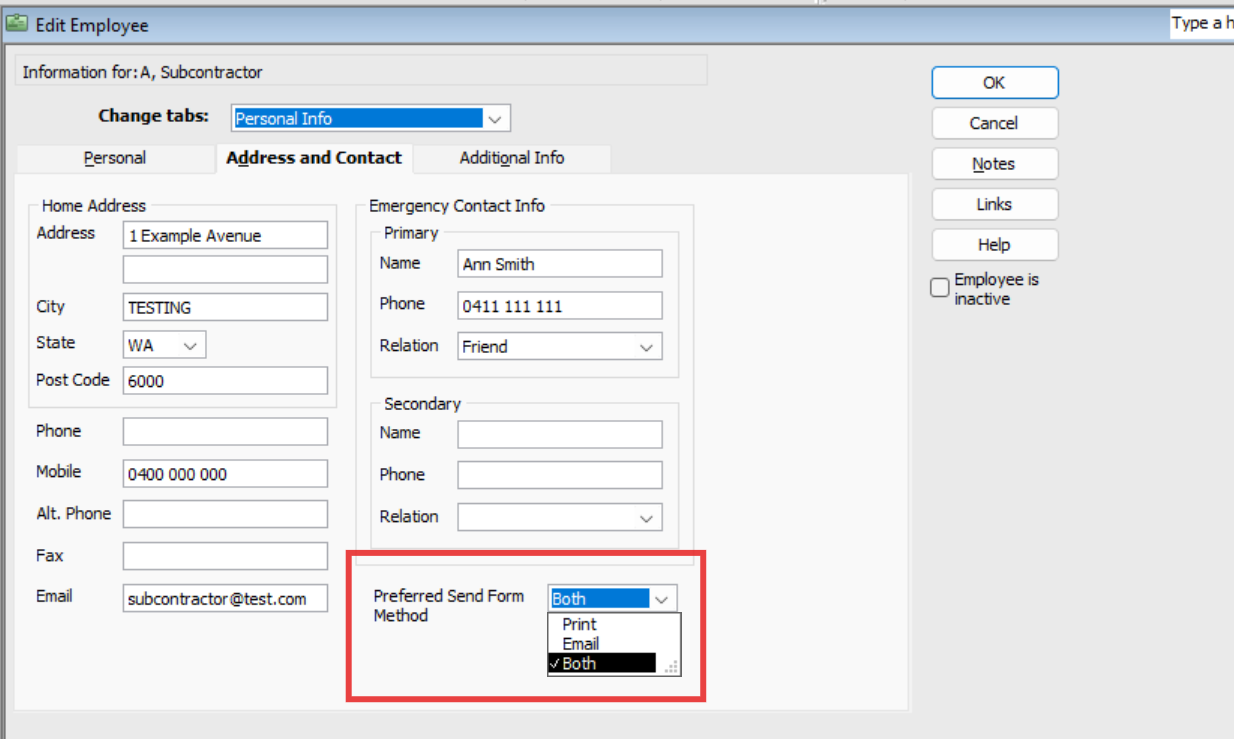
    The Payslip issue thing will usually be due to their individual selection here:

    image.png

    (I always ensure everyone's is set to Both)

    " … I also can't find a way to export the super data to the clearing house …"

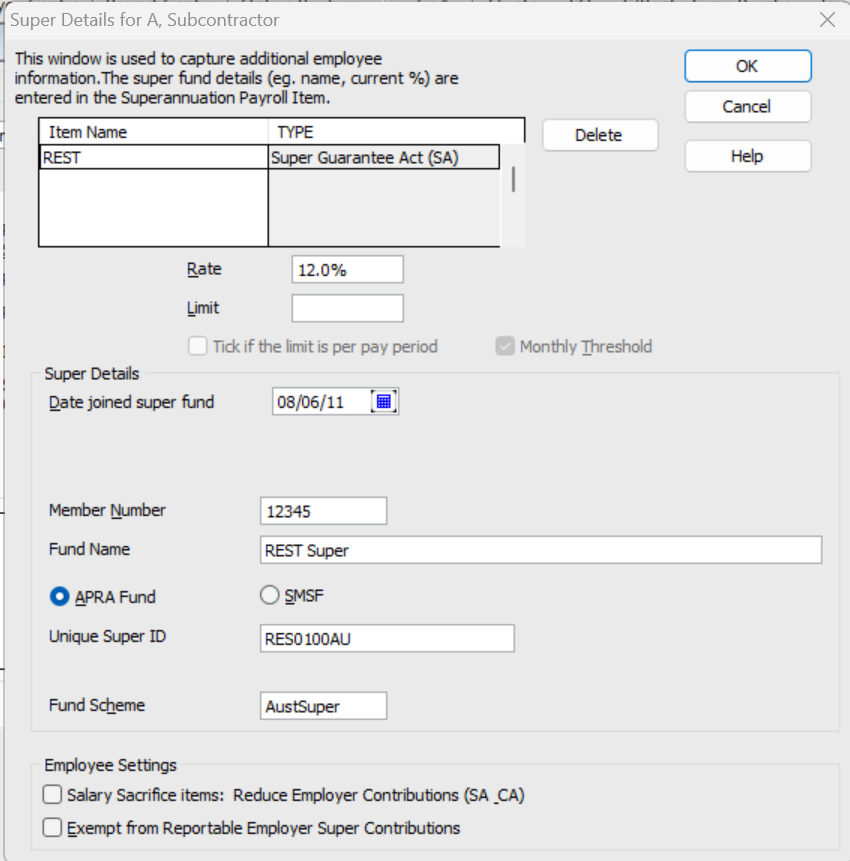
    The ability to do this relies on you completing their Super details here:

    image.png

    … & having the super line on the Paycheques.

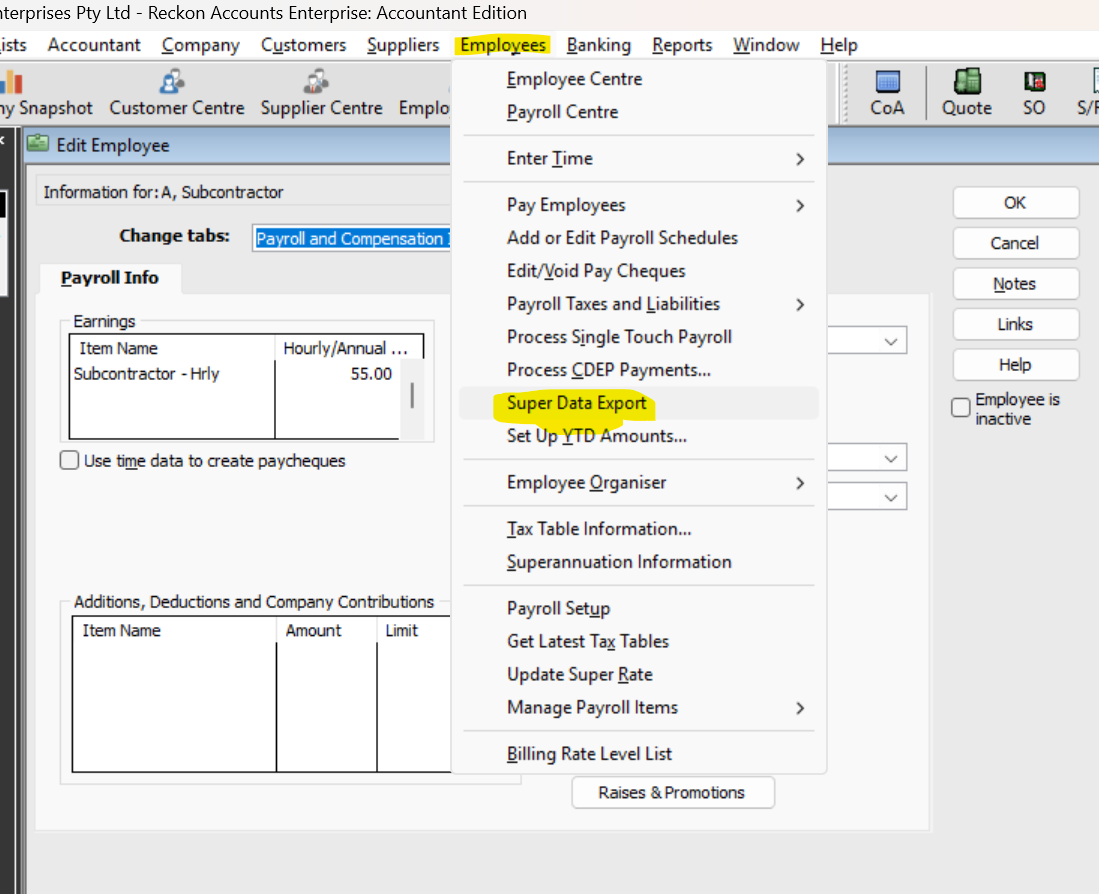
    If you've done that, you can access it from the Employee dropdown menu:

    image.png

    The Super Data Export (which creates the upload-able "SAFF" file) process is clearing-house dependent/specific, so you need to check the mapping required for the particular clearing house you're using.

    NOTE: The ATO's ("Small Business Super Clearing House") does NOT have this data import (SAFF) function!

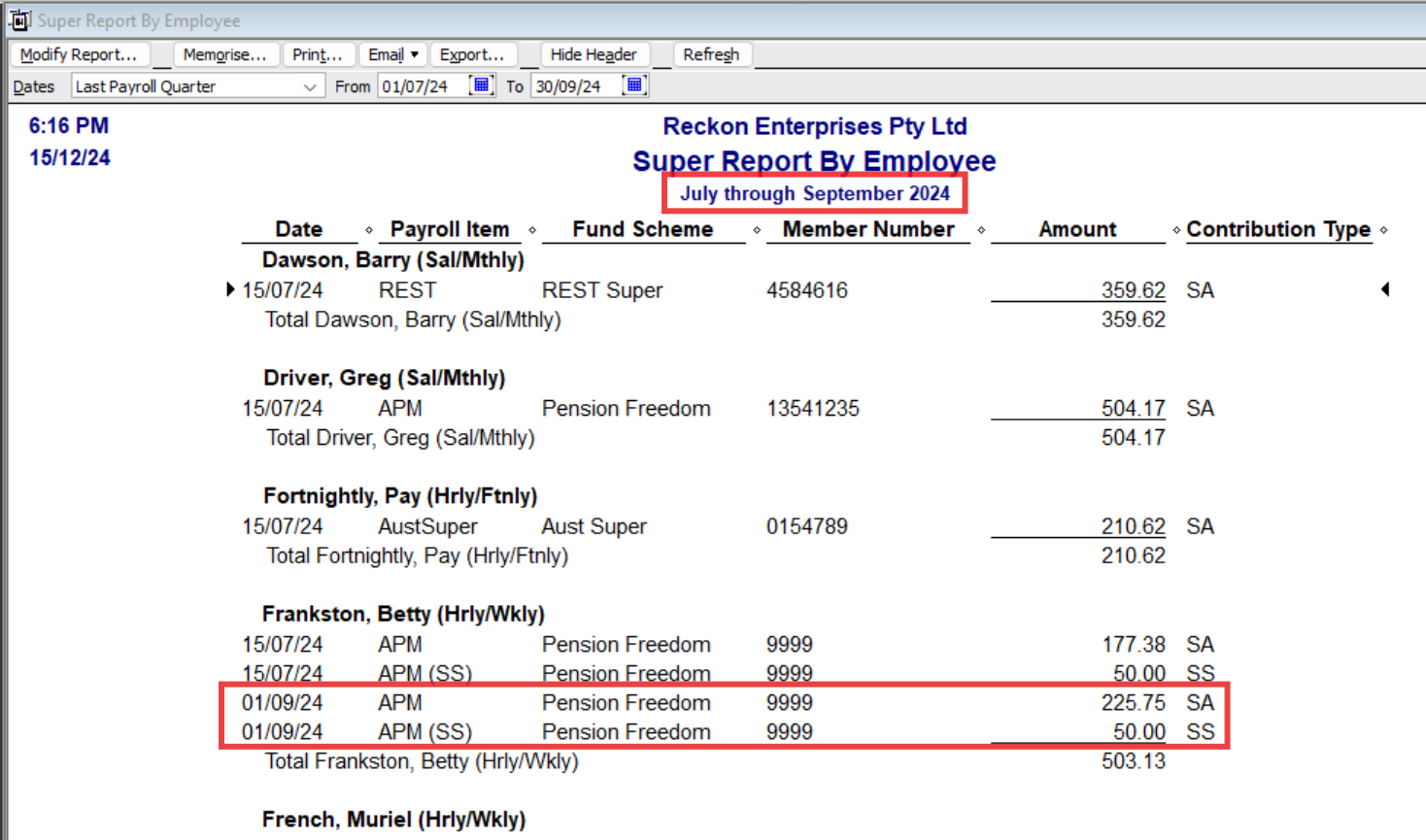
    Do you use the Super Report by Employee (Under the Reports dropdown menu > Employees & Payroll) ?

    This will display all Paycheque super amounts for a specified Date/Date range (regardless of varying employee pay frequency) :

    image.png