Reckon Software Discussion
Help Guides
Posts
Groups
Support Hub
🛠️ Support
📥 Downloads
ℹ️ Reckon Status
Find a Reckon Partner
Home
Reckon Accounts (Desktop)
Importing Item list from Old company to new
Kylie Smyth
our item list has become outdated and full..i have started a new company and exported old item list to excel and deleted obsolete items to free up space. problem is when i save the file after editing, it automatically saves as a text file and wont let me change it to anything else or its original state after i have edited it..when i try to import it doesnt recognise it....what am i doing wrong? we use Premier 2013 and excel 2013 on wind 8.
Comments
Mirko
Hey Kylie,
Welcome to the Community.
After you save the file as a .txt, try to right click the file withing windows explorer and rename to .iif (i.e.: if called FILE.txt replace with FILE.iif, save and apply).
Once you have an .iif file, you will be able to import to Reckon Accounts.
Thanks,
Mirko
Kylie Smyth
Thanks Mirko ill give that a shot and see how i go x
Mirko
Sounds good Kylie, let me know how you go!
Kylie Smyth
BUGGER....i had to go into properties and change file extension in there as i couldn't just "rename" it wouldn't change it. anyways it renamed correctly and i can open it and it all looks the same but now when i try to import it Quickbooks comes up with "program has stopped working and is shutting down" ....now i'm stumped...i have even started up another company with no entries whatsoever and it still happens.
Mirko
Sounds like the .iif has been corrupted. Try opening the iif you exported from QBs in Excel and instead of saving, once you have made your changes, just close excel which will prompt you to keep current formatting (.iif) when saving.
Let me know if this does the trick. Thanks.
Jason Hollis
Hi Kylie,
Importing an item list can be tricky. It might be worth reaching out to an accredited partner in your area with inventory experience as there are quite a few little tricks that you don't learn until you make enough mistakes.
The IIF format also has it's quirks, so again it is easy to corrupt as Mirko suggests.
Kind regards,
Jason
Kylie Smyth
thanks Mirko, as soon as i close the file that way it automatically change its format to txt....Jason whilst i appreciate your advice ..I AM so over Reckon and their support and after all these years of supporting reckon and their product quite frankly i have had enough..so far, every tech i have come across has had no idea to what i am even talking about when we have an issue, or they just say i have to upgrade..when i have paid thousands of dollars over the last 10 yrs persevering and thats the response i get from so called experts, you can surely understand why i don't feel like i would actually get anywhere. as for reckon themselves, this exact problem has been caused by my loyalty for sticking with them for so long and now after all theses years..im the one screwed!
Mirko
I've just tried to import an item list myself and it allows me to import as a CSV? Might be worth a shot, exporting the file as a CSV and importing it as such to the new company file. Thanks, Mirko
Kylie Smyth
i did that and it says data imported but then when i go and check it..nothing is there...seriously i think im just going to change the way our business records and not use part numbers anymore...im so tired of this...and we are going to have to make new companies every year or so and go through this all over again. what bugs me even more than anything is that we havent even reached our 14500 as per company record but Tech support swear thats our issue...if they dont know how the hell are reckon customers meant to work it out?
Jason Hollis
Hi Kylie, it's a combination of list records.
Please see...
http://support.quickbooks.intuit.com/support/articles/INF12412
Also hold Ctrl + 1 on your keyboard and it will show you the list totals on the right hand side of the Product Information window for the data file you have open.
Also, if you are hitting your limit every year, feel free to give me a call on 02 49 288 500 and I can go through some strategies with you.
Regards,
Jason
Kylie Smyth
ye sim aware of that....this TOTAL amount is not at 14500...its only at 13 something...and tech support still dont have any other reason for our system shutting down every time i try and enter a new item...their answer is "that must be what it is" ...really??? so so professional at $4.90pm ...actually she even reminded me that i was paying for it so to hurry up as she didnt know why else the problem would be occurring!! so you can see why people get hesitant about asking their so called partners in to help cant you?
Jason Hollis
Hi Kylie, that sounds more like a corruption with one of your items as that is a common cause, however so is a corrupt import file. Both can cause a shutdown.
Is the system crashing when you manually enter 1 item, or only through importing??
ps. I am just trying to help as an accredited partner, so let's try and focus on the issue and not on Reckon tech support as that is out of my control. Cheers.
Kylie Smyth
Yes i know,,sorry i just have had it.....it shuts down on entry of 1 item only
i have done a rebuild/verify and no issues
Jason Hollis
All good.
How many items do you have in the item list already? Were they manually entered or imported?
Have you cut n pasted any descriptions etc.. from another source that has put a funny character in the database? (** often you can't see the character)
Have you customised the columns in the item list at all?
Kylie Smyth
no i am the only one the does entries, i only ever manually enter new items per bill and haven't customised columns at all
our item list is about 13000
Graham Boast
Hi Kylie
14500 is a Reckon List limit - Its not just the Item list but includes Customers, Suppliers, Chart of Accounts, Terms List and about 750 Superlink names that you won't even be aware of.
With regard to working with the file in Excel, I tend to open the file then save it as an excel file to work on. Once I am happy with the file, I save it as excel, then File > Save As > CSV (Comma Separated Values). The file will then be named filename.csv
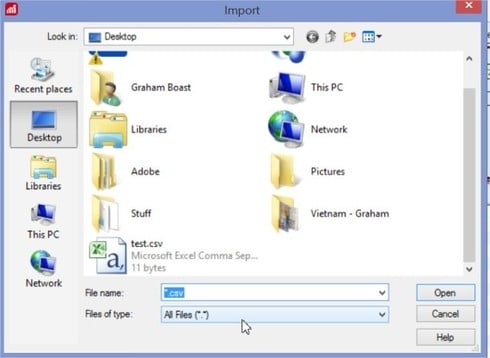
In Reckon, File > Utilities > Import > iif Files. Enter *.csv in filename then open. This will display your file - select it then open again to commence import.
If you are having difficulty with this, importing items, lists and balances from old files to new files is a specialty of mine. Drop me an email with your contact details and we can talk about the best way to get your information to a new file.
Graham
graham@reckonhelp.com.au
Find more posts tagged with
Who's Online?
megan_10040714
CarolineS
Rav