How do I transfer money between Bank Accounts?

Peter Thomas
Member Posts: 3 Novice Member 
I have just purchased Easy Start 2014 and I'm trying to come to grips with entering details. I want to transfer money from one Bank Account to another bank account. The Online help text is very vague and seems to refer to options I can't find.
0
Comments
-
Hi Peter,
Thank you for the post.
Please try this method:
click on Bank accounts on the home screen
select register -> Select the Bank account you wish to transfer money from
Have a look at the left-hand corner under Related Activities click on "Record a Funds Transfer" (refer to the screenshot below)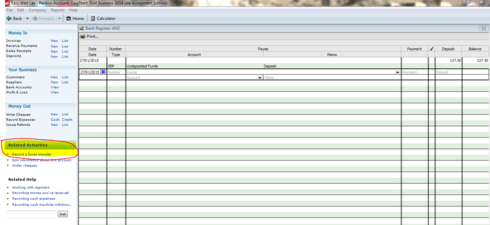
Select the Funds from Account and the Transfer Funds to Accounts and enter the transfer amount
click Save and close.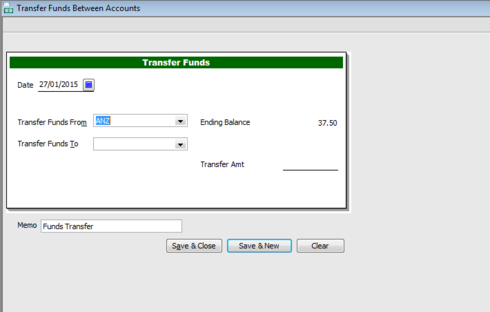
Hope this helps, let me know if you have any questions
-Lax1 -
Thanks for your reply. You have solved that issue for me. While we are on a roll can you please answer this question.
I'm trying to follow the help text for creating a Sales Receipt. However I get lost as soon as it says
"From Money In Click new next to Sales Receipt". I can't see Sales Receipt on the related activities or home screen. What am I missing?
0 -
Hi Peter,
In the file drop down menu click on preferences. Have you selected both for customers paying, etc.?
If not, then it will not appear in the left hand side where the help menu is suggesting.
Kind regards,
Sally McIntosh (sally@samsolutions.com.au)
0


This discussion has been closed.