Hi Peter Ferrett
can you do the following and see if this will resolve your issue.
1. Validate
2. Super Validate
3. Create a Backup copy
4. Restore the Backup copy into a different location.
5. remove the existing file from the old location and put it in the recycling bin and open the restored file from the new location.
if the problems persist, then restore the backup into the default location for example "C:\ProgramData\Intuit\Quicken\Sample".
hope this helps
Cheers, MichaelU
I have just started to get this problem in Personal 2022. Did you get a resolution to your issue?.
Also, when I click on Scheduled Bills from the Tools drop down the whole app hangs and I have to exit and restart the program. Any ideas? Peter
I just ran Validate and this appears to have fixed the issue for now.
Welcome to my world. Quicken takes about 5 minutes to open whenever the PC comes out of sleep mode and the PC is frozen until Quicken loads. I don't know why the spurious scheduled transactions are generated, but the only way to remove them is via super validating the QData file
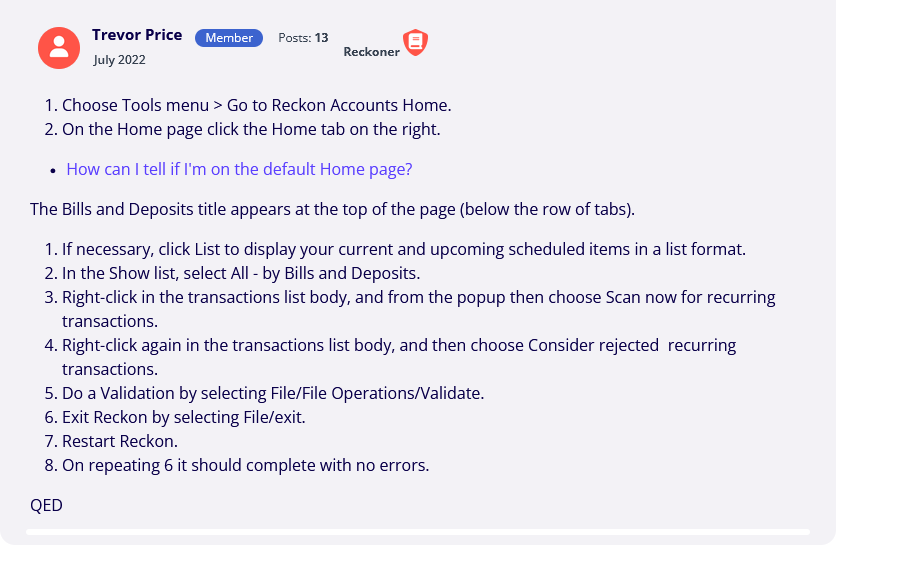
The Bills and Deposits title appears at the top of the page (below the row of tabs).
QED
There is a serious problem with year-end copies of data files created after the Personal-Plus program updates after the year 2020. Prior to that & subsequent year updates, scheduled bills & deposits were automatically deleted in the archived file so that further entries occurring in subsequent years could not be added to that file. However, in all year-end archived files created in the P/Plus upgrades, the scheduled bills/deposits remained in those archived files, which resulted in transactions from later years being continually entered into those files up until the present date (February 2023). These transactions were those marked for automatic entry, but also reminders of those other transaction items also appeared in the archived files, both due & overdue up to the current date.
I have tried all of the remedies listed on the website above, but all to no avail. It appears that the only remedy for this at present is to delete all of the scheduled bills & deposits from that file one by one (a tedious undertaking if there are many such bill reminders), as there appears to be no way to delete those items en masse. I think there needs to be a review of how these bills & deposits are handled in future year-end file archive creations, & also there should be some way to delete bill reminder entries en masse in any new file creations.
Even regular backup files from previous years show subsequent year transactions being added from the scheduled bill section, which I think is a bit strange. The Projected Cash Flow section of all files created from whatever year all show the current year's date whenever accessed (currently February 2023), although the scheduled bills etc. prior to years 2019-2020 are naturally blank, with all entries removed (I create files for financial years - July 1 to June 30). Even if I create new year-end copies of previously archived files from the P/P updates after 2020, The bills & reminders are still adding entries up to the current date. Any ideas on how to remedy this phenomenon?
Have been having problems in V31 with Scheduled transactions running rogue, duplicating themselves, looping when displayed.
Restored a backup and reprocessed a full day's work.
File Validation resulted in
The log file included:
QDF:
Validating the QDF file.
Removed [30] damaged scheduled transactions.
[the number of transactions keeps changing].
I was about the restore a backup and redo another day's work (I was setting up budgets and budget reports mainly, and edited/entered one scheduled transaction).
Found this information from @Trevor Price - thank you - this worked for me.
The key seems to be exiting more than once before the files sort themselves out.
I'm pleased to hear my solution worked for you!
@Trevor Price and @Denise
It would seem like a very simple fix for Reckon to implement to avoid the need to do this in the future!
Come on @Rav , what can you organise!
Cheers
JC