Error occured while processing ROCK Building Society QIF

Amanda_8338221
Member Posts: 3 Novice Member 
Version 2017 Reckon (Desktop) Premier. Trying to import QIF from Rock Building Society. I have downloaded all of the formats (dd/mm/yyy, dd/mm/yy, mm/dd/yyyy, mm/dd/yy) and still receive the error message stating there was a problem. I have opened the file with notepad and there are no obvious issues such as spaces. Very frustrated.
0
Comments
-
Hi Amanda,
Can you show us the first transaction as it shows in note pad.
EG: this is one transaction:
D01/01/2017
T-3000.00
PRent
^
PS: That works for me.
Regards,
Shane.1 -
D24/11/2017
T$545.60MDIRECT CR FROM:MARGARET BEAK REF: Su Beak Inv 61
^0 -
Hi Amanda,
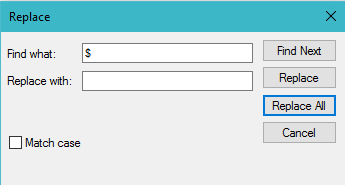
The reason it isn't working is because of the $ symbol in the amount. Reckon Accounts can't accept amounts with the $. You could open the QIF in Notepad, click Edit, Replace, in Find What enter $ and leave Replace with: blank. CLick Replace All. This will remove all the $ for you. Then click File, Save.
Try to import it again and it should work, assuming there are no other issues file.
let me know how it goes.
Regards,
Shane0 -
0
 Reckon Staff
 This discussion has been closed.