Chrome refuses log in

David_9602463
David_9602463 Member Posts: 2 Novice Member Novice Member
edited October 2024 in Accounts Hosted
When I try to sign in using Chrome I get this notice "The server encountered an error processing the request. See server logs for more details." if I sign in with Edge it allows me to log in. this has been happening for some weeks. I see mention of this in the community logs, however cant find the solution. please can you help me

Comments

  • Rav
    Rav Administrator, Reckon Staff Posts: 14,212 Reckon Community Manager Community Manager
    edited March 2018
    Hi David,
    I'd suggest firstly clearing your browser cache and cookies in Chrome and then restarting the browser before trying again.

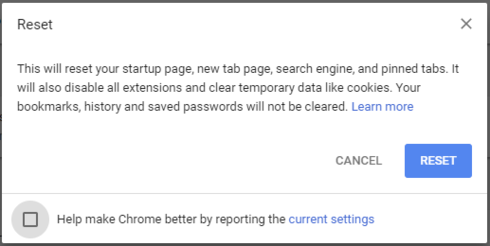
    If the issue persists, a further recommendation is to reset the Chrome browser. This can be done through Settings menu in Chrome. Settings > Advanced > Reset

    image
  • Zappy
    Zappy Accredited Partner Posts: 5,252 Accredited Partner Accredited Partner
    edited August 2019
    Im not having this problem with Chrome. Id suggest you follow Rav's suggestion.
  • Toni_9025747
    Toni_9025747 Member Posts: 123 Novice Member Novice Member
    edited August 2019
    I also had this issue and in the end I logged on with Internet Explorer- changed my password (my Reckon Hosted password not my the Company File Login)  and then logged back into Chrome with the new password - and it worked so if Rav's suggestion doesn't work then give it a go -  
  • Zappy
    Zappy Accredited Partner Posts: 5,252 Accredited Partner Accredited Partner
    edited March 2018
    I use Chrome exclusively and I have never had any issues. I think clearing the cache should do the trick. I need to do this often when using qbo. 
  • Toni_9025747
    Toni_9025747 Member Posts: 123 Novice Member Novice Member
    edited March 2018
    I had this error and could not access for days through Chrome - Rav had tech support working on it and they could not find the issues (we had tried clearing cache etc etc)- it was by good luck more than anything else that I was due to change my password and then tried in Chrome and it worked., which is why I made this suggestion.  
  • David_9602463
    David_9602463 Member Posts: 2 Novice Member Novice Member
    edited March 2018
    Fantastic thanks Toni... I cleared cache, reset google and restarted PC, didnt work....reloaded my password on the main login screen... BINGO... that worked...thankyou.
  • Toni_9025747
    Toni_9025747 Member Posts: 123 Novice Member Novice Member
    edited March 2018
    Hi David - always good to help someone else  :-) and so glad it worked !!!!!
This discussion has been closed.