If you have been sent a reconstructed portable file that has gone through a password removal service, follow the steps below.
- For company data files that have only a single username (Admin), the file will be automatically opened without any password prompts. However, if you are prompted for a password, then you are not opening the correct data file that has had the Admin password removed. You need to go through the steps of restoring the portable file to confirm you have the correct file and replace the existing original file that still has a password.
- For company data files that have multiple usernames able to access the data file, you will be prompted to enter a data file Username and a corresponding data file Password
If prompted, login using the username Admin and leave the password field blank then click the OK button.
When the data file opens, you may encounter a warning message like the one shown below, do not be alarmed.

This is a side-effect of removing the original Admin user record and replacing it with a new default Admin user record that has no password.
When you set a new password for the Admin user, the next time you log in to the data file, that warning will no longer be displayed.
- Once you are logged in, change your password to your preferred value
We recommend you read the article below before you change the password for the Admin user:
What is the recommended procedure when changing passwords?
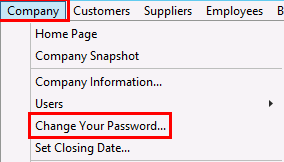
- Click on the Company menu and select Change Your Password
- If the data file had other usernames
- Click on the Company menu and select Users, then View Users to confirm this
- Each user would need to log in with their username and known password
- As the Admin user you can also change the password to their preferred value
Regards,
Data Recovery Team
