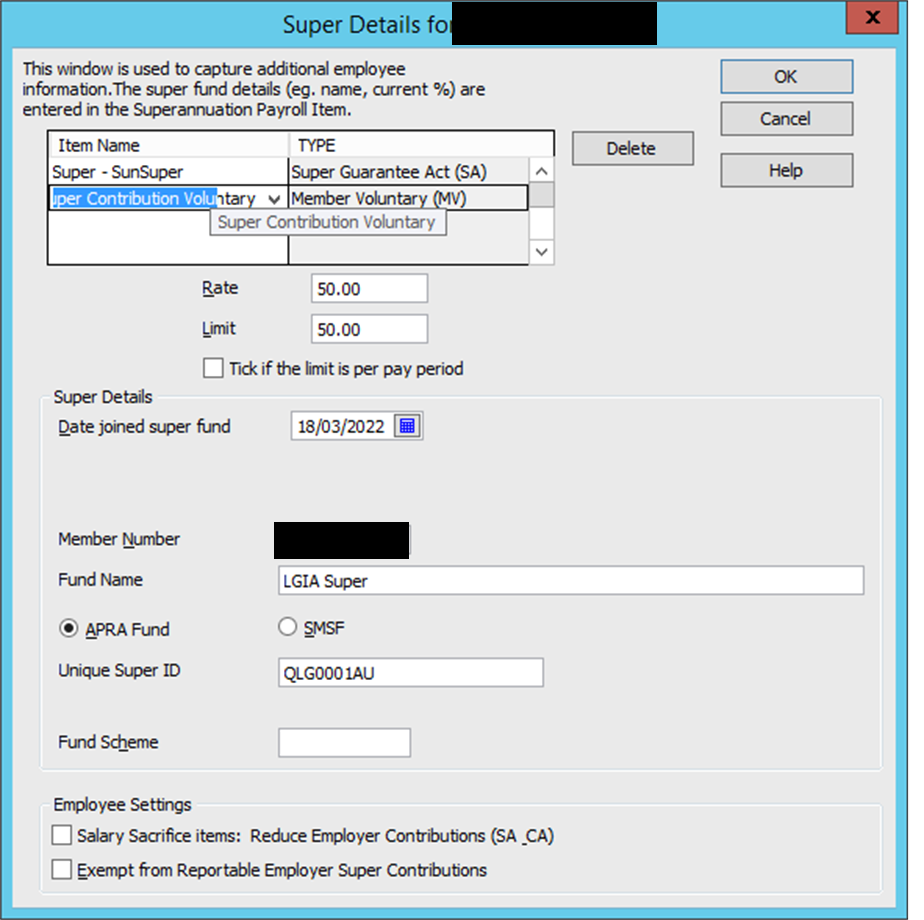
Setting up an Employee for Additional Voluntary Superannuation


I have an employee (Employee A) who requested to deduct an additional $50 per week superannuation from their weekly wage. We have an existing employee (Employee B) who does the same but for a different amount ($10 per week) however Employee B's superannuation is being paid to a different Super Fund.
For this reason I created a new Payroll item for Employee A and mirrored the settings/selections based on the payroll item set up for the Employee B only changing the Superfund and the value. Upon closer inspection, I have just realised that the payment of $50 for Employee A has only deducted once and not in the subsequent pay runs.
I can't understand why this has occurred and what I have done for the deduction not to occur each weekly payroll run.
Comments
-

It is possible that this problem is being caused because I have not ticked the checkbox "Tick if the limit is per pay period"?
0 -
You need to remove the Limit amount completely! This field is to prevent amounts being deducted in excess of any Limit amount specified, therefore, if you've entered a limit of $ 50, it won't deduct any more than this in total (hence only the one amount of $ 50 has automatically deducted)
Is the employee salary sacrificing (deducting from gross earnings to reduce their PAYG tax) or is the $ 50 to be deducted from their net pay ?
The Member Voluntary type is only if the deduction is not affecting their tax, otherwise the type should be Salary Sacrifice 🙂
1 -
Hi Shaz,
thank you for your reply. I do want to set up the employee as salary sacrificing.
Do you know the steps on how to set this up in Reckon, as I have not done this before?
Regards,
Sarina
0