Paid an employee annual leave but now we need to change it to sick leave. Have tried to put a minus amount on her next pay to credit back annual leave but nothing seems to happen with the leave loading?
Hello @Burnbaby ,
You can edit the payrun on the employee's record, and change the Leave Hourly from Annual to Personal.
This should update the employee's leave records accurately in the software.
Please note: If you have submit this to the ATO through GovConnect already, you will need to submit an Update Event to ensure parity.
Kind regards,
Alexander McKeown
Reckon Senior Technical Support
Hi, thankyou for your response however this does not affect the leave loading already paid?
You may need to process the leave in negative amounts to refund the overpayment to the employee.
This should amend the Leave Loading.
We did that but it doesn't affect the leave loading? It shouldn't be that hard?
Very strange. This should have corrected the matter.
Can you please run a rebuild on your company file?
You can do so by going File -> Utilities -> Rebuild Data.
If this does not correct the issue, please delete the payrun entirely, and re-create it. It's possible it might be tied to the payrun itself.
@Burnbaby
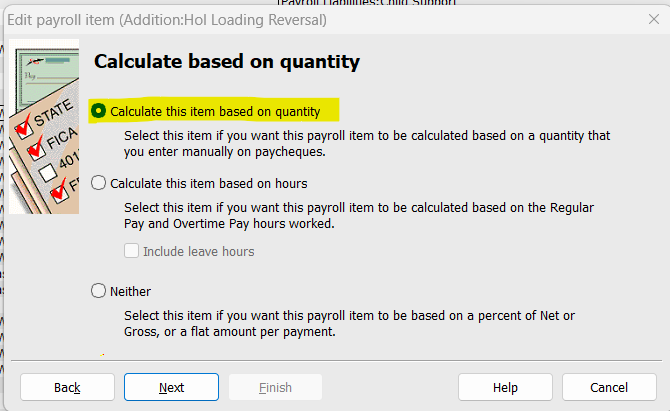
The default Holiday Loading Payroll Item is specifically configured to recognise & calculate on AL only. To reverse/deduct Leave Loading, you'll need to create a NEW (Addition-type) Payroll Item.
It should be configured the same as the original LL one - including entering the 17.5% default percentage - EXCEPT for this window, where you need to change the setting to ... quantity:
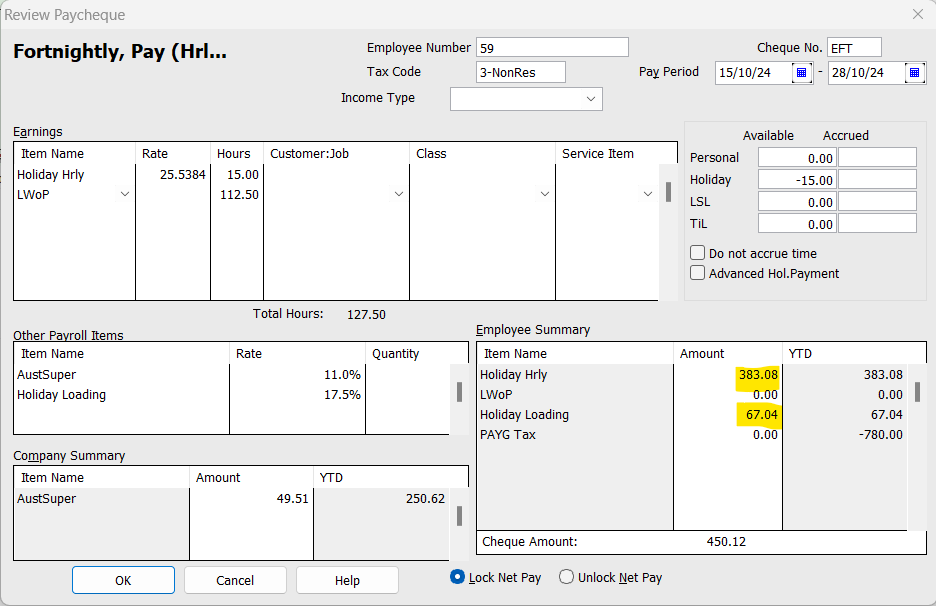
In this example, the AL paid was $ 383.08 with LL of $ 67.04:
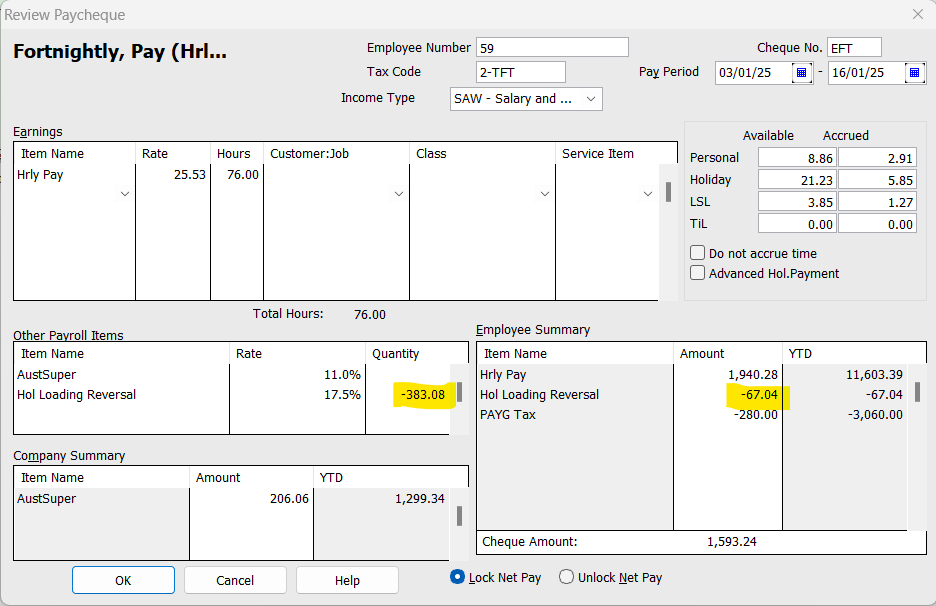
To reverse out/deduct the LL ...
In the adjusting Paycheque, add the new ... Reversal Payroll Item & ENTER THE $ AMT OF ORIGINAL AL IN THE "QUANTITY" COLUMN:
NOTE: LL attracts super unless leave is being paid out on termination. Therefore, in the example above, the reversal has reduced the additional Super also. However, if you did NOT have Super calculating on your LL originally, make sure you configure the reversal Payroll Item the same so that the reversal balances!
To fix the Leave Hrs, you can do this with the relevant Payroll Items at $ 0.00 rates on the original Paycheque. This is achieved by DEDUCTING the incorrectly-paid Holiday Hrs & ADDING them as Personal (Sick) Hrs instead:
The above processes ensure everything calculates & posts where it should, as well as retaining correct mappings for accounts, liabilities & STP 😊
This was the answer I've been looking for for awhile now! :) Thank you for this, acctd4!
Glad to hear it’s helped you @smls finance ☺️