Is anyone having issues with Reckon constantly dropping out?

TPWElliot
TPWElliot Member Posts: 6 Reckoner Reckoner

Over the last week or two, i will loose connection to the reckon servers after not touching reckon for a few minutes, and then fail to reconnect, its not an internet issue as I'm posting this as I'm trying to reconnect, I've attached screen shots of what's been happening anyone have a fix?

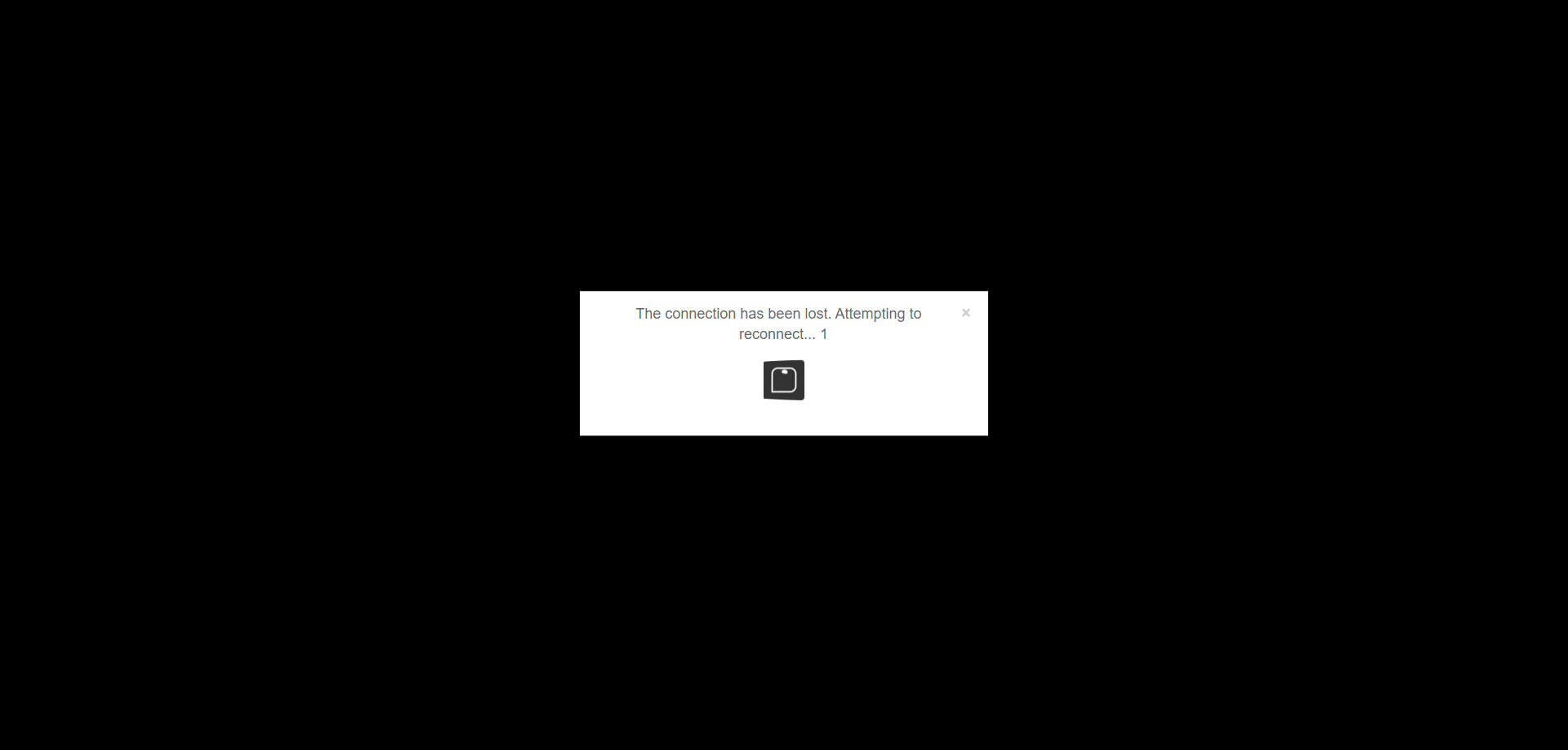
reckon disconnect.PNG RECKON LOST CONNECTION.PNG

Answers

  • Rav
    Rav Administrator, Reckon Staff Posts: 14,222 Reckon Community Manager Community Manager
    edited May 2024

    Hi @TPWElliot
    How often would you say this occurs in, lets say in a typical day? Is it multiple times in a single day or intermittent/random?

    Are you doing something else on your PC when this happens or working within your company file in Hosted itself?

    Out of curiousity, which browser are you using with Hosted? As a test, if you try using Hosted on a different browser do you notice the same behaviour occur?

  • TPWElliot
    TPWElliot Member Posts: 6 Reckoner Reckoner

    Hi Rav,

    I'd say it would happen 3 to 4 times a day, but it has happened 3 time today already in 3 hours of trade, the last time it happened was when I was returning from the print screen, currently using google chrome as a browser (in chrome it opens a new tab to print a page) on rare occasion it will manage to reconnect itself, but most of the time I have to relaunch.

  • Rav
    Rav Administrator, Reckon Staff Posts: 14,222 Reckon Community Manager Community Manager
    edited May 2024

    Ok thanks for that info.

    I'm not entirely sure if this will help but if you're using Google Chrome, can you do me a favour and try this out in Chrome's browser settings 👇

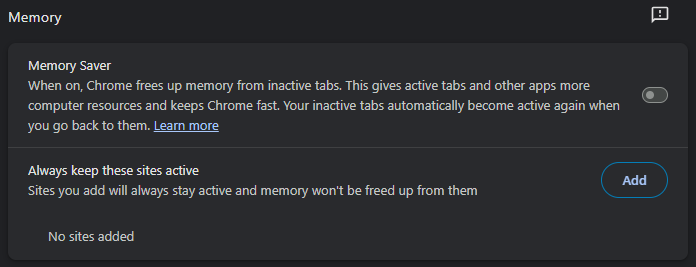
    Go to Settings ➡️ Performance ➡️ Check whether Memory Saver is on or off

    image.png

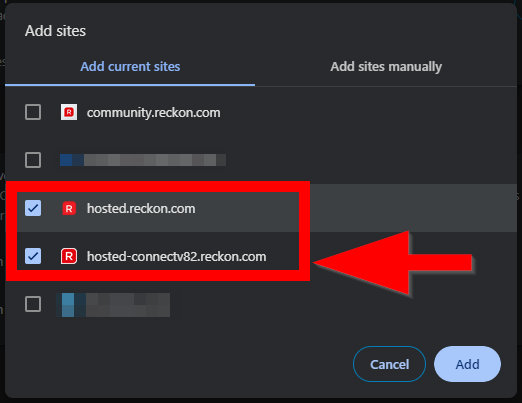
    If its on can you please either switch it off OR add Reckon Accounts Hosted to the list of sites to keep active. In particular the one labelled hosted-connectv82.reckon.com

    image.png

    After doing the above, log out of Reckon Accounts Hosted and close the browser in full. Reopen Chrome and use Hosted as you normally would.

    See how you go after this and whether or not the same thing happens today. If it does, let me know.

  • Rav
    Rav Administrator, Reckon Staff Posts: 14,222 Reckon Community Manager Community Manager

    Edit: Added additional info to the post above 👆

  • JO-ANNE_7327707
    JO-ANNE_7327707 Member Posts: 422 Reckon Star Reckon Star

    Hello

    my RAH has just dropped out with the error Gateway: Failed authenticating user token.

  • Rav
    Rav Administrator, Reckon Staff Posts: 14,222 Reckon Community Manager Community Manager

    Hi @JO-ANNE_7327707

    The Gateway: Failed authenticating user token error message usually appears if there has been an interruption in the internet connection or if a browser command has been used that interrupts the Hosted session eg. Back, Forward, Refresh etc on the browser.

    You will need to log off any active sessions in the Hosted control panel and then relaunch your file.

  • Suzanne DiStefano
    Suzanne DiStefano Member Posts: 74 Reckoner Reckoner
    edited May 2024

    We are having the same issues with multiple users. Rav, I have sent you a PM with detailed steps of what happens along with screenshots. Our users are actively working in the file when they are disconnected, it definitely isn't our network or internet, I have tested this and ruled it out.

    I have looked at your recommendation above regarding the Chrome settings and ours is set to "off'.

  • JO-ANNE_7327707
    JO-ANNE_7327707 Member Posts: 422 Reckon Star Reckon Star

    yes I am struggling with RAH today. Keeps going into "not responding" mode

  • TPWElliot
    TPWElliot Member Posts: 6 Reckoner Reckoner

    @Suzanne DiStefano,

    ive found that when you disconnect from reckon of a night, you need to completely close the chrome tab, its changed the issue from happening maybe 4-5 times a day to once-ish

  • Rav
    Rav Administrator, Reckon Staff Posts: 14,222 Reckon Community Manager Community Manager

    Hi folks

    The other thing I could suggest is checking whether there is any difference with an alternative browser although I can't be certain whether that's overly relevant here.

    With that said, if this is happening quite consistently and you're confident there is no interruption in your connection at the time it occurs eg. a momentary drop/disconnection, then I'd recommend giving our support team a call so we can have one of our technicians take a closer look.

    I'm hoping that it doesn't occur moving forward but if it does, and if possible, try and give the team a call as its happening so one of our techs can kick off a remote session and observe the behaviour as its happening in real-time.

  • Leanne_7663246
    Leanne_7663246 Member Posts: 187 Reckon Star Reckon Star

    Hi Everyone,

    I am having the same problem. It used to be an intermittent thing and I also thought it was probably the internet. In the last week to 10 days it has been happening so often. Its not the internet as I am working on other cloud programs and they dont drop out. Today in the 3 odd hours I have been working I have been booted out about 6 times if not more. Its taking longer and longer to get back in. Did anyone work out the problem. I cant get back in at the moment, it wont reconnect. I am just about to sign out of everything and try again. Any help appreciated.

  • JO-ANNE_7327707
    JO-ANNE_7327707 Member Posts: 422 Reckon Star Reckon Star

    yes I've dropped out twice this morning and very slow.

  • Leanne_7663246
    Leanne_7663246 Member Posts: 187 Reckon Star Reckon Star

    I agree @JO-ANNE_7327707 very slow also

  • Leanne_7663246
    Leanne_7663246 Member Posts: 187 Reckon Star Reckon Star

    Getting slower as day goes on and more drop outs :( I click on the tab that has the file open and it doesn't change to the file for approx. Gradually you see the background drop in then it opens. I just did a test on how long and afer 90 seconds still not open. I clicked refresh and got the gateway error. It wont open now so I am going to have to log out and log back in again. Making it a very slow day.

  • Rav
    Rav Administrator, Reckon Staff Posts: 14,222 Reckon Community Manager Community Manager

    Hi @Leanne_7663246

    Has any troubleshooting been conducted on this as yet? If not, and this occurring for you regularly then I'd recommend having a chat with our technical support team so we can have a technician take a closer look and assist.

    I clicked refresh and got the gateway error.

    Just a quick note on the above, if you use a browser navigation option eg. Back, Forward, Refresh etc, then that will interrupt your session to the Hosted server and will result in the Gateway error message so that isn't unexpected. Consistent disconnections on the other hand though are something our technicians can work with you on and try to determine potential factors contributing to them.

  • Leanne_7663246
    Leanne_7663246 Member Posts: 187 Reckon Star Reckon Star

    Hi Rav

    No troubleshooting has happened. I haven't worked since I posted above. I logged in just after 8am this morning. So far so good. If it happens again today I will contact tech support.

    cheers

    Leanne

  • probbo
    probbo Member Posts: 13 Reckoner Reckoner

    Agree, over the last few weeks this has been happening fairly regularly with us also.

  • TPWElliot
    TPWElliot Member Posts: 6 Reckoner Reckoner

    @Rav just to update you, this is still an issue that I am constantly having to deal with, with he last instance happening about a minute ago while I got up from my desk to answer a phone off the network, when going to log back in, i had to use the remote log off function causing me to loose the invoice i was partially working on

  • JO-ANNE_7327707
    JO-ANNE_7327707 Member Posts: 422 Reckon Star Reckon Star

    We are all either having internet issues or there is an issue with RAH that needs to be addressed. I keep being told it is my internet.

    Perhaps, Reckon need to address the concerns we are posting.

  • Rav
    Rav Administrator, Reckon Staff Posts: 14,222 Reckon Community Manager Community Manager

    Hi @TPWElliot

    Has any troubleshooting been conducted on this as yet? If not, and this occurring for you regularly then I'd recommend having a chat with our technical support team so we can have a technician take a closer look and assist.

  • Suzanne DiStefano
    Suzanne DiStefano Member Posts: 74 Reckoner Reckoner

    @JO-ANNE_7327707 I agree. I wonder if things will improve when we do the file upgrade to 2024. Will be interested to know if any people having the same issue have done the upgrade as yet.

  • Leanne_7663246
    Leanne_7663246 Member Posts: 187 Reckon Star Reckon Star

    Mine had been a little better then this morning its dropped out again. I couldnt just re log in as it said that I was still in the file. I had to go to control panel, log off users and start again. Also made me enter MFA again. I thought that it was only meant to be entered once every 24 hours. Would love to have it fixed as it wastes a lot of time. @Rav is there a dedicated specialist for this type of problem in your tech team that you could put us in touch with. I don't have the spare time today to spend on hold and explaining the issue.

    cheers

    Leanne

  • JO-ANNE_7327707
    JO-ANNE_7327707 Member Posts: 422 Reckon Star Reckon Star

    yes mine dropped out again this morning, had to log off users and was able to get back in and yes had to enter the MFA again.

  • probbo
    probbo Member Posts: 13 Reckoner Reckoner

    Yes I just got kicked out with a user token error. Had reckon open…Clicked on "Check It Out" to read these notifications which open in a new window went back to Reckon Window & it didnt want to play nicely anymore.

  • AnnJenn24EvisonGrain
    AnnJenn24EvisonGrain Member Posts: 5 Reckoner Reckoner

    We are having the same problem as all the above. Our steps to find the solution.

    1. Updated and upgrade internet to FTTP
    2. Upgraded the phones to a new network
    3. Up dated computers, replaced by our IT support.
    4. Cables checked and replaced were needed.
    5. Our internet and phone suppliers have been on site multiple times to further investigate this and spent countless hours trying to figure out the fault/s at hand.
    6. Contacted Reckon technical support team with no resolution.

    My workers are so stressed, the impact of not being able to process their work also loss of work through drop outs and dis connections. A shop full of customers and both computers with the above issues is affecting both workers and leaving customers frustrated and angry.