Accounts Premier Desktop- Reverse out payroll for the whole year


Hello,
As a tax saving measure I have a client - business owner - that we put through wages for in Accounts Premier Desktop.
We are coming close to the EOFY and they have made a loss and we need to reverse out 40k of their wages and all of their PAYG for the whole year.
As they process payroll weekly I do not want to have to reverse each pay individually and would like to do one negative payroll to reverse out these two components.
Has anyone found a work around to be able to reverse pay in one go?
Thanks, Carmen
Answers
-
Hi Carmen
The best option would be to adjust the YTD:
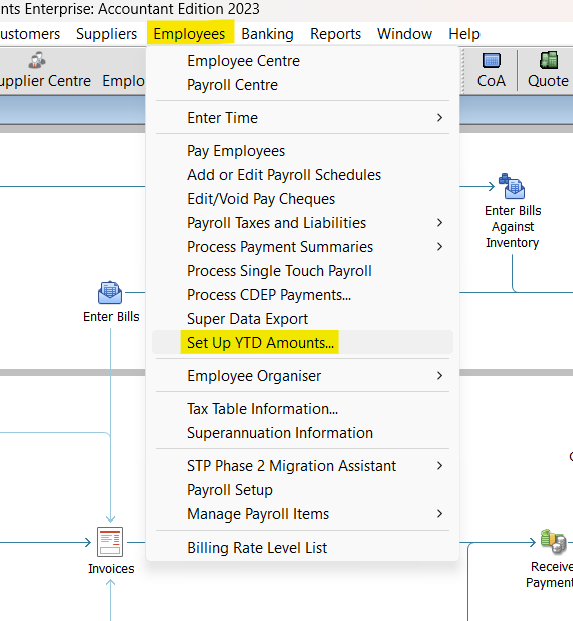
.. & submit an Update Event, then submit the finalisation at EOFY (Finalise Year)
0 -
Hi Shaz,
Thankyou for your prompt help.
When I went to do this, the dates went back to 2006 and I started to get nervous about what we were doing.
Do you know if there is a step by step instructions for this?0 -
Hi Carmen
There won't be step-by-step instructions for your situation as it's primarily used to set up existing YTD figures when commencing a file partway through a financial year, however this is also a workaround for your scenario.
It will be defaulting to commencement date so just change the date range to the current FY (eg 01/07/23 - 30/06/24) 😊
Print out the employee's last Payslip as this will show you all the Payroll Items & amounts to be zeroed out. In the YTD adjustment window, ensure the dates are set to this FY & add each Payroll Item amount as per the Payslip, but as a NEGATIVE.
0 -
Interestingly, I've just tried this & it looks like it's no longer possible to do it this way 😖
The liabilities (eg Super, PAYG etc) can still be adjusted via the Adjust Payroll Liabilities section so those are OK but for other Payroll Items, I'll need to have a think 🧐😬
0 -
Unfortunately, there's not currently a way of "reversing" Paycheque amounts as the system won't actually allow a negative Paycheque to be created 😩
".. they have made a loss and we need to reverse out 40k of their wages and all of their PAYG for the whole year …"
@Carmen_10624117 I'm a bit confused by this … Have they not already PAID these wages & submitted them via STP ?
0 -
Hi Shaz,
Thankyou for looking into this further, I appreciate your time!
Yes - they have been paid but we will journal these payments to his drawings, instead of being payments for wages.
I am thinking at this stage to lodge a paper payment summary to over-ride the STP lodgement and when we bring in the EOFY accounts into our Xero file we use to prepare the tax return we will journal where we need to and adjust the BAS accordingly.
0 -
Unfortunately, that won’t fix the STP side though 😬
💡Actually, I have a better solution ….! 💡
(It still requires editing each of the Paycheques but it won’t impact the bank account so at least you won’t need to re-reconcile that 😊)
Create a new “Drawings” Payroll Item for the owner’s payments & link this to his Drawings account (or a Payments subaccount, if you've created one) NOTE: If this owner is a sole trader, payroll “wages” are not applicable anyway!
This should be configured to not attract PAYG Tax, Super or Leave & should be mapped to None for Tax Tracking type.
If you have already paid the PAYGW & Super, this is a bit more challenging …
You can redo the BASs (for W1 & W2) & get back the PAYGW however getting the super refunded can be a bit hit & miss … but you could always try (Upon receipt of any liability refunds, these would then be entered via Deposit Refund of Liabilities) Alternatively, create an Member Voluntary (MV)-type Super Payroll Item & notify the fund that these contributions should be classified as voluntary/personal, NOT SGC.
NOTE: In setting-up the MV Super Payroll Item, the MV type should be specified here:
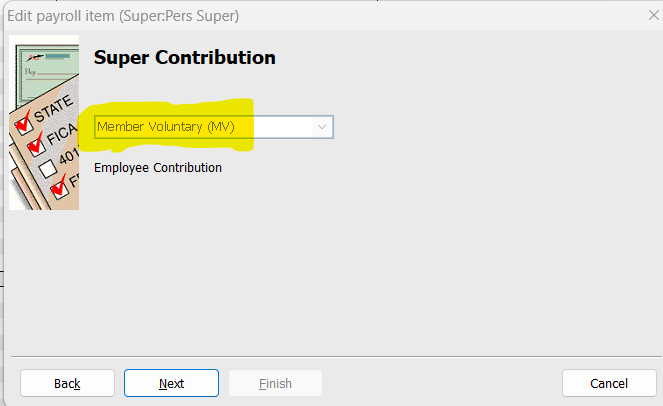
Ensure it's mapped to Drawings (or a Super subaccount of this, if you've created one) as the Liability account:
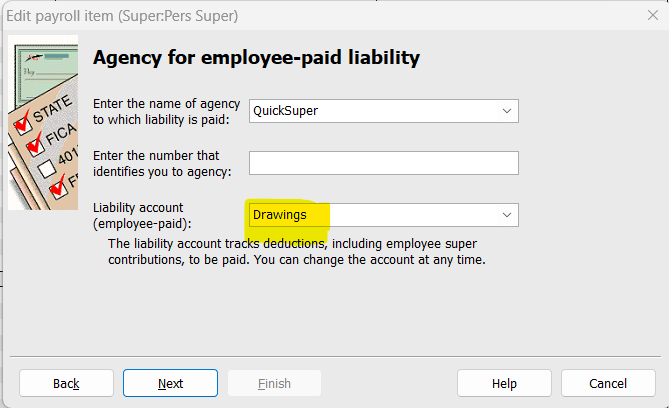
… & again mapped to None as this is N/A for payroll.
It should also NOT be selected for Payroll Tax or PAYG Tax 😊
You’ll then need to Unlock each Paycheque & change the Payroll Items used to these new ones.
Once complete, submit an Update Event STP submission for the most recent pay. This will override all the YTD balances accordingly, removing the relevant figures from STP.
😊
2 -
Hi Shaz,
Ok i can see what you are getting at! Thanks so much!! Thats a much better alternative and I think you are very creative.
I am going back out to the client on Friday. I will keep you posted as to how we go.
1 -





