My One step Update which I've used for years stopped updating about a week ago


I have Reckon Accounts Personal Plus v31 Release R 1.
About a week ago the One step Update stopped working. I have used it for YEARS . My internet connection is working. I Uninstalled the program this morning, rebooted PC and reinstalled program. One Step Update is still not working.
I can't think what I should do next.
Comments
-
Dear @1320857 ,
I would recommend the following:
- Check each of your Stock/Share Ticker codes. Remove and re-add them, then check if they match up on the Ticker Tracker.
- Validate your Company File.
- Ensure your file meets the following criteria:
- Your file is in C:\Users\<your username>\Documents\Quicken\ and not in C:\Users\<your username>\OneDrive\Documents\Quicken\.
- Your file name is less than 8 characters long.
Ensure you haveReckon Accounts Home & Business V31, and notPersonal Plus. Personal Plus does not have Stock functionality built into it.
Kind regards,
Alexis McKeown
Reckon Senior Technical Support
Alexis McKeown
Reckon Senior Technical Support
Working hard since 20180 -
Personal Plus." Personal Plus does not have Stock functionality built into it". This hasn't been true for me. If so it seems a breach of the contract, the one step update has ALWAYs worked for even the current version which also has the instructions included in the help screen. So how about with some genuine help please. Nothing has changed with any settings in the program so update should work
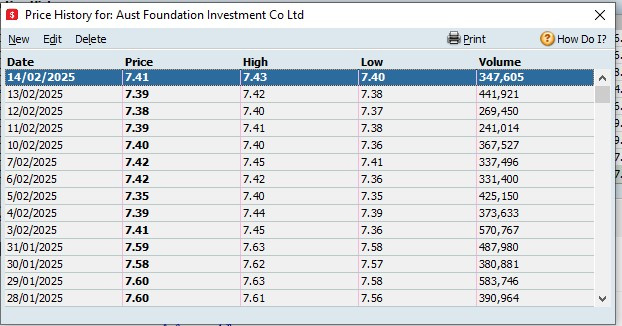 1
1 -
Hi @1320857
Looks like we may have got our wires crossed there, honest mistake and can happen to anyone. Personal Plus does indeed have share price download functionality as you've mentioned.
The share price download service itself is working ok as you'll see from the test I've just run in Personal Plus v31 below.
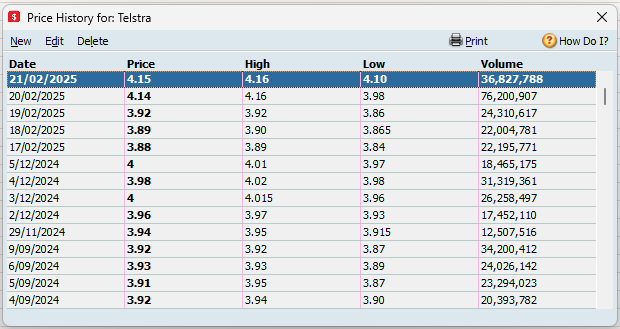
So a few more questions, are all your shares failing to update or just a select one/few?
The point above by @Alexis McKeownt around the file name being less than 8 characters is an important one. Can you confirm that your file name is less than 8 characters in length?
0 -
Yes, all aren't updating, your test? was it done through my program or your's. File name has ALWAYS been the same for about 5 years, including since last July's update to current version.
 0
0 -
If I have to change the file name I'll need some help there
0 -
The above test was conducted my own install and file. The Personal Range software is a desktop-based installation software, there's no way for me or anyone else to access your software and/or file.
You'll find the option to rename your file in the File ➡️ File Operations menu, see screenshot below.
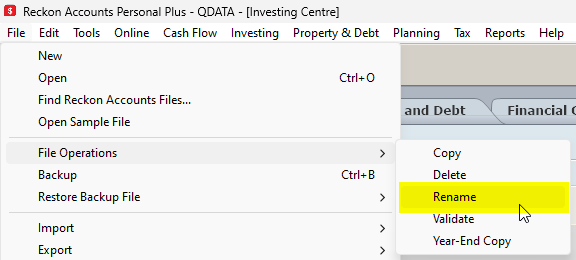
I can see in your latest screenshot above you have a special character (') in your file name as well, please ensure you remove that as well so there are only alphanumeric characters in your file name and less than 8 characters in length.
0 -
Thanks, that's interesting as the file name has been the same for about 5 years without any problem with live update. I'll try the rename tomorrow ( I've had enough for one day LO).
0 -
If you give me a call we can usually sort it for you. 0418907140
Gerry id 6376
Gerhard Winter
Ph. 0418907140
Reckon Store Next Door
"Always at your Service"
Email: gwinter0808@gmail.com
0 -
You don't make anything easy. First attempt at name change, lost 5 years data. Second attempt FINALLY worked, just had to reinput last 2 weeks data. One step update is now working. I can't say thanks because I had SO MUCH TROUBLE.
0

 Reckon Staff




