How to Updating Super Guarantee rate in Reckon Accounts Hosted 2024 version?
Hi @Zheng
Is there any particular reason you're looking to update the SG rate in the 2024 version as opposed to doing so in the new/current 2025 version of Hosted?
HI @Zheng
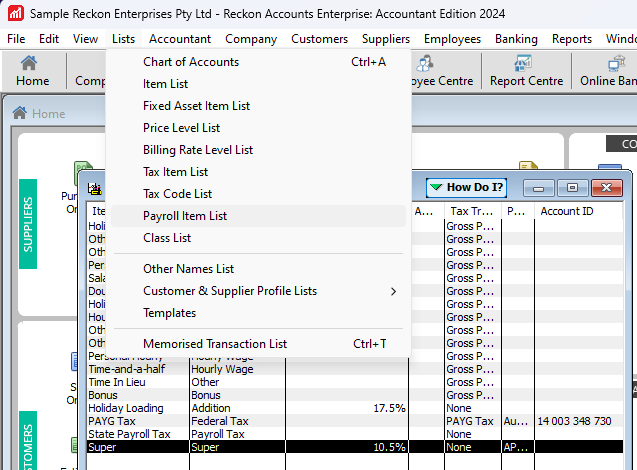
If you wanted to change the rate in the 2024 version. You can go to Lists > Payroll Item List and edit the Super item rate.
Hi Rav, I haven't updated to the 2025 version, and I have a pay run today, which the
Super Guarantee rate will be 12%. Can I update the Super Guarantee rate in the 2024 version?
Hi Jason,
If I updated the super guarantee rate to 12% in the 2024 version, will this affect the previous paid period super amount? Thank you
you can but you would have to do it for each employee, but there is no reason at all why you can’t update to 2025 version, even if you haven’t finished your year end work, then you can update all in one step
updating in 2024 will not affect past transactions
Hi Kris, does it take long for the system to update? Thanks.
Upgrading doesn't take long at all. We also have a guide which I'll link below for your reference:
Great, thank you so much for all your help.
no not at all, the only thing I will point out, which is probably in the instructions above, is that when it brings up the backup window it doesn’t name the file. It says *.qbb, you need to put a name e.g 2025.qbb
Check out the latest important info & announcements for Reckon Accounts Hosted
Each Reckon software has its own dedicated category on the Community. Click below to browse all categories.