
We've just released a new update for Reckon One which includes a number of enhancements and fixes to some pesky bugs.
Check out the inclusions of today's update here 👇
Updated super funds
We've refreshed our super fund listings in Reckon One using the latest information from the ATO Super Fund Lookup. We’ve added a bunch of new funds, disabled those that are no longer active, and updated fund names where applicable to ensure accuracy and alignment with current records.
For more info on our latest updated super funds, click here -
https://help.reckon.com/article/1a84m3s2u9
Reportable Fringe Benefits - Updated STP reporting category
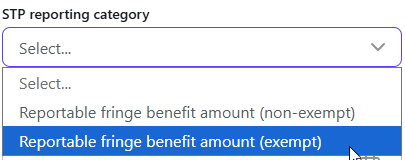
Based on user feedback we've updated the STP reporting category label to improve clarity for Reportable Fringe Benefits. The previous Reportable fringe benefit amount (exceeding exempt) label has been updated to Reportable Fringe Benefit Amount (Exempt).
Enhancements to Employee List Report
We've added and updated some of the optional report settings for the Employee List report.
The Award label has been updated to Employment Agreement and will now display the agreement added on the employee's profile in the report.


A new Agreement Classification column has been added to the report and will display the corresponding classification from the employee's profile.
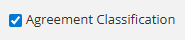

The existing Classification column in the report has been updated to reflect the new classification field in the employee profile.

For more info on classifications in payroll, check out our previous release notes here.
New Invoice Experience - enhancements
Based on user feedback we've made several enhancements and fixes to the new invoice experience in Reckon One. If you're using the new Reckon invoice functionality in Reckon One, we'd love to hear your feedback, whether its anything you like or think needs improvement.
🐛 Bug Fixes
✅ We've fixed an issue affecting the ability for users to send us the form to add a super fund to Reckon One when the specific super fund you're trying to add doesn't exist in Reckon One yet. You'll now be directed to our support ticket form.
✅ Fixed an issue where a 500 internal server error would appear when attempting to revert a pay run to draft. This has now been resolved which will allow successful reversion without errors.
✅ The EOFY screen will now display STP submission for the respective financial year, even if no pay run exists. Previously, submissions would only appear if associated with a pay run. This is particularly useful for users who have migrated from Payroll Premier and/or Reckon Accounts.
✅ We've fixed a bug affecting tax amounts not updating correctly when removing individual leave items from a pay run.
Note: A fix for pay runs where a leave item is removed when a pay run contains multiple leave types and one is removed is coming soon.
✅ Fixed an issue affecting the company logo appearing blank on the Generic invoice template
New Invoice Experience
✅ Fixed an issue for users encountering an unhelpful error message when they don't have document attachment permissions
✅ Fixed an issue where users were unable to save changes to a customer’s record.
✅ Fixed issues relating to invoicing billable projects
✅ Fixed an issue where tax was incorrectly added to the gross price of a project-specific item when a project rate was applied.
✅ Fixed an issue where a warning message was not displaying when the selected customer has exceeded their credit limit.
✅ We've updated the Invoices List Report so that Purchase Order now shows after the Reference column in the report.

