Ctrl S stopped working

Crown Connections Australia
Crown Connections Australia Member Posts: 27 Reckoner Reckoner
edited July 23 in Accounts Hosted

Hi.

Can anyone help please?

I am using Reckon Accounts Hosted through Chrome, and when printing and a new tab opens, Ctrl+S no longer saves as a pdf. The save as pdf symbol is still there, but Ive been doing it this way for years so its quicker for me until now

My question is 'is this a Reckon issue or Chrome issue, and how to fix?'

Ctrl+S seems to work when browsing normally, hence why I came here.

Any help appreciate.

Answers

  • Reeta
    Reeta Reckon Staff Posts: 379 Reckon Staff Reckon Staff

    Hi @Crown Connections Australia ,

    Thanks for reaching out. To help investigate the issue further, could you please confirm the following:

    • When you press CTRL+S, does anything happen at all (e.g., does the browser try to save the webpage)?
    • Have you recently changed any browser settings or updated your browser?
    • Are you able to use other keyboard shortcuts (like CTRL+C or CTRL+V) within Reckon Hosted?

    This will help us determine whether the issue is browser-related or specific to the Reckon Hosted platform.

    Kind regards,

    Reeta

  • Crown Connections Australia
    Crown Connections Australia Member Posts: 27 Reckoner Reckoner

    Thanks for the quick response.

    Ctrl+S does nothing.

    No settings have changed from the users side.

    Ctrl+P brings up the print screen (from the new tab opened) but thats all, nothing to copy or paste to or from on this screen.

  • Reeta
    Reeta Reckon Staff Posts: 379 Reckon Staff Reckon Staff

    @Crown Connections Australia ,

    Thank you for letting me know.

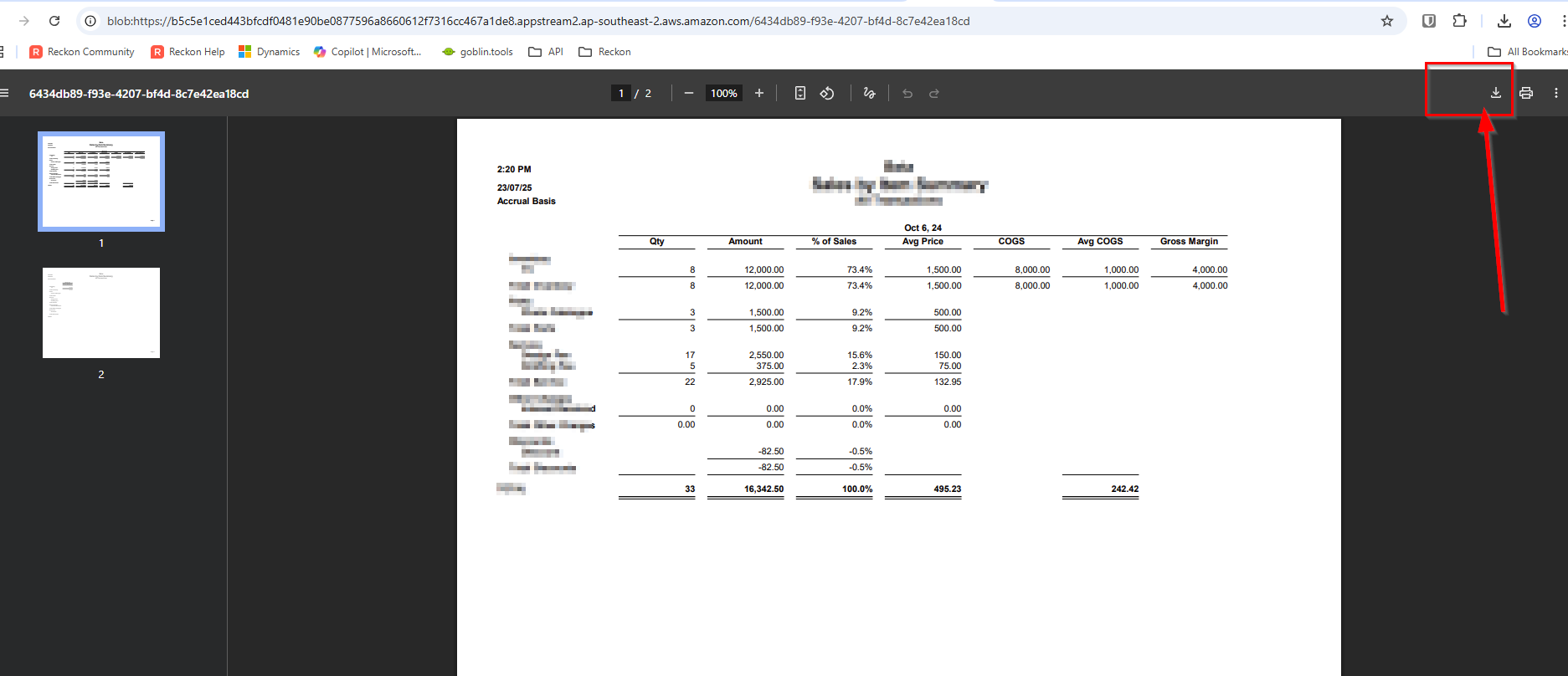
    For printing , when you press Ctrl+P, a new window will open displaying a print preview. On that same page, you'll also find an option to download the report directly to your local device and save it . It’s a simple, one-click process that allows you to save a copy without needing to print it physically. Please find the attached image below:

    image.png

    As for shortcut, could you please let me know the last time you saved the report using the Ctrl+S shortcut? Based on our testing and current understanding, it appears that this functionality is not available in Reckon hosted.

    If you believe having the Ctrl+S shortcut for saving reports would be a valuable enhancement, I would recommend submitting this as a new idea on the Community Page under the Ideas section. That way, it can be reviewed and considered for future updates based on user feedback.

    Let me know if there’s anything else I can assist you with!!

    Regards,

    Reeta

  • Crown Connections Australia
    Crown Connections Australia Member Posts: 27 Reckoner Reckoner
    edited July 23

    Thanks again for the quick response.

    So yes, instead of picking up the mouse and pressing the download button, ctrl+S would offer to save the document and now does not.

    The last it worked was a while ago, before the last update when the overhead tool bar was added.

    Suggestion done!

  • Reeta
    Reeta Reckon Staff Posts: 379 Reckon Staff Reckon Staff
    edited July 23

    @Crown Connections Australia ,

    Thanks for confirming that.

    It’s helpful to know Ctrl+S worked before the toolbar update. Thank you for adding the suggestion as an idea, hopefully the team can consider bringing it back.

    Much appreciated.😊

    Regards,

    Reeta

  • Tanvi_kataria
    Tanvi_kataria Reckon Staff Posts: 565 Reckon Staff Reckon Staff
    edited July 23

    Hi @Crown Connections Australia

    In addition to what @Reeta mentioned, In Chrome Browser, the PDF reports can still be generated with the different Keys (CTRL+P). Steps to follow:

    • Generate a Report
    • Used keys CTRL+P (To Print)
    • Successful print in new window
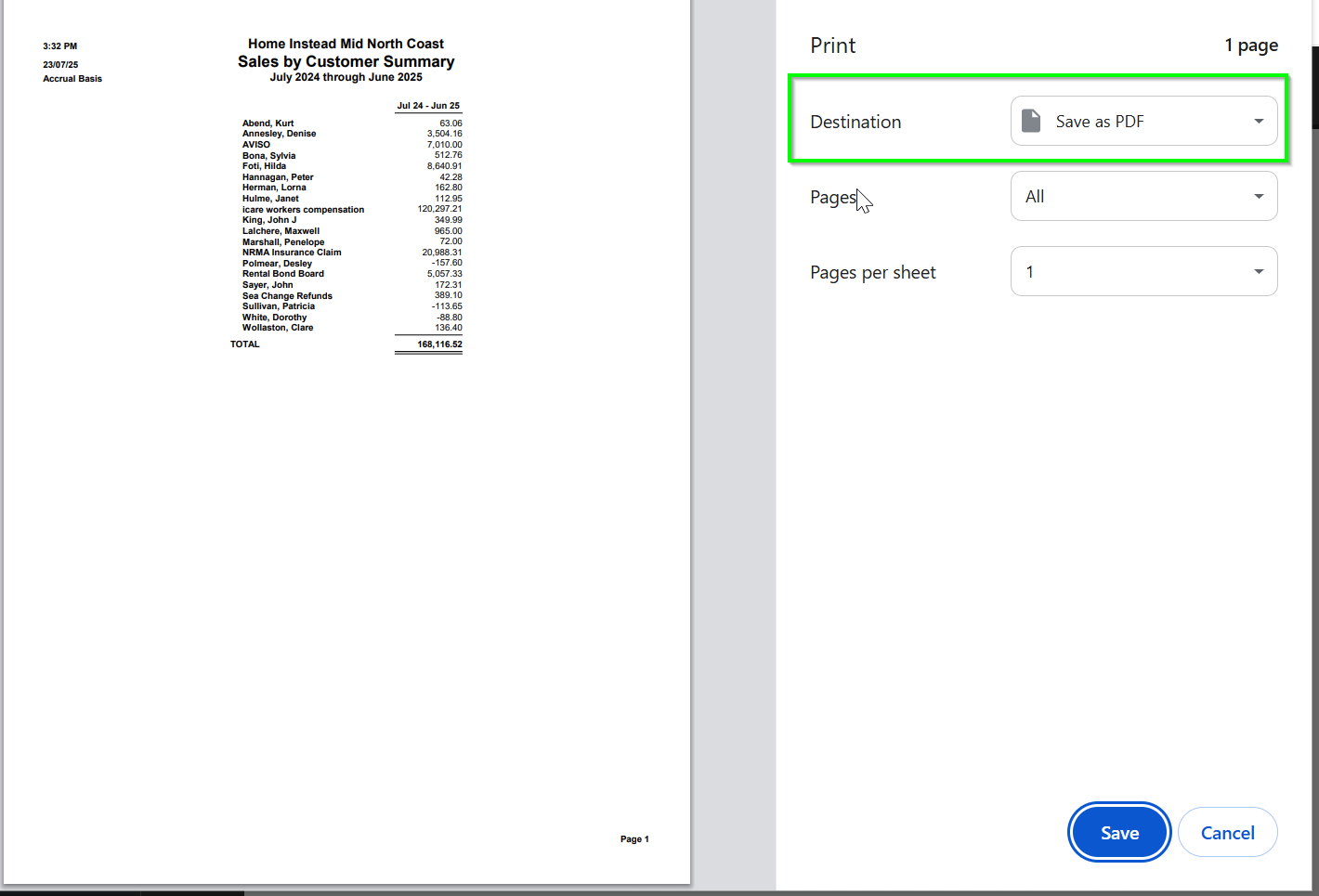
    • Press CTRL+P and choose destination: Save as PDF (as in the screenshot attached below)
    image.png

    Alternatively, I have tested in Edge Browser, and it seems to have been working with CTRL+S to save the printed file as Adobe Acrobat Document (PDF).

    I hope this can be of any help. Please feel free to reach out if any concerns. Thank you!

    Regards

    Tanvi

  • Crown Connections Australia
    Crown Connections Australia Member Posts: 27 Reckoner Reckoner

    Yeah, thanks. That what I am currently doing

    Its still clunky to use the mouse, prior it was just ctrl+S and a pre-determined location was selected, type file name and press enter.

    I am saving invoices and quotes to add to (cash sale) emails so doing hundreds a day

  • Tanvi_kataria
    Tanvi_kataria Reckon Staff Posts: 565 Reckon Staff Reckon Staff

    Hi @Crown Connections Australia

    Thank you for confirming.

    Have you tried different browser like EDGE if that works for you?

    Regards

    Tanvi

  • Crown Connections Australia
    Crown Connections Australia Member Posts: 27 Reckoner Reckoner

    No I am to integrated into Chrome now and oppose Microsoft.

    Like I said it used to work, but now doesn't, so I'm seeking a fix