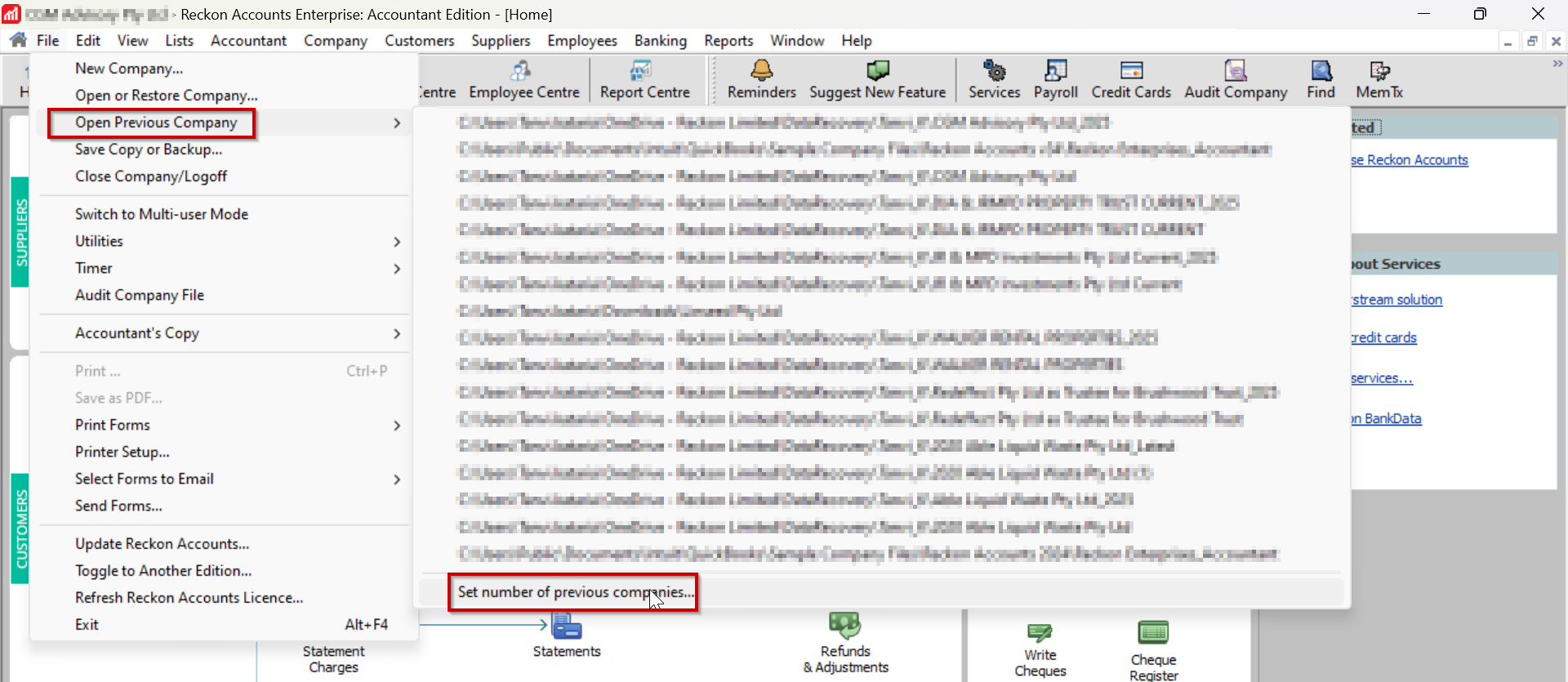
We have two companies on our Reckon Hosted software and one is not appearing in Open Previous Company. I accessed it last week but it is not showing there now.
Hi @Bev13
Please confirm what's the number of previous companies set to? You can check that by following the steps as in the screenshot attached -
If it is set to 1, please make changes and try opening the company again and see if it appears on the No company open screen. Thank you!
Regards
Tanvi
It is set to 4 companies, we have 2 but only 1 is showing
This could also be caused when the QBW.INI file becomes corrupted. The QBW.INI file is responsible for storing information about previous files opened. If you are still experiencing the issue, could you please try this fix: https://help.reckon.com/article/0faoavzof6-kba-5189-reckon-accounts-hosted-does-not-remember-the-list-of-previous-company-files-opened
Hi @Bev13,
I wanted to follow up and see if you're still experiencing the issue, or if it's been resolved.
I need to get rid of old company files that haven’t been used for years, and are no longer stored on Reckon Hosted, but they still appear on the opening window
Hi @Kris_Williams
Reduce the Set number of companies … to a qty less those ones 😊
it’s not in that window under file open previous company, that works as it’s intended. This is the window after you launch Reckon Accounts. A window in the centre of the page with all current and previous files. You can select one and click open, however many of them have been out of use for years and now deleted altogether
If you change the qty under "Set number of companies …" it should remove them from the Open Company File window also 😊
I could be wrong but I was under the impression that those two sections were linked.
If @Acctd4's suggestions doesn't work then the article i linked above might help for you as well. https://help.reckon.com/article/0faoavzof6-kba-5189-reckon-accounts-hosted-does-not-remember-the-list-of-previous-company-files-opened
Pretty sure mine are certainly not linked but I will experiment
They should be, as mine definitely are!
Just tested it in Hosted … I had 20 company files set (& listed) via the File dropdown & also in the Open Company File starting box.
Changed the qty to 1 & now just the latest company file I had open, displays in both areas 😊
(… Have changed it back to 20 again but looks like I'll have to open each one again now, for it to remember them all again, so make sure you change it to the total, just less the qty that you don't want ! 🤦♀️🙄😩 )
I changed the number of companies to 1 and it still showed 3 in the open window list - 2 of which were old files and not even stored on hosted for some time. Also renamed qbw.ini but same result
Hmm … Sounds like it’s corrupted then 🤔
Did you try renaming the .INI file (as per the Help article) ? Can you delete those 2 old files from the Q drive ?
Also, try logging off remote sessions completely, afterwards
yes I did, the old files are not on any drive and haven’t been for some time. At least the number of files have decreased will try rebuilding later. Thanks Shaz have a nice weekend
Don't miss announcements and important info for Reckon Accounts Hosted
Do you have an idea for a feature in Reckon Accounts Hosted? Let us know here!