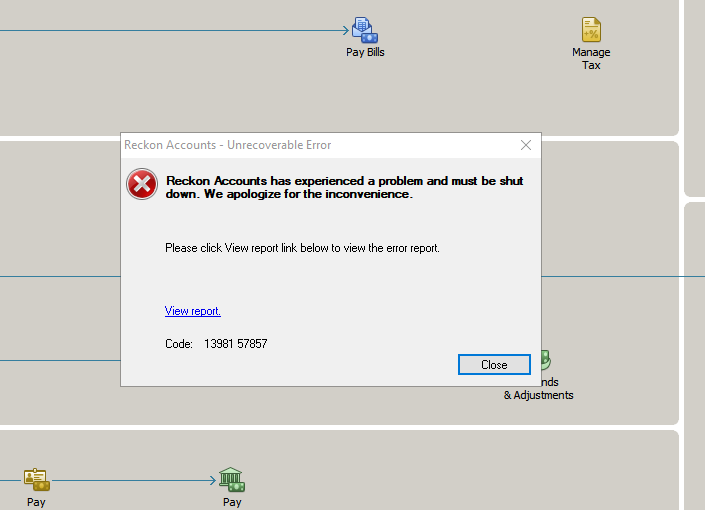
I cannot open Reckon this morning. Getting an error "Reckon accounts has experienced a problem and must be shut down". Tried logging out completely and re-starting, but hasn't fixed. Please help.
I just logged on from my iPad using Safari. I would restart the computer and try a different browser
I've restarted the computer and tried using a different web browser too, to no avail.
I would click on view report and post a screenshot to help the guys in tech support, sorry I have nothing else to suggest. Good luck
You file has a corruption
You need to run the verify option and fix the error
Call me if you get stuck
Zappy 0407 744 914
Hi @Sepalika Siriwardhana
Where does this error message appear? As soon as you login or when you're performing a certain task/function?
As Kevin has mentioned above, usually an unrecoverable error message can point to data corruption in your file. I'd recommend running a verify and rebuild in the first instance and I'll add step by step instructions on how to do so here - How to Verify Data and Rebuild Data for a company data file in Accounts Business (Hosted)
Its also been recommended on the Community to run the rebuild 3x in succession.
Let us know how you get on.
Hi @Rav , it starts as soon as I login, but somehow after many tries - when I found a small break before the message appeared, got into do a Backup. I'll see how that go, and let you know. Thanks
HI @Sepalika Siriwardhana
How often have you created backups?
When you make a backup, do you leave enabled the option for "Complete verification"?
When was the most recent backup created at a time when there were no problems being experienced?
How many backup sets do you have on the Hosted B: location?
Hi @Datarec , We haven't created many backups over the years - just a single one each year before the new Reckon edition comes out each new financial year, totaling 7 backup (including todays) across both users. Most recent backup was on 16th Jun 2025. I've now completed a backup, and run a data verification (once), which came out with no problems.
@Sepalika Siriwardhana
You are in trouble
Backups should be done weekly at a bare minimum most often after payroll
Call me I should be able to help
Kevin 0407 744 914
Glad to hear that you latest backup attempt has been successful with no errors detected.
A more regular backup interval is highly recommended.
If your data file is very large AND you have not backed up regularly, you will encounter a situation in which a companion transaction log file (TLG) will continue to get larger alongside your company data file (QBW).
Then when you do make a backup, it can take longer than usual due to the combined size of the QBW + TLG file.
When you backup regularly with the complete verification option enabled, the verify data operation that takes place as part of the backup process will 'reset' the TLG file if there are no errors detected, which ensures that the resulting backup mostly contains the QBW file with only a tiny TLG file.
Don't miss announcements and important info for Reckon Accounts Hosted
Do you have an idea for a feature in Reckon Accounts Hosted? Let us know here!